> ## Documentation Index
> Fetch the complete documentation index at: https://www.spacebring.com/docs/llms.txt
> Use this file to discover all available pages before exploring further.
# Contact support
> Learn how to contact Spacebring support, check platform status, submit feedback, report a bug, and track new features, solutions, and product updates with release notes
## Get instant help
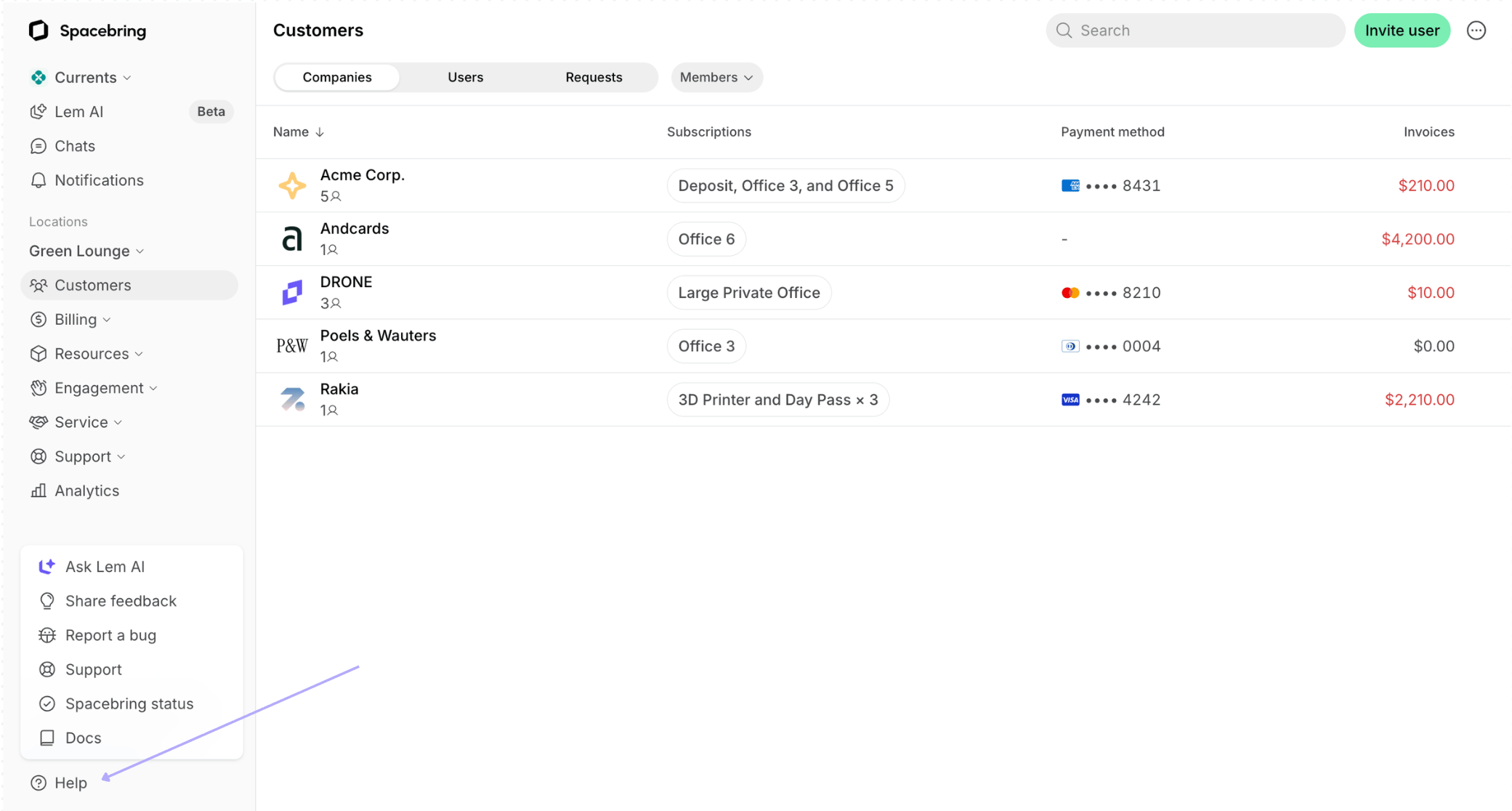
If you have questions about features or need help with setup, tap the **Help** button in the bottom left corner of your admin portal:
* **Ask Lem AI** — Lem AI knows all of Spacebring's functionality and has access to your specific data, so it can give you a personalized answer or assistance instantly.
* **Docs** — find comprehensive Spacebring documentation about a specific feature or setup.
 ## Contact us
To contact us:
1. Tap the **Help** button in the bottom left corner > **Support**.
2. If the AI response isn't helpful and you choose to submit your question to our support team, you will receive a response from us via email.
Alternatively, contact us directly at [support@spacebring.com](mailto:support@spacebring.com) at any time.
In addition to our standard support channel, a dedicated support session is available for purchase.
### Office hours
Our regular office hours are *Monday through Friday, 2 a.m. to 5 p.m. Eastern Time (ET)*. Our regular response time is *3 minutes*.
## Check status page
To check the status of our servers:
1. Tap the **Help** button in the bottom left corner > **Spacebring status**.
2. Press **Subscribe to updates** to subscribe to any news via email, Slack, or Microsoft Teams.
## Share feedback
If you have feature requests, insights to share about the platform, or have faced any challenges tap the **Help** button in the bottom left corner > **Share feedback**. This is the fastest way to submit feature requests — our team reviews every submission.
## Report a bug
To report an issue or bug, tap the **Help** button in the bottom left corner > **Report bug**. We will send you updates about the bug resolution to your email.
## Track release notes
To stay informed about all new features, solutions and product improvements implemented in Spacebring, monitor **Release notes** in the bottom left corner of the admin web portal.
**FAQs**
Keep an eye on the **Release notes** in the bottom left corner of the admin web portal to be constantly notified when new features and solutions you are interested in become available.
## Contact us
To contact us:
1. Tap the **Help** button in the bottom left corner > **Support**.
2. If the AI response isn't helpful and you choose to submit your question to our support team, you will receive a response from us via email.
Alternatively, contact us directly at [support@spacebring.com](mailto:support@spacebring.com) at any time.
In addition to our standard support channel, a dedicated support session is available for purchase.
### Office hours
Our regular office hours are *Monday through Friday, 2 a.m. to 5 p.m. Eastern Time (ET)*. Our regular response time is *3 minutes*.
## Check status page
To check the status of our servers:
1. Tap the **Help** button in the bottom left corner > **Spacebring status**.
2. Press **Subscribe to updates** to subscribe to any news via email, Slack, or Microsoft Teams.
## Share feedback
If you have feature requests, insights to share about the platform, or have faced any challenges tap the **Help** button in the bottom left corner > **Share feedback**. This is the fastest way to submit feature requests — our team reviews every submission.
## Report a bug
To report an issue or bug, tap the **Help** button in the bottom left corner > **Report bug**. We will send you updates about the bug resolution to your email.
## Track release notes
To stay informed about all new features, solutions and product improvements implemented in Spacebring, monitor **Release notes** in the bottom left corner of the admin web portal.
**FAQs**
Keep an eye on the **Release notes** in the bottom left corner of the admin web portal to be constantly notified when new features and solutions you are interested in become available.