> ## Documentation Index
> Fetch the complete documentation index at: https://www.spacebring.com/docs/llms.txt
> Use this file to discover all available pages before exploring further.
# Owners
> Understand the owner role, what permissions owners have in Spacebring, and how to grant or remove owner rights
## Who is an owner
The owner is responsible for managing the entire network and acting as a point of contact in your organization regarding the subscription with Spacebring.
A network can have multiple owners. At least one owner must always remain on a network, so the last remaining owner can't remove their own owner rights.
## What an owner can do
* Have full management access to all locations
* Manage [payment and invoicing information](/docs/administration/billing/make-changes-to-spacebring-subscription#update-your-payment-or-billing-information) for subscription to Spacebring
* Grant and remove owner rights from other administrators
* [Add and delete locations](/docs/administration/locations)
* [Customize member web portal](/docs/member-web-portal/customize) and [mobile app](/docs/member-mobile-app/customize)
* Manage [privacy policy](/docs/general/privacy-policy), [terms of use](/docs/general/terms-of-use), [network language](/docs/general/language)
* Enable and disable [**Chats**](/docs/engagement/chats), [Lem AI](/docs/lem-ai/ask)
* Manage all network [users](/docs/customer-management/users/remove), add abusive users to the [blacklist](/docs/general/users#blacklist-users)
* Connect network-level integrations ([Google Analytics](/docs/integrations/analytics/google-analytics), [Twilio](/docs/integrations/communication/twilio), [Meta Pixel](/docs/integrations/analytics/meta-pixel)).
To manage network settings, owners click the network name top left > go to **Network settings**.
 Other location [administrators](/docs/administration/administrators) can view **Network settings** but cannot make changes.
 ## Grant or remove owner rights
A network can have multiple owners. Any existing owner can grant owner rights to an administrator or remove owner rights from another owner.
You can grant owner rights only to [administrators](/docs/administration/administrators). [Add the user as an administrator](/docs/administration/administrators#assign-or-remove-administrator-role) first if they aren't one yet.
To grant or remove owner rights:
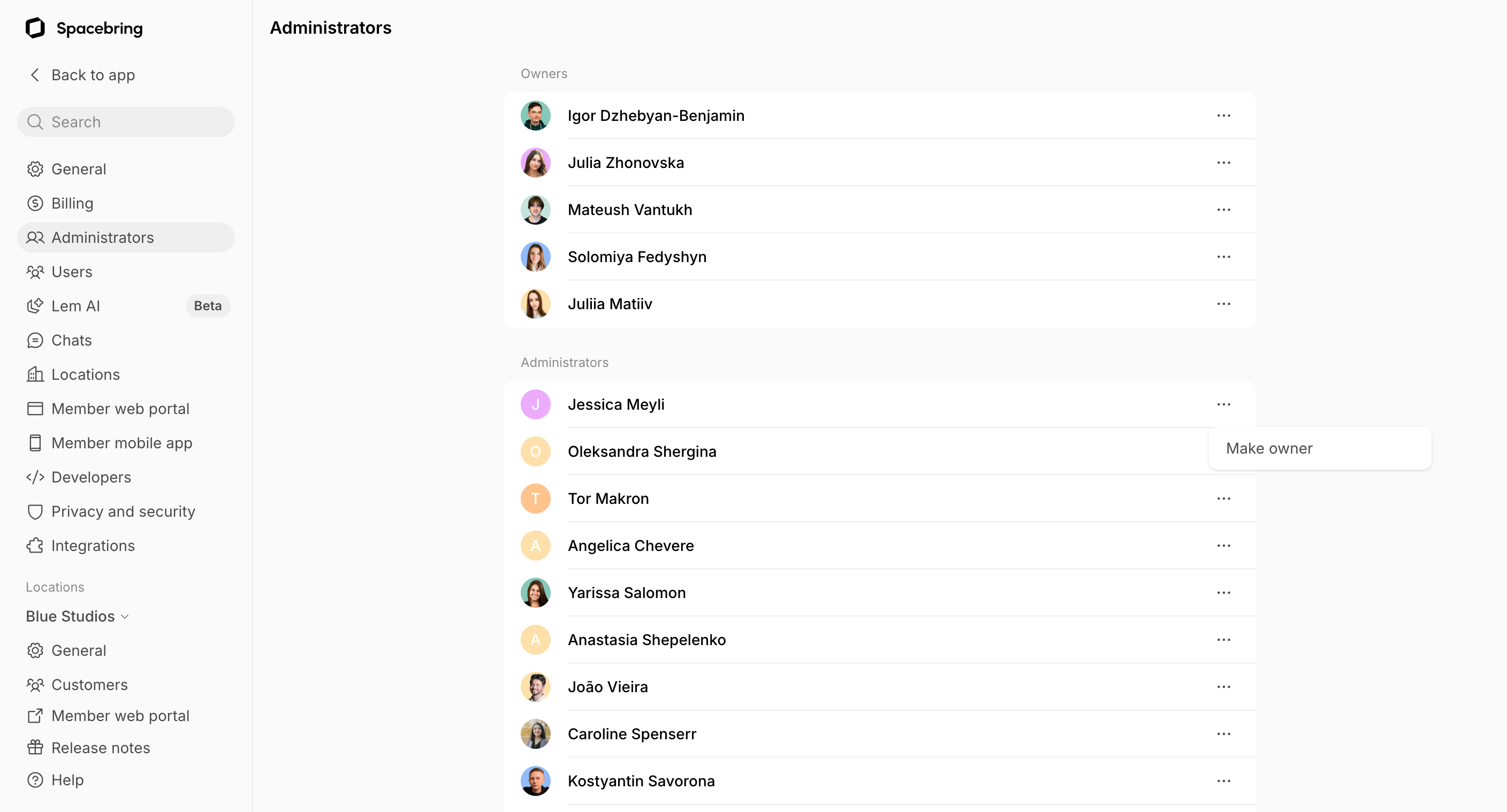
1. Click the network name top left > go to **Network settings** > **Administrators**.
2. On this page, the **Owners** section lists all current owners, and the **Administrators** section lists all other administrators across your locations.
3. Press the **(...)** menu next to a user:
* On an administrator, select **Make owner** to grant them owner rights. They'll get full access to all network settings and locations.
* On an owner, select **Remove owner rights** to revert them to an administrator. They keep their administrator access in the releavnt locations but lose owner rights.
## Grant or remove owner rights
A network can have multiple owners. Any existing owner can grant owner rights to an administrator or remove owner rights from another owner.
You can grant owner rights only to [administrators](/docs/administration/administrators). [Add the user as an administrator](/docs/administration/administrators#assign-or-remove-administrator-role) first if they aren't one yet.
To grant or remove owner rights:
1. Click the network name top left > go to **Network settings** > **Administrators**.
2. On this page, the **Owners** section lists all current owners, and the **Administrators** section lists all other administrators across your locations.
3. Press the **(...)** menu next to a user:
* On an administrator, select **Make owner** to grant them owner rights. They'll get full access to all network settings and locations.
* On an owner, select **Remove owner rights** to revert them to an administrator. They keep their administrator access in the releavnt locations but lose owner rights.
 Consider making an actual person an owner, not a general team inbox (e.g., [team@coworking.com](mailto:team@coworking.com)). The owner role allows for making changes and accessing your billing, so it is a good practice to encourage personal accountability.