> ## Documentation Index
> Fetch the complete documentation index at: https://www.spacebring.com/docs/llms.txt
> Use this file to discover all available pages before exploring further.
# Spacebring in WhatsApp
> Connect your Spacebring account to WhatsApp, and ask Spacebring about your bookings, invoices, members, and support tickets right in WhatsApp
Ask Spacebring about your network right in WhatsApp, without opening your admin dashboard. Send your question in your WhatsApp chat with Spacebring, and it answers from your Spacebring data.
Spacebring in WhatsApp is currently in private beta.
## Connect Spacebring to WhatsApp
1. Click the **Lem AI** icon in the top left corner of your Spacebring admin dashboard and send: [Connect WhatsApp](https://app.spacebring.com/lem?q=Connect%20WhatsApp).
2. You get a link in the chat. Open it — it works once and expires in 15 minutes, so ask again if you need a new one.
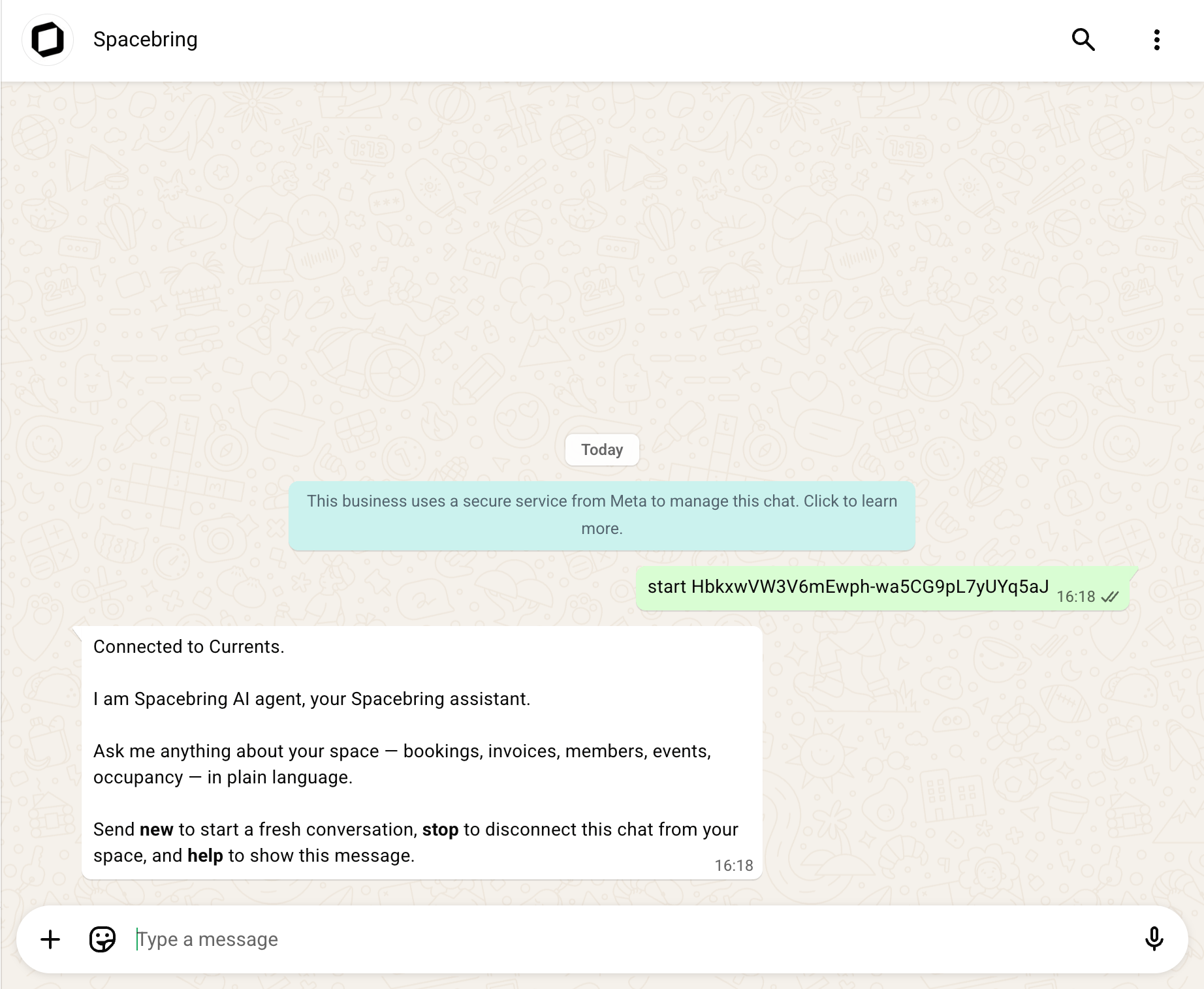
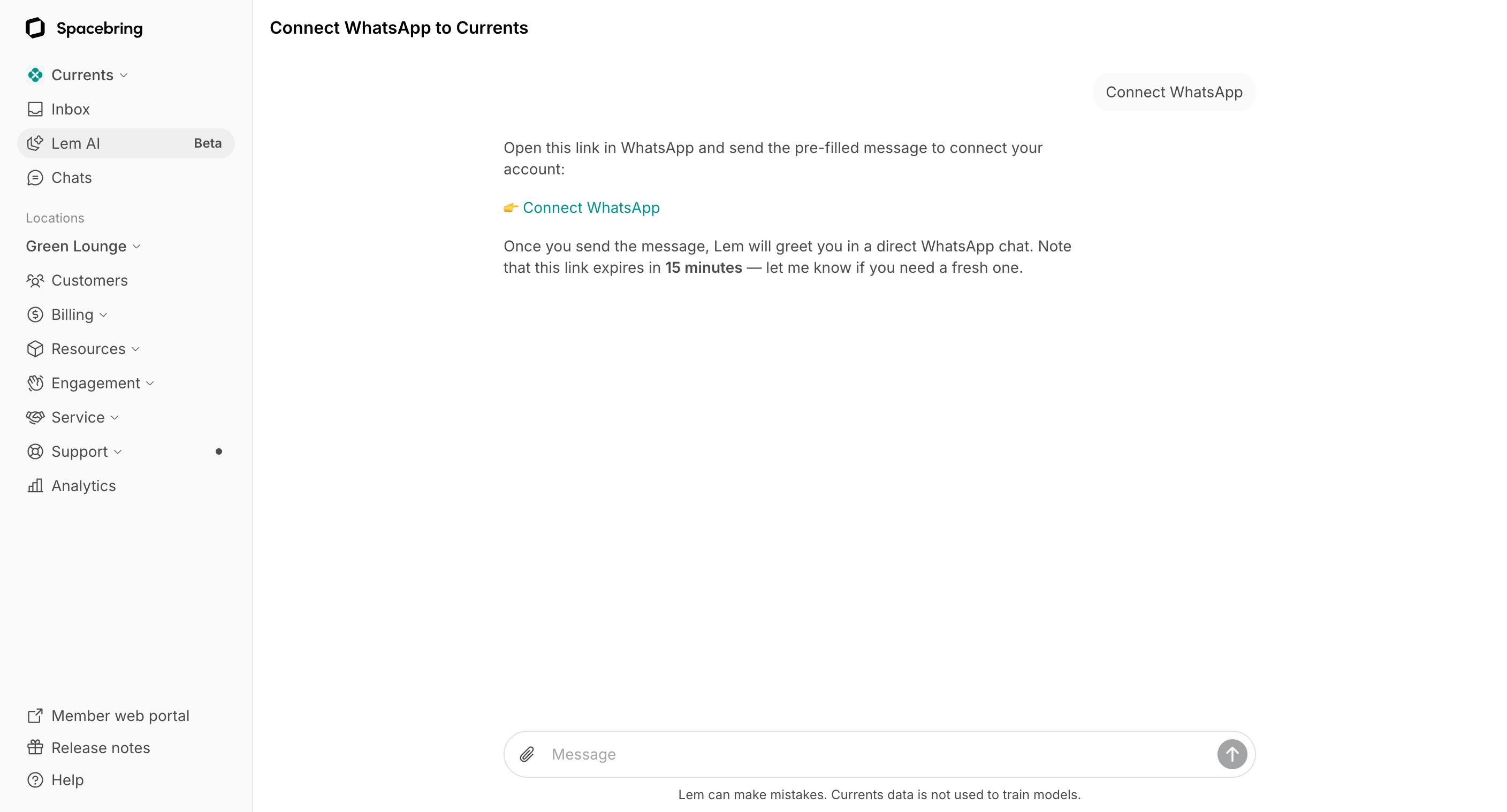 3. The link opens a WhatsApp chat with Spacebring and fills in a message that starts with `start`. Click **Open app**, or **Continue to WhatsApp Web** to use WhatsApp in your browser.
 4. Send the message as it is, without changing it. Spacebring then confirms which network you are connected to.
 The link is personal. Anyone who opens it can ask Spacebring about your network as you, so do not forward it.
Only administrators can connect Spacebring to WhatsApp. Each administrator connects Spacebring to their own WhatsApp account.
## Ask Spacebring in WhatsApp
1. In WhatsApp, open your chat with **Spacebring**.
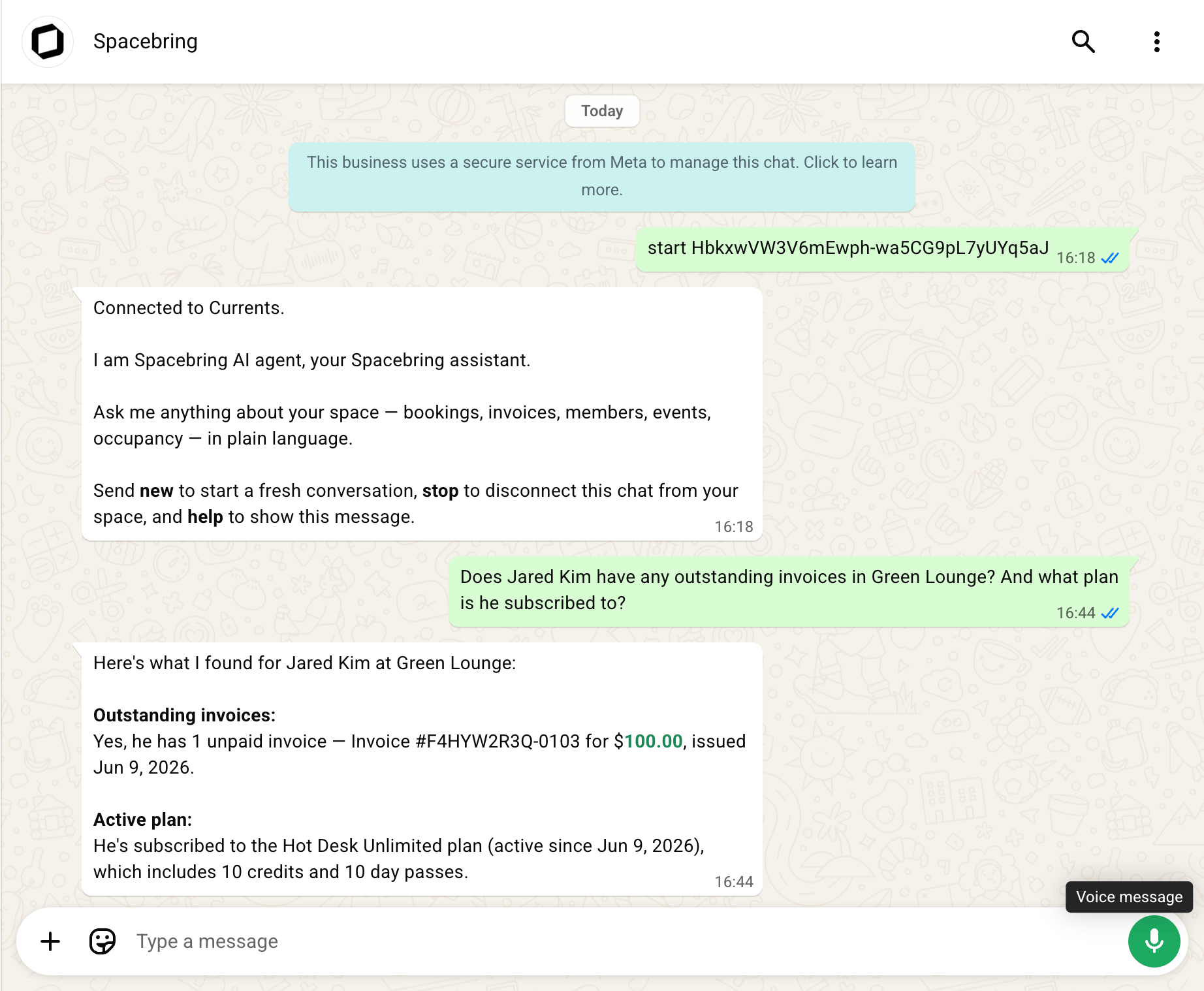
2. Send your question in plain language, the same way you would in your Spacebring admin dashboard. Spacebring keeps the conversation, so you can follow up on its answer.
The link is personal. Anyone who opens it can ask Spacebring about your network as you, so do not forward it.
Only administrators can connect Spacebring to WhatsApp. Each administrator connects Spacebring to their own WhatsApp account.
## Ask Spacebring in WhatsApp
1. In WhatsApp, open your chat with **Spacebring**.
2. Send your question in plain language, the same way you would in your Spacebring admin dashboard. Spacebring keeps the conversation, so you can follow up on its answer.
 You can attach an image, such as a screenshot, and ask about it. Write your question as the caption of the image.
Your WhatsApp conversation with Spacebring is also saved as a chat with Lem AI in your Spacebring admin dashboard.
Spacebring answers only in your one-to-one chat with it, not in WhatsApp groups.
## What you can ask Spacebring
Ask about any of the following, in plain language, and Spacebring finds the answer for you:
* Network and locations
* Members, companies, and contracts
* Plans and subscriptions
* Resources, bookings, and occupancy
* Invoices, payments, and discounts
* Credits and day passes
* Shop products and orders
* Events and tickets
* Benefits and applications
* Feed posts, support tickets, and visitors
* Guides
Spacebring can also:
* Combine these in one request — for example, unpaid invoices per location for last month.
* Link you straight to the right page of your Spacebring admin dashboard.
* Answer how-to questions about Spacebring from its documentation.
### Commands
In your chat with Spacebring in WhatsApp, a few words work as commands. Type them without a slash.
| Command | What it does |
| ------- | --------------------------------------------------------- |
| `help` | Lists the commands and what Spacebring can do in WhatsApp |
| `new` | Starts a fresh conversation |
| `stop` | Disconnects your WhatsApp account from your network |
## How Spacebring in WhatsApp works
* In WhatsApp, Spacebring answers questions. To create, edit, or change settings, ask directly in your Spacebring admin dashboard.
* WhatsApp cannot show charts, tables, or file exports, so answers come as sentences and short bullet lists. A long answer arrives as several messages.
* Spacebring only replies to your messages, and never writes to you first.
* You can send images up to 5 MB. Documents, voice messages, and video cannot be read in WhatsApp — send those in your Spacebring admin dashboard, which [supports more file types](/docs/lem-ai/ask#start-a-chat-with-lem-ai).
* Your WhatsApp account is connected to one Spacebring network at a time. Connect again from another network to switch to it, which also starts a fresh conversation.
* Spacebring stops answering you in WhatsApp as soon as your Spacebring administrator role is removed.
## Disconnect Spacebring from WhatsApp
1. Send `stop` in your chat with Spacebring.
2. Spacebring stops answering your questions. Your earlier messages stay in WhatsApp and in your Spacebring admin dashboard — nothing is deleted.
To use it again, [connect Spacebring to WhatsApp](#connect-spacebring-to-whatsapp) once more.
Deleting the chat in WhatsApp does not disconnect Spacebring from your WhatsApp account.
You can attach an image, such as a screenshot, and ask about it. Write your question as the caption of the image.
Your WhatsApp conversation with Spacebring is also saved as a chat with Lem AI in your Spacebring admin dashboard.
Spacebring answers only in your one-to-one chat with it, not in WhatsApp groups.
## What you can ask Spacebring
Ask about any of the following, in plain language, and Spacebring finds the answer for you:
* Network and locations
* Members, companies, and contracts
* Plans and subscriptions
* Resources, bookings, and occupancy
* Invoices, payments, and discounts
* Credits and day passes
* Shop products and orders
* Events and tickets
* Benefits and applications
* Feed posts, support tickets, and visitors
* Guides
Spacebring can also:
* Combine these in one request — for example, unpaid invoices per location for last month.
* Link you straight to the right page of your Spacebring admin dashboard.
* Answer how-to questions about Spacebring from its documentation.
### Commands
In your chat with Spacebring in WhatsApp, a few words work as commands. Type them without a slash.
| Command | What it does |
| ------- | --------------------------------------------------------- |
| `help` | Lists the commands and what Spacebring can do in WhatsApp |
| `new` | Starts a fresh conversation |
| `stop` | Disconnects your WhatsApp account from your network |
## How Spacebring in WhatsApp works
* In WhatsApp, Spacebring answers questions. To create, edit, or change settings, ask directly in your Spacebring admin dashboard.
* WhatsApp cannot show charts, tables, or file exports, so answers come as sentences and short bullet lists. A long answer arrives as several messages.
* Spacebring only replies to your messages, and never writes to you first.
* You can send images up to 5 MB. Documents, voice messages, and video cannot be read in WhatsApp — send those in your Spacebring admin dashboard, which [supports more file types](/docs/lem-ai/ask#start-a-chat-with-lem-ai).
* Your WhatsApp account is connected to one Spacebring network at a time. Connect again from another network to switch to it, which also starts a fresh conversation.
* Spacebring stops answering you in WhatsApp as soon as your Spacebring administrator role is removed.
## Disconnect Spacebring from WhatsApp
1. Send `stop` in your chat with Spacebring.
2. Spacebring stops answering your questions. Your earlier messages stay in WhatsApp and in your Spacebring admin dashboard — nothing is deleted.
To use it again, [connect Spacebring to WhatsApp](#connect-spacebring-to-whatsapp) once more.
Deleting the chat in WhatsApp does not disconnect Spacebring from your WhatsApp account.