> ## Documentation Index
> Fetch the complete documentation index at: https://www.spacebring.com/docs/llms.txt
> Use this file to discover all available pages before exploring further.
# Packages
> Create and sell packages of credits and day passes, and understand how members purchase packages
Packages are bundles of credits, day passes, or both that members buy as a one-time purchase and use for bookings, shop orders, or event tickets.
Use packages to:
* Sell one-time bundles of credits and day passes to members who need occasional access rather than a recurring plan
* Let members purchase more when they run out of credit or day passes in their subscription
* Create packages with custom expiration periods or non-expiring packages
* Encourage credit payments, reducing small transactions and payment processing fees.
## Create packages
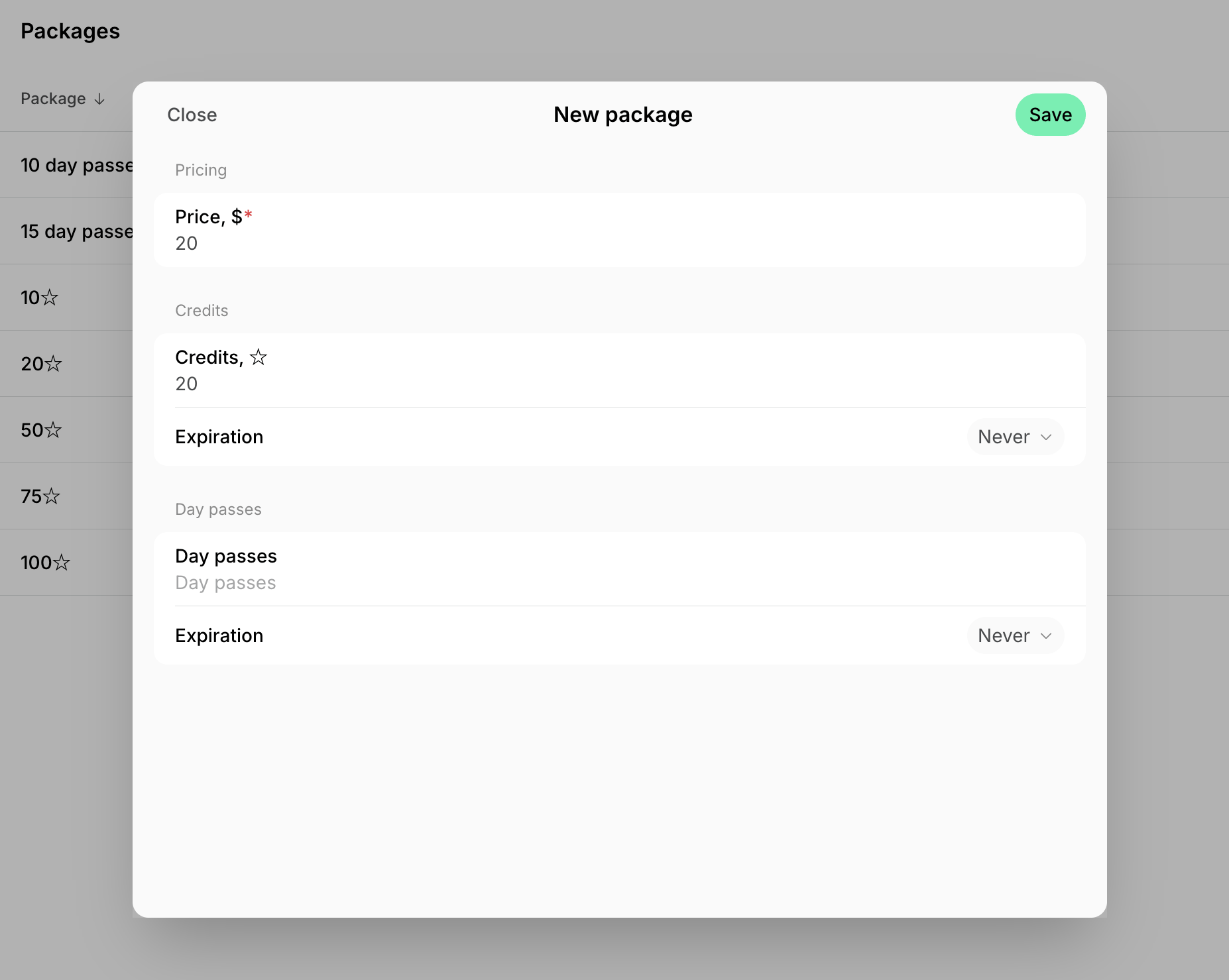
1. Go to **Catalog** > **Packages**.
2. Click **Create package**.
3. Enter the package price.
4. Enter the number of credits, day passes, or both to create a mixed package.
5. Turn on **Expiration** and enter how many days after purchase the credits or day passes stay usable, from 1 to 3650. Leave it off for a non-expiring package.
6. Click **Save**.
 ## How members buy packages
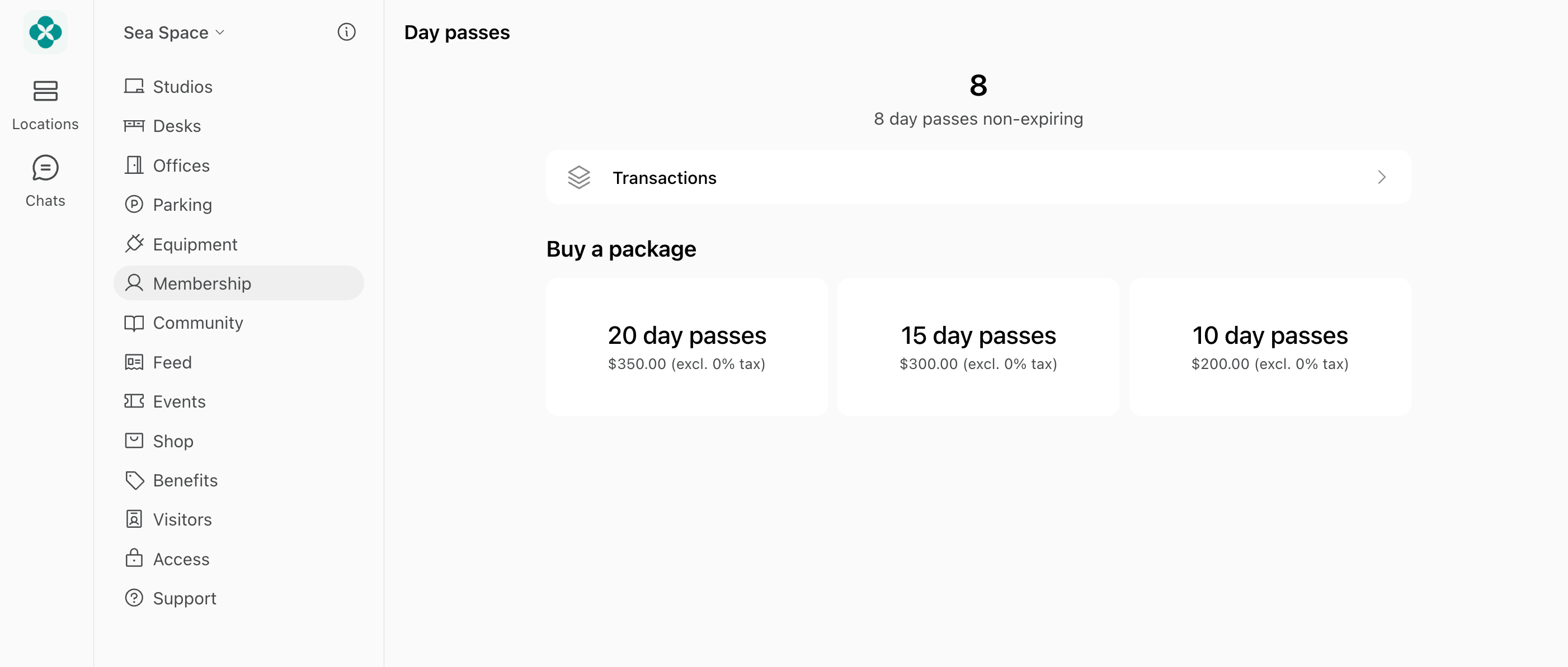
1. Members buy packages from the **Membership > Credits** and **Day passes** pages.
* Individual members — under the **Personal** section.
* Company managers and members — under the company section.
## How members buy packages
1. Members buy packages from the **Membership > Credits** and **Day passes** pages.
* Individual members — under the **Personal** section.
* Company managers and members — under the company section.
 2. After purchase, credits or day passes are added immediately to their balance and can be used until the package expiration date (if there is any).
Only members can see, buy, and use packages, with or without a subscription — nonmembers cannot:
* [Invite](/docs/customer-management/users/members#invite-a-member) them as a member so they can buy a package, or
* Nonmembers can [sign up for plans](/docs/catalog/plans) with credits and day passes instead.
Company members (non-managers) can only purchase packages for their company if they have a [permission](/docs/customer-management/companies/payment-method-permissions) to use company card or company invoice for this.
## Manage packages
To edit or delete a package:
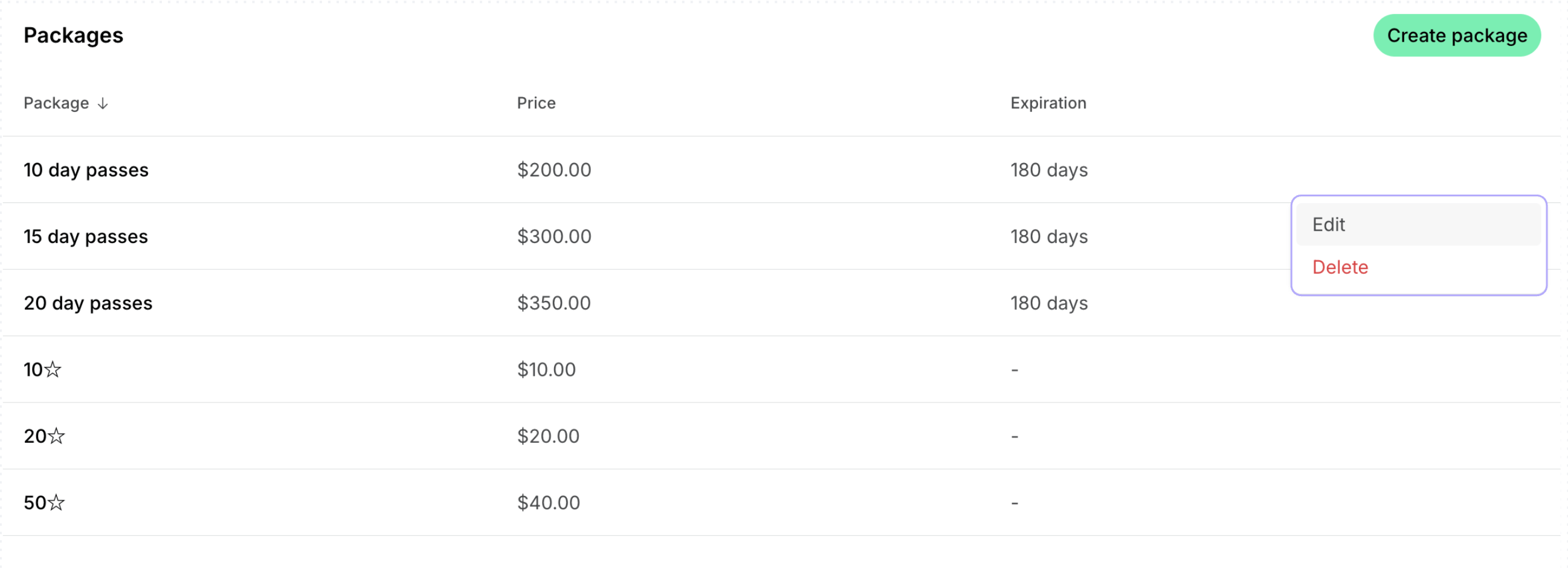
1. Go to **Catalog > Packages.**
2. Press **(...)** next to the necessary package and tap **Edit** or **Delete**.
2. After purchase, credits or day passes are added immediately to their balance and can be used until the package expiration date (if there is any).
Only members can see, buy, and use packages, with or without a subscription — nonmembers cannot:
* [Invite](/docs/customer-management/users/members#invite-a-member) them as a member so they can buy a package, or
* Nonmembers can [sign up for plans](/docs/catalog/plans) with credits and day passes instead.
Company members (non-managers) can only purchase packages for their company if they have a [permission](/docs/customer-management/companies/payment-method-permissions) to use company card or company invoice for this.
## Manage packages
To edit or delete a package:
1. Go to **Catalog > Packages.**
2. Press **(...)** next to the necessary package and tap **Edit** or **Delete**.
 To delete several packages at once, select their checkboxes, then press **Delete** at the bottom of the page. To quickly select several or all items in a long list, select a checkbox, then hold **Shift** and select another checkbox to select every row between them.
### Export a packages report
On the **Packages** page, click **(...)** in the top right corner > **Export packages** > **CSV** or **XLSX** to download a report on all packages.
To delete several packages at once, select their checkboxes, then press **Delete** at the bottom of the page. To quickly select several or all items in a long list, select a checkbox, then hold **Shift** and select another checkbox to select every row between them.
### Export a packages report
On the **Packages** page, click **(...)** in the top right corner > **Export packages** > **CSV** or **XLSX** to download a report on all packages.
 The report includes each package's price and currency, the number of credits and day passes it contains, how many days they last, and the package's create date.
## Best practices
To encourage package sales:
* Price larger packages slightly below their equivalent monetary value, or
* Give members [discounts on packages](/docs/catalog/discounts/give-and-apply#share-a-promo-code-for-the-customer-to-apply) of credits and day passes.
This encourages customers to prepay upfront and increases their commitment to your space.
## FAQs
* [**Plans**](/docs/catalog/plans) — your membership options. Both members and nonmembers can sign up for plans with day passes. Signing up creates a subscription for the customer and grants the plan's day passes, along with its other allowances and access. If the subscription is recurring, it renews next period, such as next month, and grants a new balance of day passes.
* **Packages** — bundles of credits or day passes sold for a set price. Only members can see and buy them, on the **Membership** > **Credits** and **Day passes** pages. A package is a one-off purchase that adds its credits or day passes to the member's balance, for when they need more than their subscription grants or book only occasionally.
No. Members buy packages themselves on the **Membership** > **Credits** and **Day passes** pages. To give a customer credits or day passes yourself, [add them to their balance](/docs/billing/credits-and-day-passes/day-passes#add-day-passes).
* If purchased by card — on the **Membership** > **Billing** > **Transactions** page.
* If purchased with an invoice — on the **Membership** > **Billing** page > **Upcoming invoice** or **Invoices**.
* Package purchases are also reflected in their credit history on the **Membership** > **Credits/Day passes** > **Transactions** page.
* Enable [notifications](/docs/account/notifications) for package purchases.
* Use the **Payments** tab on [**Analytics**](/docs/analytics) to monitor package sales.
* Export a [transactions report](/docs/billing/payments/transactions#export-a-transactions-report) and filter it by **Package** type.
This documentation is built and hosted on [Mintlify](https://mintlify.com), a developer documentation platform.
The report includes each package's price and currency, the number of credits and day passes it contains, how many days they last, and the package's create date.
## Best practices
To encourage package sales:
* Price larger packages slightly below their equivalent monetary value, or
* Give members [discounts on packages](/docs/catalog/discounts/give-and-apply#share-a-promo-code-for-the-customer-to-apply) of credits and day passes.
This encourages customers to prepay upfront and increases their commitment to your space.
## FAQs
* [**Plans**](/docs/catalog/plans) — your membership options. Both members and nonmembers can sign up for plans with day passes. Signing up creates a subscription for the customer and grants the plan's day passes, along with its other allowances and access. If the subscription is recurring, it renews next period, such as next month, and grants a new balance of day passes.
* **Packages** — bundles of credits or day passes sold for a set price. Only members can see and buy them, on the **Membership** > **Credits** and **Day passes** pages. A package is a one-off purchase that adds its credits or day passes to the member's balance, for when they need more than their subscription grants or book only occasionally.
No. Members buy packages themselves on the **Membership** > **Credits** and **Day passes** pages. To give a customer credits or day passes yourself, [add them to their balance](/docs/billing/credits-and-day-passes/day-passes#add-day-passes).
* If purchased by card — on the **Membership** > **Billing** > **Transactions** page.
* If purchased with an invoice — on the **Membership** > **Billing** page > **Upcoming invoice** or **Invoices**.
* Package purchases are also reflected in their credit history on the **Membership** > **Credits/Day passes** > **Transactions** page.
* Enable [notifications](/docs/account/notifications) for package purchases.
* Use the **Payments** tab on [**Analytics**](/docs/analytics) to monitor package sales.
* Export a [transactions report](/docs/billing/payments/transactions#export-a-transactions-report) and filter it by **Package** type.
This documentation is built and hosted on [Mintlify](https://mintlify.com), a developer documentation platform.