> ## Documentation Index
> Fetch the complete documentation index at: https://www.spacebring.com/docs/llms.txt
> Use this file to discover all available pages before exploring further.
# View and manage customer billing
> Learn how administrartors, company managers, and individual members can manage different aspects of their billing from their profile
Your customers can access and manage their billing data and settings, while certain aspects can only be managed by administrators.
## How administrators view and manage customer billing
On the **Customers** page, users and companies are sorted alphabetically by default, but you can use filters to sort them by subscription title, default payment method, and the total amount of unpaid and draft invoices.
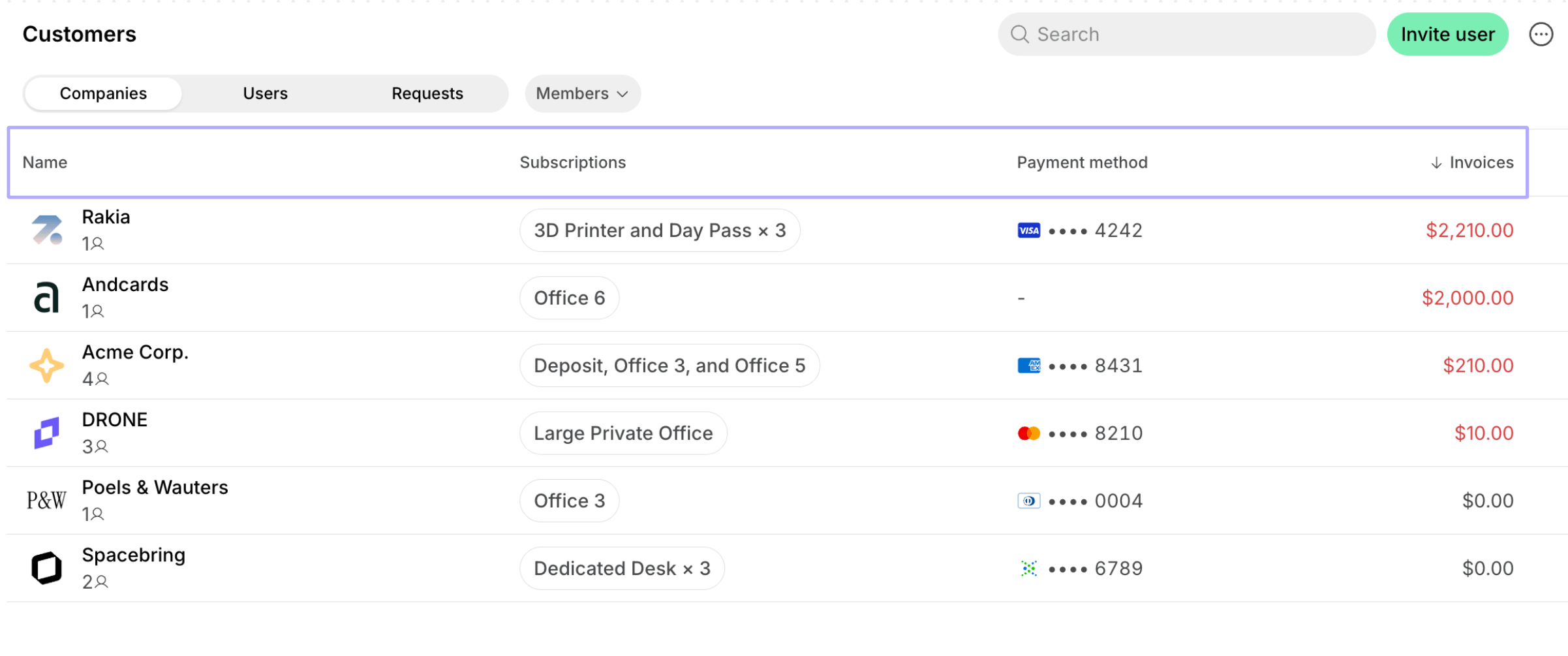 To view and manage billing data and settings of a specific customer, open the user or company profile.
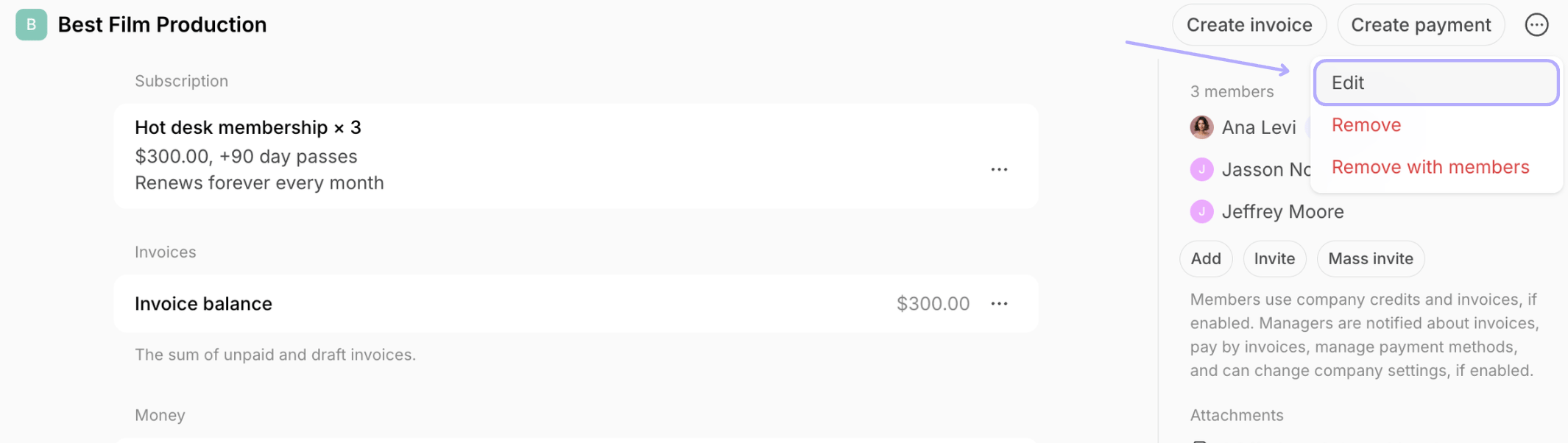
1. For companies, click **(...)** top right > **Edit** to update the company name.
To view and manage billing data and settings of a specific customer, open the user or company profile.
1. For companies, click **(...)** top right > **Edit** to update the company name.
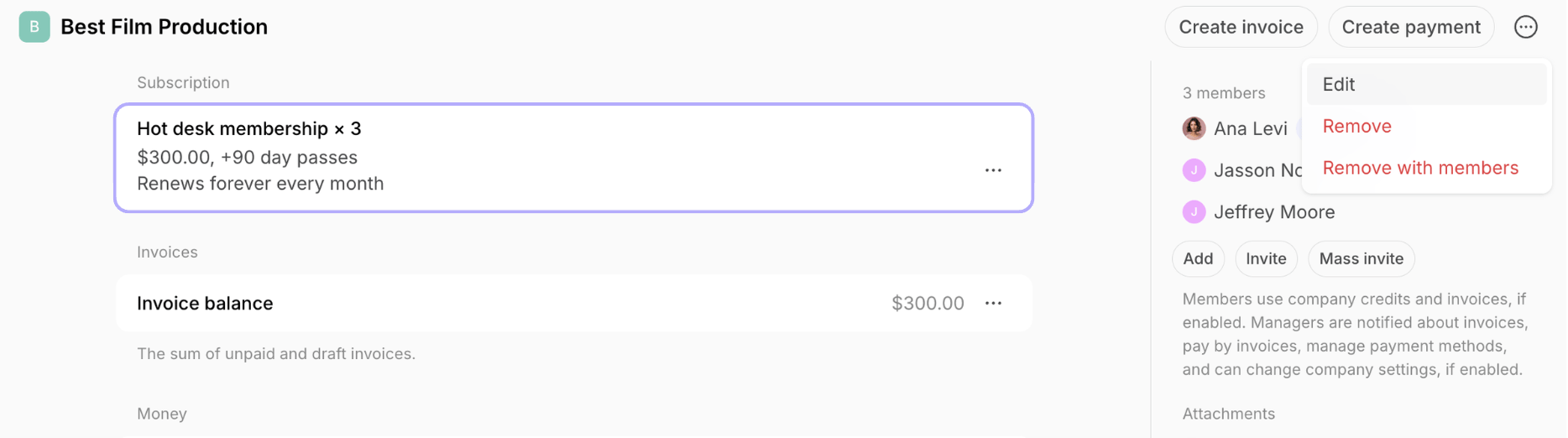
 2. Open the customer's subscription to:
* [Edit it](/docs/billing/subscriptions/edit) based on the new contract terms.
* [Pause payment collection](/docs/billing/subscriptions/invoice-issuance) for the customer.
* [View upcoming invoice](/docs/billing/invoices/upcoming).
2. Open the customer's subscription to:
* [Edit it](/docs/billing/subscriptions/edit) based on the new contract terms.
* [Pause payment collection](/docs/billing/subscriptions/invoice-issuance) for the customer.
* [View upcoming invoice](/docs/billing/invoices/upcoming).
 3. Go to the customer's profile to:
* Manage the [**Pay with invoice**](/docs/billing/payments/pay-with-invoice) setting.
* [Manage the customer's invoices](/docs/billing/invoices/track-and-manage) and view [transactions](/docs/billing/payments/payment-gateway).
* [Download invoices](/docs/billing/invoices/download) and [receipts](/docs/billing/payments/receipts).
* [Manage customer's money balance](/docs/billing/invoices/money-balance)
* Manage pending invoice items.
* View the customer's payment methods and check if they have a [default one](/docs/billing/payments/payment-gateway).
* Access the customer's page with payment history in Stripe via the **View in Stripe** button (available if you have the [Stripe integration connected](/docs/integrations/payments/stripe)).
* View or update the [customer's billing details.](/docs/customer-management/billing-details)
* For companies, manage the billing email to send company invoices and receipts to an additional recipient apart from the company managers.
* Manage the [Auto-pay](/docs/billing/subscriptions/invoice-auto-charge) setting.
* Enable and apply an [alternative currency](/docs/billing/currencies) for this customer.
## How company managers view and manage their company billing
Company managers go to **Locations** > **Membership** > **Billing** under the section with their company name. On this page, they can:
* View and [pay company invoices.](/docs/billing/invoices/payments)
* View transactions made with company payment methods.
* [Download invoices](/docs/billing/invoices/download) and [receipts](/docs/billing/payments/receipts).
* [View their company's money balance.](/docs/billing/invoices/money-balance)
* Check their current subscription details.
* Check their [upcoming invoice.](/docs/billing/invoices/upcoming)
* [Add a payment method](/docs/billing/payments/payment-gateway), [save as default](/docs/billing/payments/payment-gateway), [change the default payment method](/docs/billing/payments/payment-gateway), or [delete a payment method](/docs/billing/payments/payment-gateway).
* [Manage company payment methods permissions](/docs/customer-management/companies/payment-method-permissions): company card, company invoice, credits, and day passes.
* Manage [company billing details.](/docs/customer-management/billing-details)
* Manage the company billing email to send invoices and receipts to an additional recipient apart from the company managers.
## How individual users view and manage their billing
Individual users go to **Locations** > **Membership** > **Billing** under the **Personal** section. On this page, they can:
* View and [pay their invoices.](/docs/billing/invoices/payments) View the transactions.
* [Download invoices](/docs/billing/invoices/download) and [receipts](/docs/billing/payments/receipts).
* [View their money balance.](/docs/billing/invoices/money-balance)
* Check their current subscription details.
* Check their [upcoming invoice.](/docs/billing/invoices/upcoming)
* [Add a payment method](/docs/billing/payments/payment-gateway), [save as default](/docs/billing/payments/payment-gateway), [change the default payment method](/docs/billing/payments/payment-gateway), or [delete a payment method](/docs/billing/payments/payment-gateway).
* Manage their [billing details.](/docs/customer-management/billing-details)
3. Go to the customer's profile to:
* Manage the [**Pay with invoice**](/docs/billing/payments/pay-with-invoice) setting.
* [Manage the customer's invoices](/docs/billing/invoices/track-and-manage) and view [transactions](/docs/billing/payments/payment-gateway).
* [Download invoices](/docs/billing/invoices/download) and [receipts](/docs/billing/payments/receipts).
* [Manage customer's money balance](/docs/billing/invoices/money-balance)
* Manage pending invoice items.
* View the customer's payment methods and check if they have a [default one](/docs/billing/payments/payment-gateway).
* Access the customer's page with payment history in Stripe via the **View in Stripe** button (available if you have the [Stripe integration connected](/docs/integrations/payments/stripe)).
* View or update the [customer's billing details.](/docs/customer-management/billing-details)
* For companies, manage the billing email to send company invoices and receipts to an additional recipient apart from the company managers.
* Manage the [Auto-pay](/docs/billing/subscriptions/invoice-auto-charge) setting.
* Enable and apply an [alternative currency](/docs/billing/currencies) for this customer.
## How company managers view and manage their company billing
Company managers go to **Locations** > **Membership** > **Billing** under the section with their company name. On this page, they can:
* View and [pay company invoices.](/docs/billing/invoices/payments)
* View transactions made with company payment methods.
* [Download invoices](/docs/billing/invoices/download) and [receipts](/docs/billing/payments/receipts).
* [View their company's money balance.](/docs/billing/invoices/money-balance)
* Check their current subscription details.
* Check their [upcoming invoice.](/docs/billing/invoices/upcoming)
* [Add a payment method](/docs/billing/payments/payment-gateway), [save as default](/docs/billing/payments/payment-gateway), [change the default payment method](/docs/billing/payments/payment-gateway), or [delete a payment method](/docs/billing/payments/payment-gateway).
* [Manage company payment methods permissions](/docs/customer-management/companies/payment-method-permissions): company card, company invoice, credits, and day passes.
* Manage [company billing details.](/docs/customer-management/billing-details)
* Manage the company billing email to send invoices and receipts to an additional recipient apart from the company managers.
## How individual users view and manage their billing
Individual users go to **Locations** > **Membership** > **Billing** under the **Personal** section. On this page, they can:
* View and [pay their invoices.](/docs/billing/invoices/payments) View the transactions.
* [Download invoices](/docs/billing/invoices/download) and [receipts](/docs/billing/payments/receipts).
* [View their money balance.](/docs/billing/invoices/money-balance)
* Check their current subscription details.
* Check their [upcoming invoice.](/docs/billing/invoices/upcoming)
* [Add a payment method](/docs/billing/payments/payment-gateway), [save as default](/docs/billing/payments/payment-gateway), [change the default payment method](/docs/billing/payments/payment-gateway), or [delete a payment method](/docs/billing/payments/payment-gateway).
* Manage their [billing details.](/docs/customer-management/billing-details)