> ## Documentation Index
> Fetch the complete documentation index at: https://www.spacebring.com/docs/llms.txt
> Use this file to discover all available pages before exploring further.
# Privacy policy
> Create and manage your space's privacy policy, understand what details to include and how users accept it
Adding a privacy policy helps provide transparency about how you treat users' data. Whether or not your business is physically located in the EU, the GDPR requires you to have a privacy policy if you process data of EU citizens.
## What should privacy policy include
Your privacy policy must include:
* Disclosing the types of personal and sensitive user data the app accesses, collects, uses, and shares; and any parties with which any personal or sensitive user data is shared. Spacebring will collect your users' personal information and is, therefore, a data processor. We advise you to disclose Spacebring as your data processor with the following information:
* Company name: Spacebring Sp. z o.o.
* Website: [spacebring.com](https://www.spacebring.com/)
* Purpose: provision of shared space software services
* Spacebring Privacy policy: [https://www.spacebring.com/privacy/](https://www.spacebring.com/privacy)
* Secure data-handling procedures for personal and sensitive user data.
* Spacebring’s data retention and deletion policy, available in our privacy policy.
For example, company members and administrators can use personally identifiable information (full name, email) to invite other users to the app. During the first login, the app users may add personal information. **Such information may be discoverable by other app users.** Therefore, your privacy policy must require all app users to legally obtain any personally identifiable information and have permission to share it in the app.
## Create privacy policy
Use a [sample we suggest](https://currents.spacebring.com/privacy/) and include your network name there, or use any other resources to create your privacy policy.
Consult your legal representative for advice on what is required to make your privacy policy legitimate.
## Manage privacy policy
1. Log in to Spacebring as an [owner](/docs/administration/owners).
2. On the left-side panel, click **(...)** next to your network name > **Network settings**.
3. Go to **General** > **Information**.
4. Tap **Privacy policy**.
5. Paste the new text of your privacy policy or edit the existing text, and press `Save`. The changes apply immediately.
 ## Where and how users accept your privacy policy
The moment a user starts a booking, signs up for a plan, or begins any other interaction in your member portal for the first time, they're prompted to enter and verify their email address. At that point, they see a prompt that by pressing **Continue**, they agree to your privacy policy.
## Where and how users accept your privacy policy
The moment a user starts a booking, signs up for a plan, or begins any other interaction in your member portal for the first time, they're prompted to enter and verify their email address. At that point, they see a prompt that by pressing **Continue**, they agree to your privacy policy.
 Beyond this initial prompt, users can always access your privacy policy on:
* The **Account** page of the member web portal and mobile app.
* Your Google Play Store app listing.
* Your Apple App Store app listing.
## Prompt users to reaccept the updated privacy policy
If you’ve updated your privacy policy and need users to review and accept it again:
1. On the left-side panel, click **(...)** next to your network name > **Network settings**.
2. Go to **General** > **Information**.
3. Click **Reset consents** and confirm the action.
Beyond this initial prompt, users can always access your privacy policy on:
* The **Account** page of the member web portal and mobile app.
* Your Google Play Store app listing.
* Your Apple App Store app listing.
## Prompt users to reaccept the updated privacy policy
If you’ve updated your privacy policy and need users to review and accept it again:
1. On the left-side panel, click **(...)** next to your network name > **Network settings**.
2. Go to **General** > **Information**.
3. Click **Reset consents** and confirm the action.
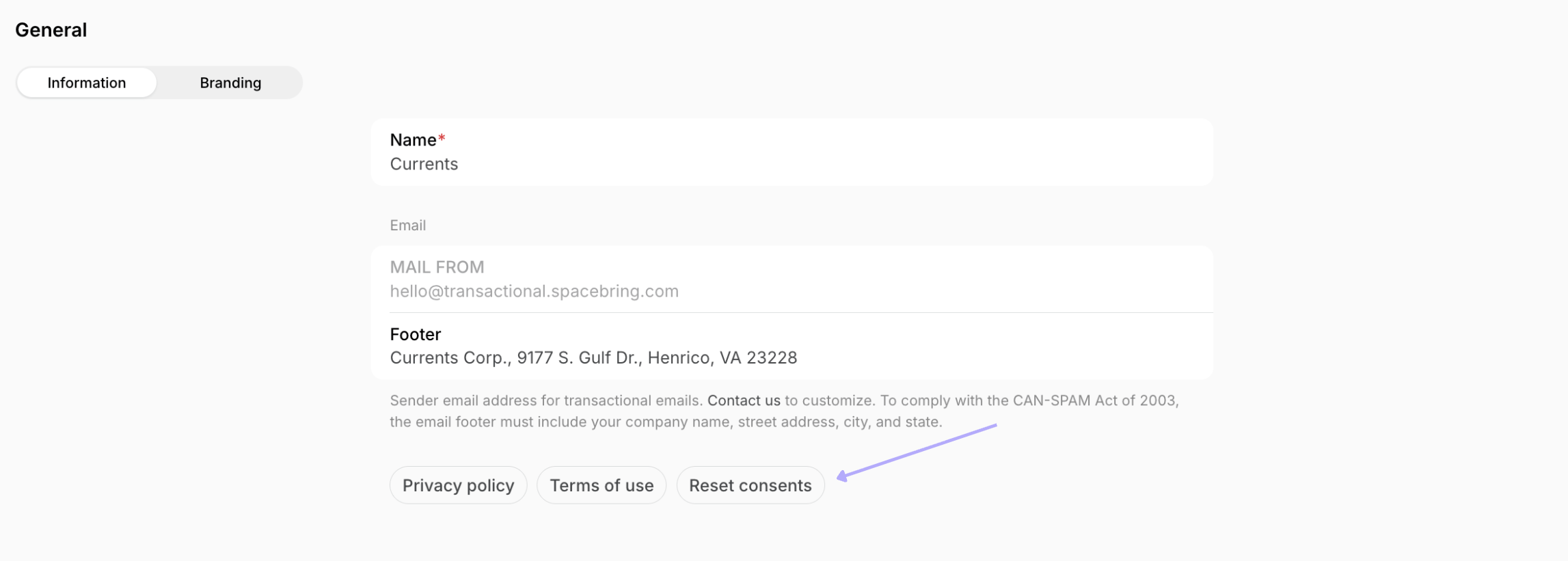 This will reset the saved consents for all registered users in your network. The next time users open your member web portal or mobile app, they’ll be prompted to review and agree to your privacy policy and terms of use again.