> ## Documentation Index
> Fetch the complete documentation index at: https://www.spacebring.com/docs/llms.txt
> Use this file to discover all available pages before exploring further.
# Offboard members
> Streamline member offboarding with auto-remove, subscription end date tracking, last-minute retention incentives, invoice checks, and saving contacts for future outreach
A thoughtful automated offboarding process can not only help to leave a lasting positive impression and keep the operations running smoothly but also be an opportunity to retain the customer base.
We recommend the next tips to ensure seamless management and effective future business opportunities.
## Automate offboarding to save time
Turn on the [Auto-remove members feature](/customer-management/remove-a-user#auto-remove-members) to automatically remove members as soon as their subscription ends. It helps keep your space's access list clean and up to date.
## Use subscription end date to time offboarding
To plan a smooth offboarding, track scheduled subscription expirations.
1. Go to the **Billing > Subscriptions** page.
2. Use the **End date** filter to see which customers' subscriptions are due to expire soon.
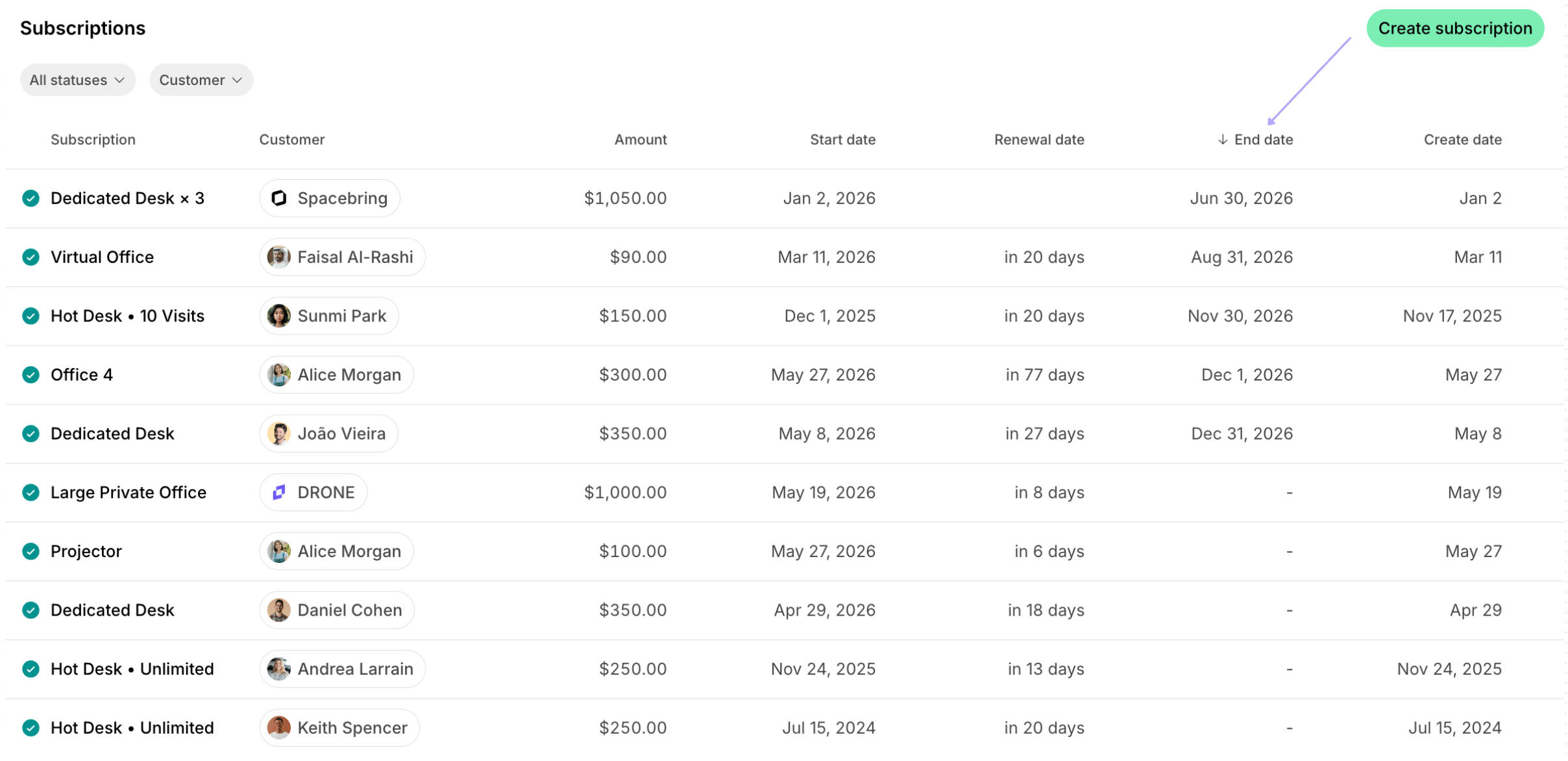 Administrators can always change the end date by [editing the subscription.](/billing/subscriptions/edit-a-subscription)
## Offer last-minute retention incentives
Don't let a member's departure be the final goodbye. When you see that the user's subscription is about to end, use these tools to encourage them to stay:
* Credits: [Add credits](/billing/credits-and-day-passes/credits#add-credits) that members and companies can use for services or bookings.
* Day passes: [Provide day passes](/billing/credits-and-day-passes/day-passes) for hot desk bookings to encourage new bookings.
* Discounts & Promo codes: [Set up subscription discounts](/billing/discounts/give-and-apply#give-discounts-with-plans) or [create personalized promo codes](/billing/discounts/give-and-apply#create-promo-codes) to re-engage members to stay longer.
Make sure to reach out to such members and highlight how these benefits can save them money or fit their changing needs.
## Incorporate invoice checks
If the member still decided to terminate the subscription, we recommend verifying payment statuses before completing the offboarding process:
1. Go to the **Customers** page and see the outstanding balances of the members/companies in the **Invoices** section.
Administrators can always change the end date by [editing the subscription.](/billing/subscriptions/edit-a-subscription)
## Offer last-minute retention incentives
Don't let a member's departure be the final goodbye. When you see that the user's subscription is about to end, use these tools to encourage them to stay:
* Credits: [Add credits](/billing/credits-and-day-passes/credits#add-credits) that members and companies can use for services or bookings.
* Day passes: [Provide day passes](/billing/credits-and-day-passes/day-passes) for hot desk bookings to encourage new bookings.
* Discounts & Promo codes: [Set up subscription discounts](/billing/discounts/give-and-apply#give-discounts-with-plans) or [create personalized promo codes](/billing/discounts/give-and-apply#create-promo-codes) to re-engage members to stay longer.
Make sure to reach out to such members and highlight how these benefits can save them money or fit their changing needs.
## Incorporate invoice checks
If the member still decided to terminate the subscription, we recommend verifying payment statuses before completing the offboarding process:
1. Go to the **Customers** page and see the outstanding balances of the members/companies in the **Invoices** section.
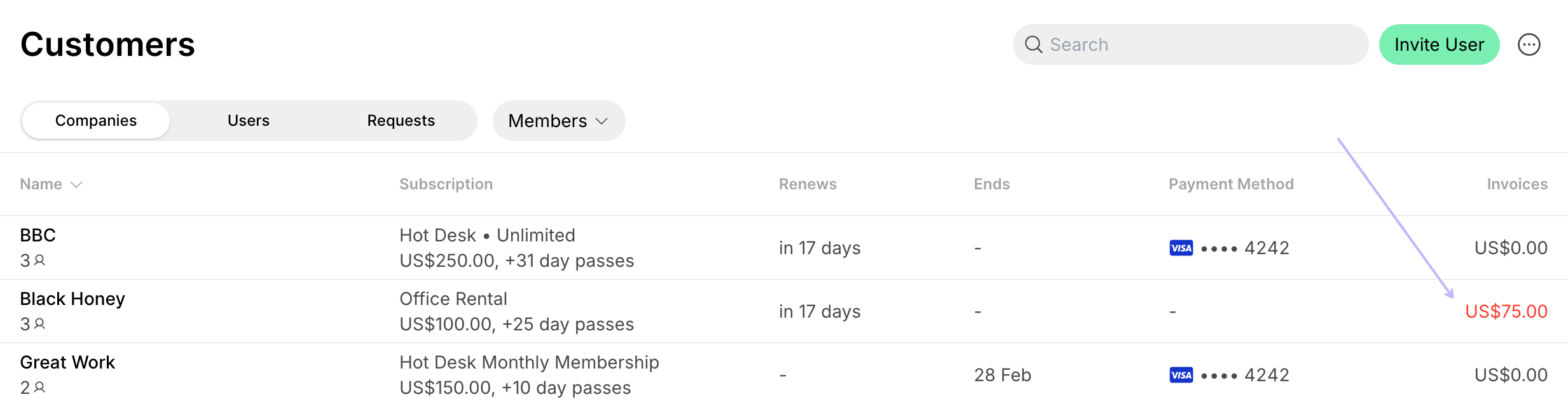 Alternatively, administrators can go to **Billing** > **Invoices**. The invoices can be filtered by status and a company or a user they belong to:
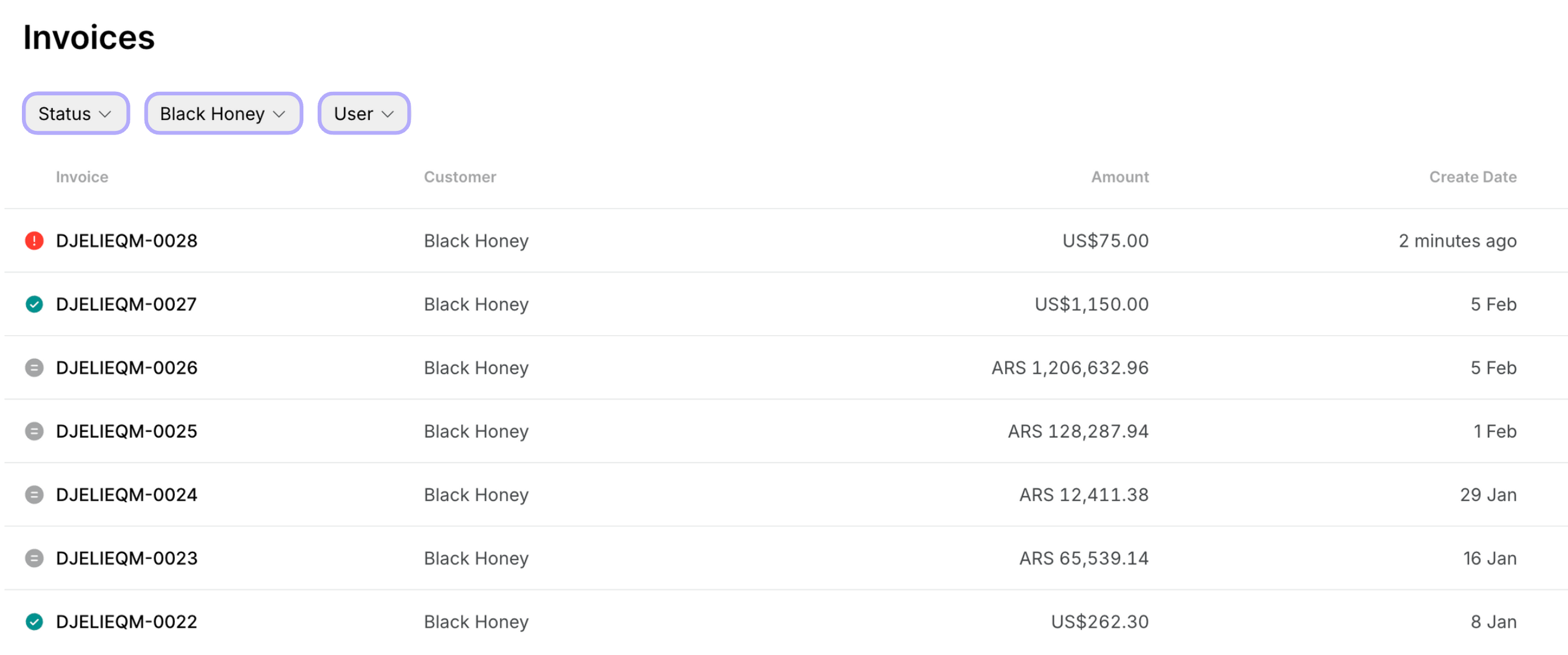 2. Check who has outstanding invoices, reach out to users, and [resend invoices](/billing/invoicing/resend-an-invoice).
## Save contacts for future outreach
A member's decision to cancel may be due to personal reasons rather than a loss of interest.
To maintain the connection, consider [removing them from the **Customers** page](/customer-management/remove-a-user) but keeping their profile on the **Nonmembers** page for easy outreach. [Understand user roles](/customer-management/roles)
Reach out periodically with updates, offers, or new services. Administrators can contact nonmembers via **Chat** or email to share events, seasonal offers, or new services.
Offboarding is a chance to reinforce your brand's professionalism and customer relationships, turning departing members into loyal advocates or future clients.
2. Check who has outstanding invoices, reach out to users, and [resend invoices](/billing/invoicing/resend-an-invoice).
## Save contacts for future outreach
A member's decision to cancel may be due to personal reasons rather than a loss of interest.
To maintain the connection, consider [removing them from the **Customers** page](/customer-management/remove-a-user) but keeping their profile on the **Nonmembers** page for easy outreach. [Understand user roles](/customer-management/roles)
Reach out periodically with updates, offers, or new services. Administrators can contact nonmembers via **Chat** or email to share events, seasonal offers, or new services.
Offboarding is a chance to reinforce your brand's professionalism and customer relationships, turning departing members into loyal advocates or future clients.