> ## Documentation Index
> Fetch the complete documentation index at: https://www.spacebring.com/docs/llms.txt
> Use this file to discover all available pages before exploring further.
# Membership
> Understand how members, nonmembers, company members, and company managers use the Membership page to view subscriptions, pay invoices, manage payment methods and billing details, check credits and day passes, and buy packages
The **Membership** page is where customers see what they get from your location and pay for it: subscriptions, invoices, payment methods, credits, and day passes. They open it from **Membership** in the location menu.
The page is visible to the same customers as the most visible page of your location. For example, every logged-in customer sees it if at least one page has **Public** [visibility](/docs/location/visibility).
## What customers see
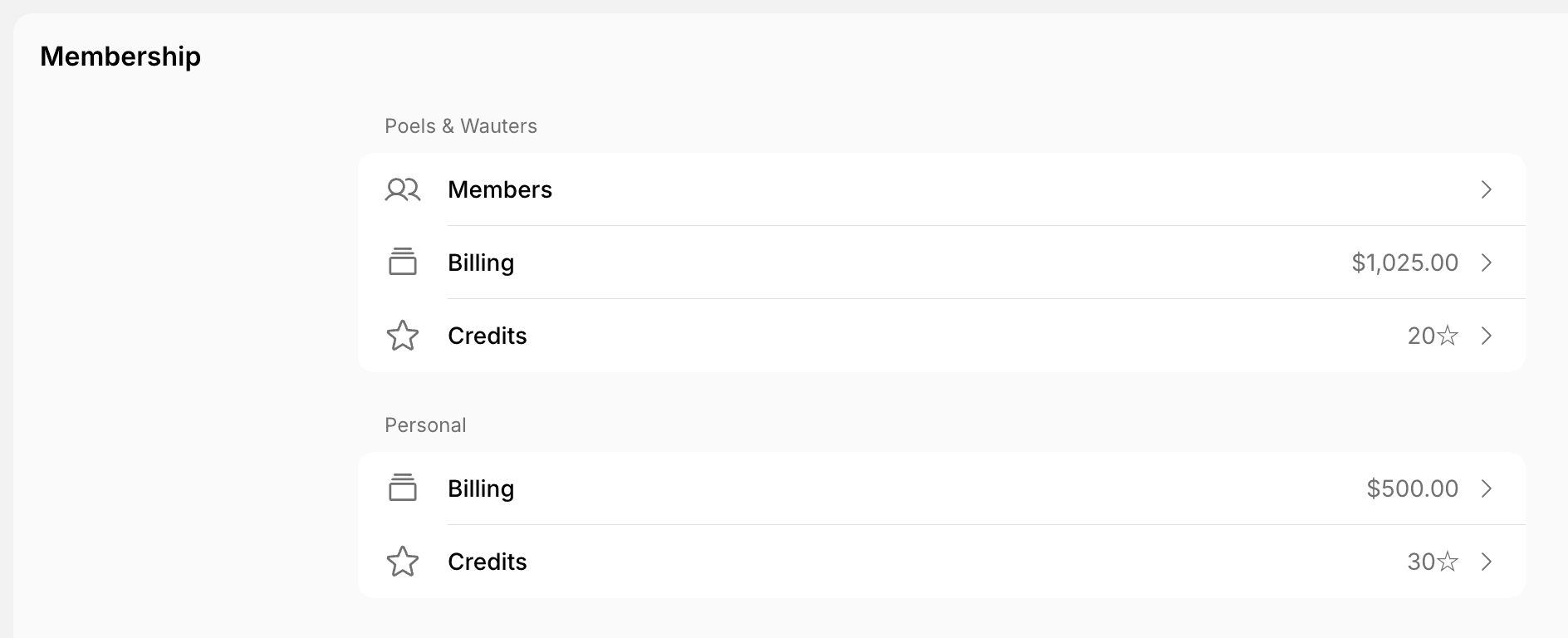 * **Nonmembers** see **Personal** > **Billing**.
* **Members** also see **Credits**, **Day passes**, and **Printing** under **Personal**, if your location uses them. **Printing** shows the pages they printed this month and last month on Sindoh printers.
* **Company members** also see a section with the company name above **Personal**, with **Members**, **Credits**, and **Day passes**.
* **Company managers** also see the company's **Billing** in that section.
## Billing
Customers manage their own billing under **Personal** > **Billing**. Company managers manage the company's billing under the section with the company name > **Billing**.
* **Nonmembers** see **Personal** > **Billing**.
* **Members** also see **Credits**, **Day passes**, and **Printing** under **Personal**, if your location uses them. **Printing** shows the pages they printed this month and last month on Sindoh printers.
* **Company members** also see a section with the company name above **Personal**, with **Members**, **Credits**, and **Day passes**.
* **Company managers** also see the company's **Billing** in that section.
## Billing
Customers manage their own billing under **Personal** > **Billing**. Company managers manage the company's billing under the section with the company name > **Billing**.
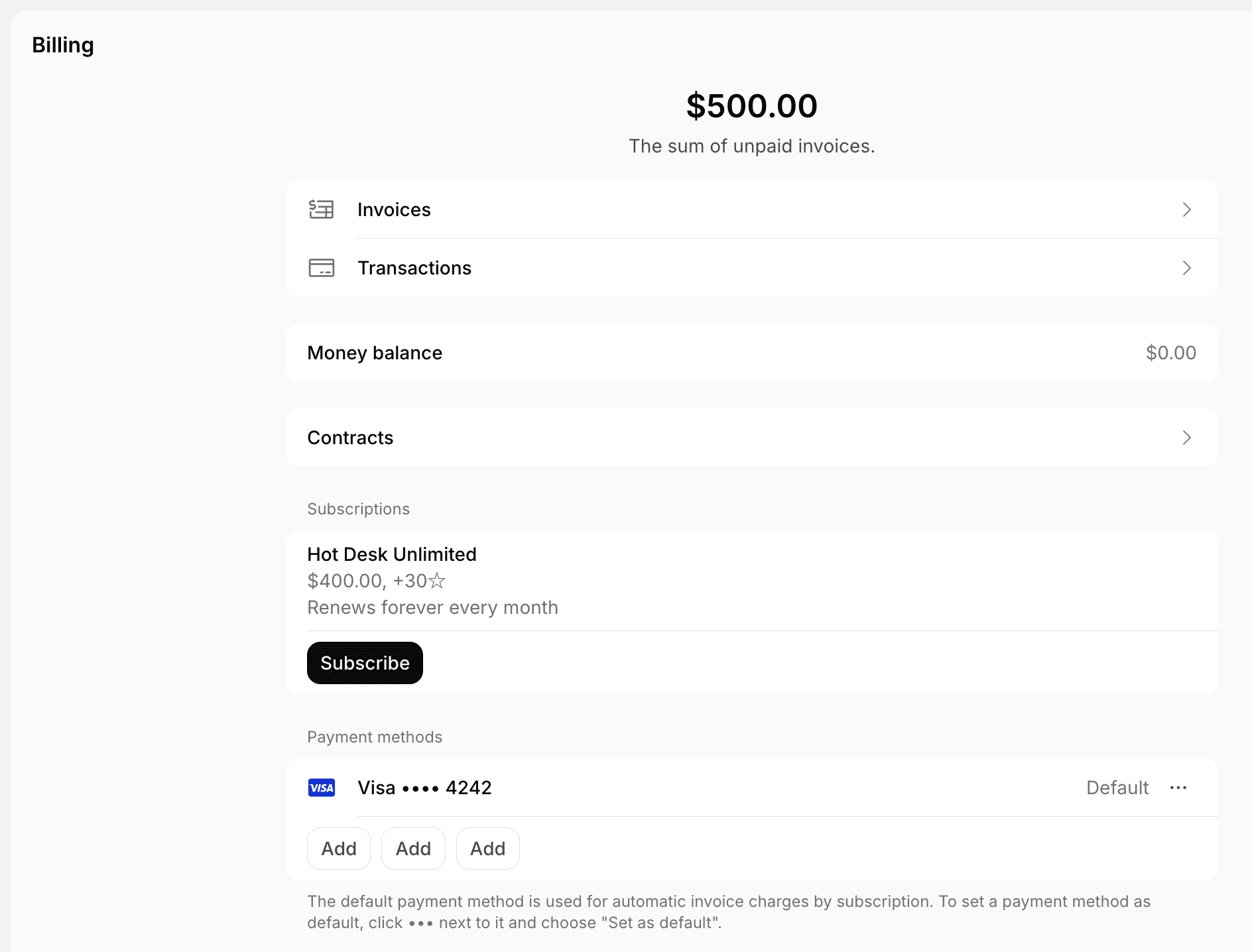 * The amount at the top is the sum of unpaid invoices.
* **Invoices** — view, pay, and download invoices.
* **Transactions** — view payments and download receipts.
* **Money balance** — the money balance that applies to the next invoice.
* **Contracts** — view and download contracts, including signed ones.
* **Subscriptions** — open a subscription to check its credits, day passes, discounts, items, assignments, and upcoming invoice. Click **Subscribe** to sign up for another plan.
* **Pending invoice items** — bookings and purchases paid by invoice that aren't invoiced yet.
* **Payment methods** — add, delete, or set a default payment method. The default one is charged automatically for subscription invoices.
* **Billing details** — the legal business name, address, and tax ID on invoices and receipts.
* **Billing emails** — on the company's **Billing** page, the addresses that receive company invoices and receipts.
On the company's **Billing** page, company managers also choose [who in the company can pay](/docs/customer-management/companies/payment-method-permissions) with company credits, day passes, the company invoice, and company cards.
Customers who haven't bought anything at your location yet see the plans open for sign-up instead.
Customers can't cancel a subscription themselves. **Cancel subscription** on the subscription page sends your team a cancellation request as a support ticket, and shows only if **Support** is enabled for the location.
## Credits and day passes
Customers check their own balance under **Personal** > **Credits** or **Day passes**, and the company's balance under the section with the company name.
* The amount at the top is the sum of unpaid invoices.
* **Invoices** — view, pay, and download invoices.
* **Transactions** — view payments and download receipts.
* **Money balance** — the money balance that applies to the next invoice.
* **Contracts** — view and download contracts, including signed ones.
* **Subscriptions** — open a subscription to check its credits, day passes, discounts, items, assignments, and upcoming invoice. Click **Subscribe** to sign up for another plan.
* **Pending invoice items** — bookings and purchases paid by invoice that aren't invoiced yet.
* **Payment methods** — add, delete, or set a default payment method. The default one is charged automatically for subscription invoices.
* **Billing details** — the legal business name, address, and tax ID on invoices and receipts.
* **Billing emails** — on the company's **Billing** page, the addresses that receive company invoices and receipts.
On the company's **Billing** page, company managers also choose [who in the company can pay](/docs/customer-management/companies/payment-method-permissions) with company credits, day passes, the company invoice, and company cards.
Customers who haven't bought anything at your location yet see the plans open for sign-up instead.
Customers can't cancel a subscription themselves. **Cancel subscription** on the subscription page sends your team a cancellation request as a support ticket, and shows only if **Support** is enabled for the location.
## Credits and day passes
Customers check their own balance under **Personal** > **Credits** or **Day passes**, and the company's balance under the section with the company name.
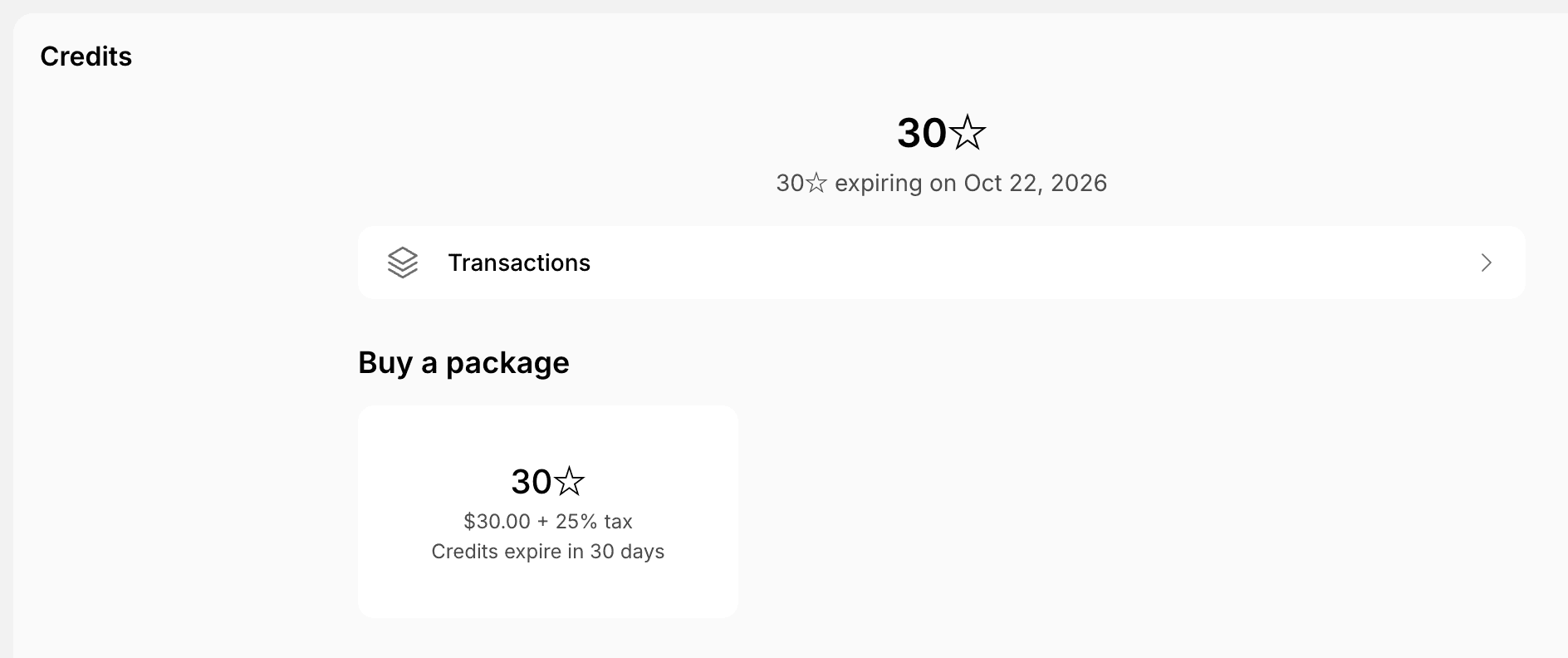 * The balance at the top shows how much expires and when.
* **Transactions** — the history of credits or day passes received and spent.
* **Buy a package** — [buy more credits or day passes](/docs/billing/credits-and-day-passes/packages#how-members-buy-packages).
* **Scheduled transactions** — credits reserved for bookings in a future subscription period.
Every company member can see the company's credits and day passes. Who can spend them depends on the company's payment method permissions.
## Company members
Under the section with the company name > **Members**, company members see everyone in their company, with company managers marked **Manager**.
* Any company member can click **Invite user** to [invite someone to the company](/docs/customer-management/companies#as-a-company-member).
* Company managers can remove people from the company.
* The balance at the top shows how much expires and when.
* **Transactions** — the history of credits or day passes received and spent.
* **Buy a package** — [buy more credits or day passes](/docs/billing/credits-and-day-passes/packages#how-members-buy-packages).
* **Scheduled transactions** — credits reserved for bookings in a future subscription period.
Every company member can see the company's credits and day passes. Who can spend them depends on the company's payment method permissions.
## Company members
Under the section with the company name > **Members**, company members see everyone in their company, with company managers marked **Manager**.
* Any company member can click **Invite user** to [invite someone to the company](/docs/customer-management/companies#as-a-company-member).
* Company managers can remove people from the company.