> ## Documentation Index
> Fetch the complete documentation index at: https://www.spacebring.com/docs/llms.txt
> Use this file to discover all available pages before exploring further.
# Start guide
> A step-by-step guide to help you with the initial setup of your network, location, resources, plans, and members in Spacebring
We've created this start guide to help you set up your location and build on the basics. Explore how to save time and provide excellent service to members with Spacebring.
## Set up network
*Total time: 10 minutes*
**You'll need the following:**
* Your business's brand materials (square logo, colors).
* Access your domain name's control panel to set up a [custom domain](/member-web-portal/manage-a-custom-third-level-domain-for-your-member-web-portal).
* Your privacy policy and terms of use text.
* Description for member web portal.
**Steps to set up your network**:
1. Log in as an [owner](/administration/roles/owner) to Spacebring.
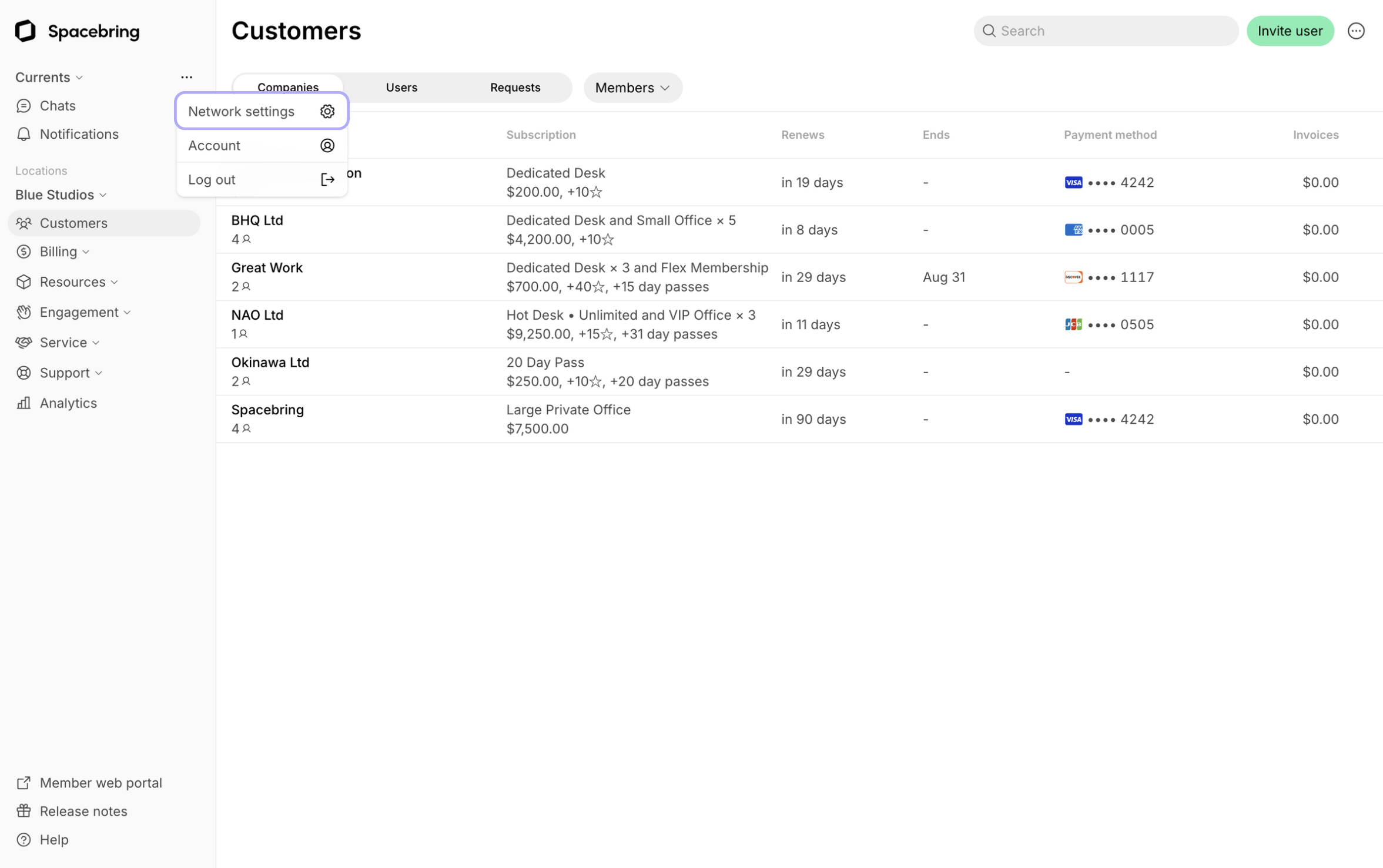
2. On the left-side panel, click **(...)** next to your network name > **Network settings** > **General** page.
3. Set up a [custom domain](/member-web-portal/manage-a-custom-third-level-domain-for-your-member-web-portal), an email footer, [customize the look of your member web portal](/member-web-portal/customize-member-web-portal), and add your policies' text.
Since you are processing personal data, various country laws and app publishing platforms require you to disclose privacy practices and forbid questionable content and behavior. You must [add a privacy policy](/privacy-policy) and [terms of use](/terms-of-use) which will appear in the member web portal and mobile app.
## Set up locations
*Total time: 15 minutes*
**You'll need the following:**
* Basic location information (name, address, description, contacts, photo, or video).
* Location guides (e.g., parking, pets, printing)
* Your business's billing and bank details.
* Local sales or VAT tax rate.
**Steps to set up the locations**:
1. The owner needs to [add all locations.](/administration/locations)
2. As an [administrator](/administration/roles), go to Spacebring > select the location on the left-side panel > click **(...)** next to it > **Location** **settings**.
3. Configure general location settings, [billing](/billing), and enable the modules you'll need.
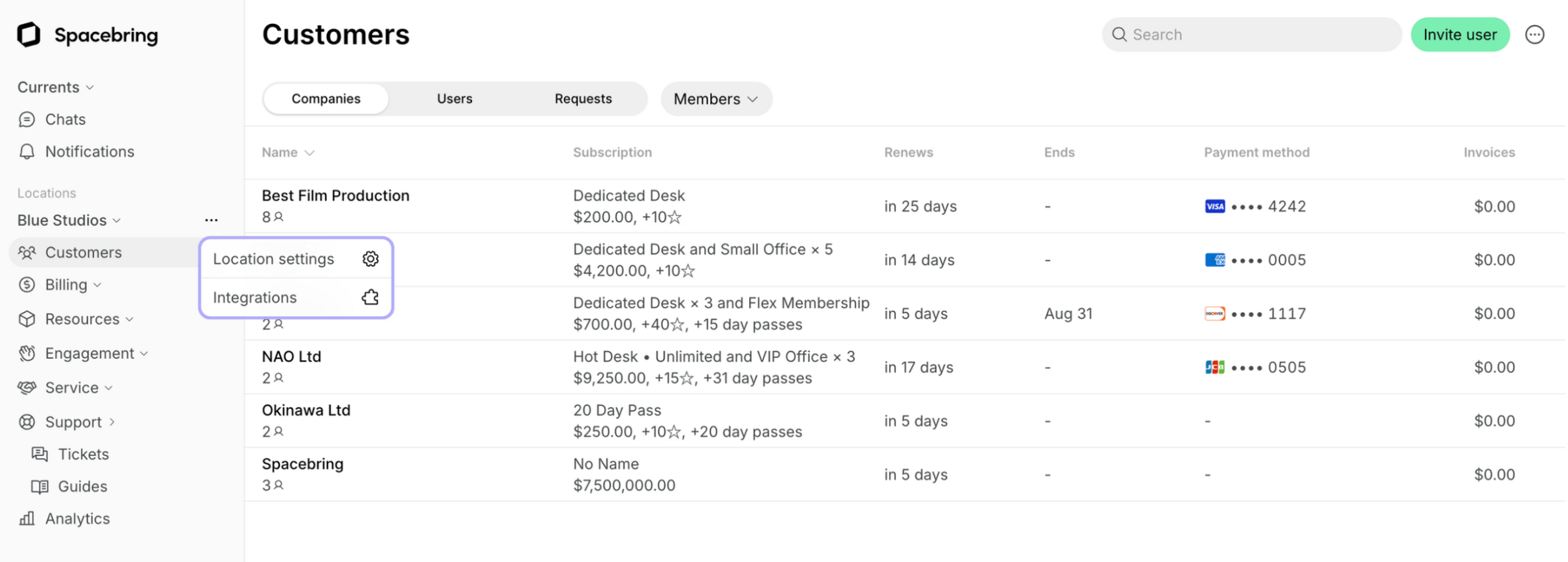
4. Click **(...)** next to the location on the left-side panel > select **Integrations** > connect integrations such as a [payment gateway](/integrations/payments).
## Set up resources
*Total time: 1 hour*
**You'll need the following:**
* Cover photos for rooms, desks, offices, and any other services you provide.
* Prices for your resources
**Steps to set up the resources**:
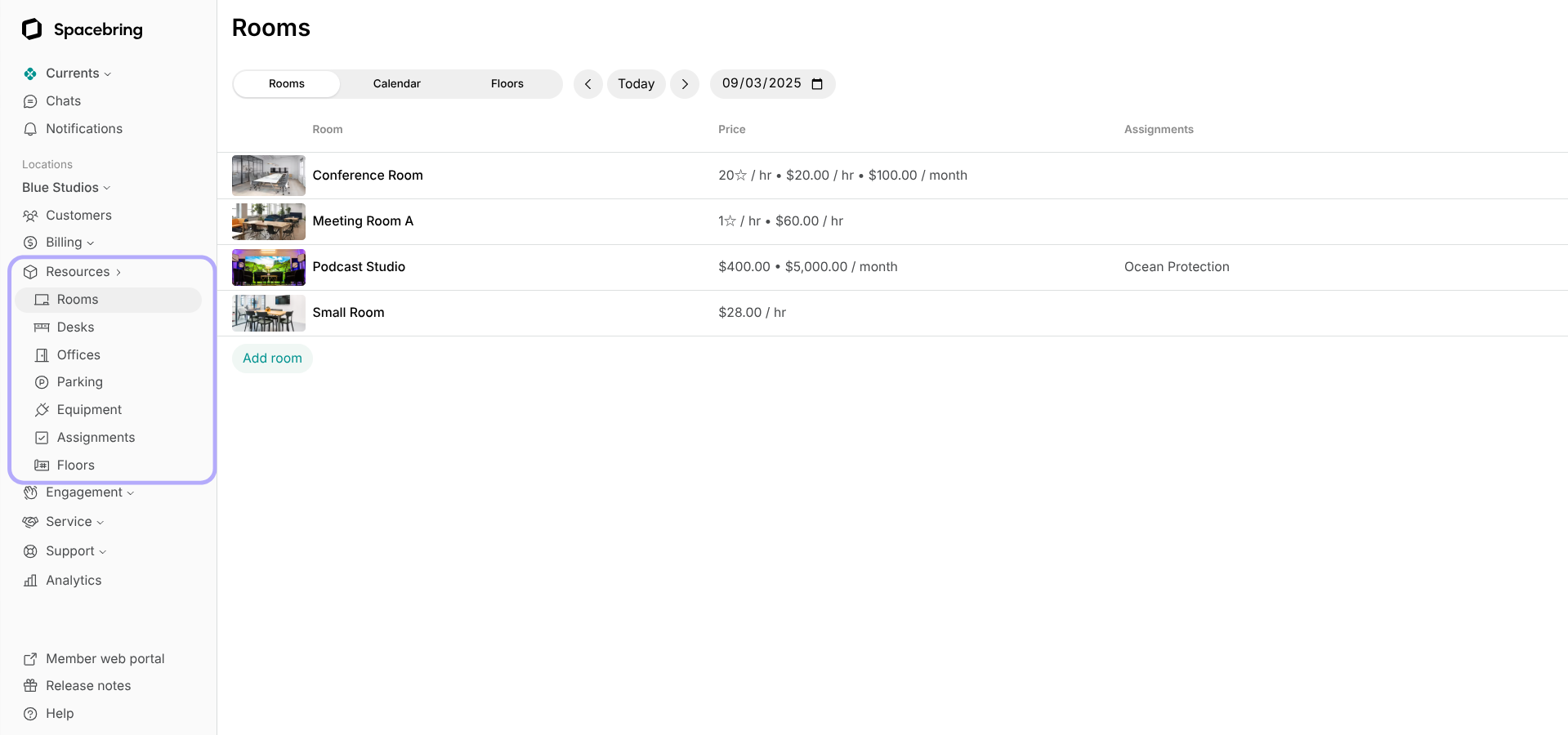
1. Go to **Resources** and select the necessary page:
* [Rooms](/resource-management/set-up#rooms)
* [Desks](/resource-management/set-up#desks)
* [Offices](/resource-management/set-up#offices)
* [Parking](/resource-management/set-up#parking)
* [Equipment](/resource-management/set-up#equipment)
2. Create your resources.
## Set up plans & contracts
*Total time: 30 minutes*
**You'll need the following:**
* List of your recurring membership plans with titles, prices and descriptions.
* Contract templates for individual agreements with your customers.
**Steps to automate invoicing and subscriptions**:
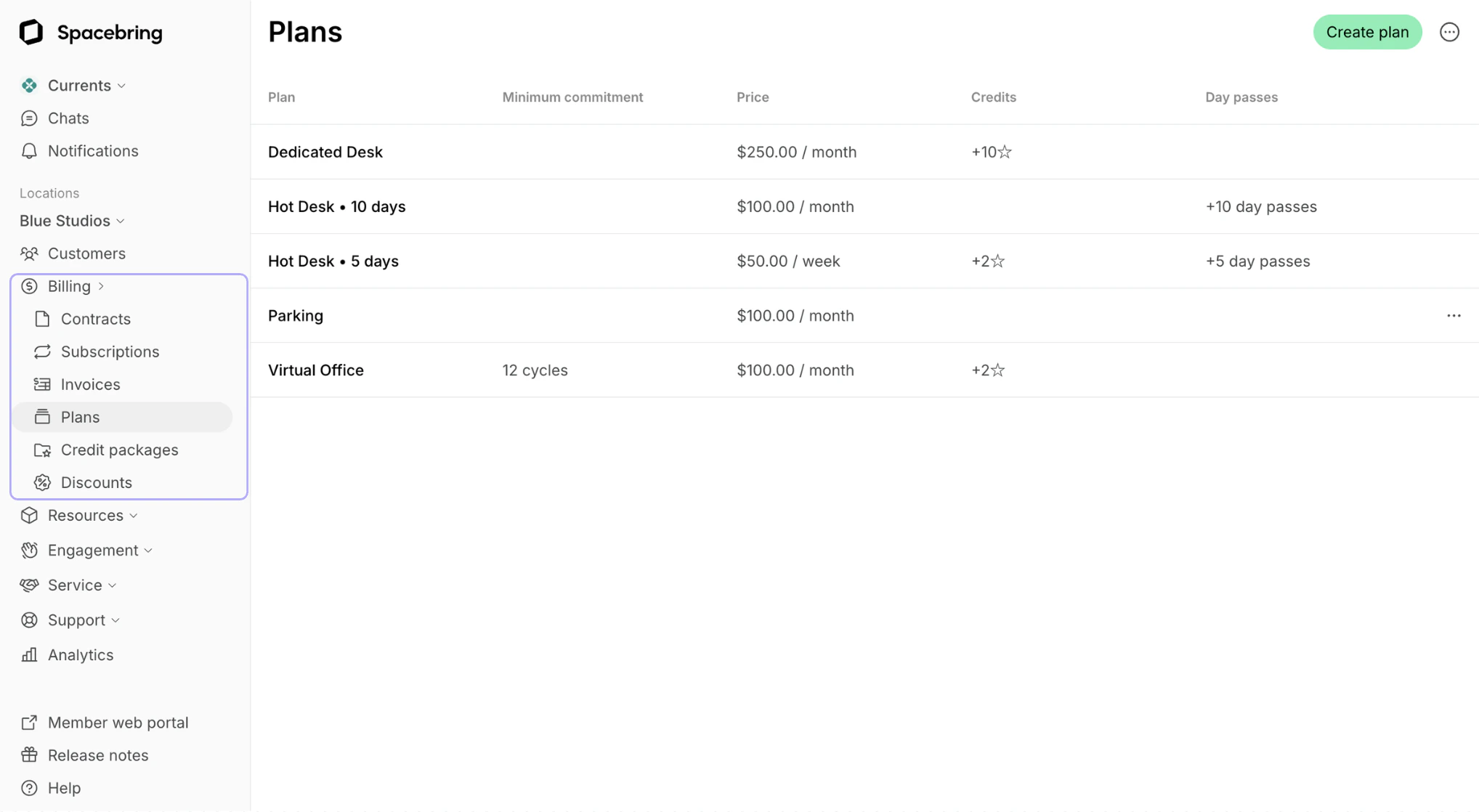
1. Go to **Billing** > **Plans** and [create plans](/billing/plans).
2. [Add credit packages](/billing/credits-and-day-passes/credit-packages) and [discounts](/billing/discounts/set-up) if necessary.
3. [Upload contract templates.](/billing/contracts/templates)
3. Click **Member web portal** on the left-side panel to check how your services appear to members.
## Invite members
*Total time: 5 minutes per account*
**You'll need the following:**
* [Spreadsheet](/customer-management/members#invite-multiple-members) with members' names, emails, and information about their subscriptions.
**Steps to invite members**:
1. [Create companies](/customer-management/create-a-company).
2. [Invite members](/customer-management/members#invite-multiple-members) using a mass invitation file.
3. [Create subscriptions](/billing/subscriptions).
4. Introduce what the new app can do for your members via **Feed**, newsletter, and by [promoting the app](/guide/promote-member-web-portal-and-mobile-app) on social media and the marketing site.
## Explore docs & Spacebring mobile app
Know what's happening in your coworking space in real time by downloading Spacebring admin mobile app:
* [Open Google Play Store](https://play.google.com/store/apps/details?id=com.spacebring.app)
* [Open App Store](https://apps.apple.com/app/spacebring/id6749810616)
Whenever you need help, find answers on various topics and getting started guides in our [Docs](/).
Don't forget to [say hi to us](/administration/contact-support). We're always happy to help!
 3. Set up a [custom domain](/member-web-portal/manage-a-custom-third-level-domain-for-your-member-web-portal), an email footer, [customize the look of your member web portal](/member-web-portal/customize-member-web-portal), and add your policies' text.
 ## Set up resources
*Total time: 1 hour*
**You'll need the following:**
* Cover photos for rooms, desks, offices, and any other services you provide.
* Prices for your resources
**Steps to set up the resources**:
1. Go to **Resources** and select the necessary page:
## Set up resources
*Total time: 1 hour*
**You'll need the following:**
* Cover photos for rooms, desks, offices, and any other services you provide.
* Prices for your resources
**Steps to set up the resources**:
1. Go to **Resources** and select the necessary page:
 * [Rooms](/resource-management/set-up#rooms)
* [Desks](/resource-management/set-up#desks)
* [Offices](/resource-management/set-up#offices)
* [Parking](/resource-management/set-up#parking)
* [Equipment](/resource-management/set-up#equipment)
2. Create your resources.
## Set up plans & contracts
*Total time: 30 minutes*
**You'll need the following:**
* List of your recurring membership plans with titles, prices and descriptions.
* Contract templates for individual agreements with your customers.
**Steps to automate invoicing and subscriptions**:
1. Go to **Billing** > **Plans** and [create plans](/billing/plans).
2. [Add credit packages](/billing/credits-and-day-passes/credit-packages) and [discounts](/billing/discounts/set-up) if necessary.
3. [Upload contract templates.](/billing/contracts/templates)
* [Rooms](/resource-management/set-up#rooms)
* [Desks](/resource-management/set-up#desks)
* [Offices](/resource-management/set-up#offices)
* [Parking](/resource-management/set-up#parking)
* [Equipment](/resource-management/set-up#equipment)
2. Create your resources.
## Set up plans & contracts
*Total time: 30 minutes*
**You'll need the following:**
* List of your recurring membership plans with titles, prices and descriptions.
* Contract templates for individual agreements with your customers.
**Steps to automate invoicing and subscriptions**:
1. Go to **Billing** > **Plans** and [create plans](/billing/plans).
2. [Add credit packages](/billing/credits-and-day-passes/credit-packages) and [discounts](/billing/discounts/set-up) if necessary.
3. [Upload contract templates.](/billing/contracts/templates)
 3. Click **Member web portal** on the left-side panel to check how your services appear to members.
## Invite members
*Total time: 5 minutes per account*
**You'll need the following:**
* [Spreadsheet](/customer-management/members#invite-multiple-members) with members' names, emails, and information about their subscriptions.
**Steps to invite members**:
1. [Create companies](/customer-management/create-a-company).
2. [Invite members](/customer-management/members#invite-multiple-members) using a mass invitation file.
3. [Create subscriptions](/billing/subscriptions).
4. Introduce what the new app can do for your members via **Feed**, newsletter, and by [promoting the app](/guide/promote-member-web-portal-and-mobile-app) on social media and the marketing site.
## Explore docs & Spacebring mobile app
Know what's happening in your coworking space in real time by downloading Spacebring admin mobile app:
* [Open Google Play Store](https://play.google.com/store/apps/details?id=com.spacebring.app)
* [Open App Store](https://apps.apple.com/app/spacebring/id6749810616)
Whenever you need help, find answers on various topics and getting started guides in our [Docs](/).
Don't forget to [say hi to us](/administration/contact-support). We're always happy to help!
3. Click **Member web portal** on the left-side panel to check how your services appear to members.
## Invite members
*Total time: 5 minutes per account*
**You'll need the following:**
* [Spreadsheet](/customer-management/members#invite-multiple-members) with members' names, emails, and information about their subscriptions.
**Steps to invite members**:
1. [Create companies](/customer-management/create-a-company).
2. [Invite members](/customer-management/members#invite-multiple-members) using a mass invitation file.
3. [Create subscriptions](/billing/subscriptions).
4. Introduce what the new app can do for your members via **Feed**, newsletter, and by [promoting the app](/guide/promote-member-web-portal-and-mobile-app) on social media and the marketing site.
## Explore docs & Spacebring mobile app
Know what's happening in your coworking space in real time by downloading Spacebring admin mobile app:
* [Open Google Play Store](https://play.google.com/store/apps/details?id=com.spacebring.app)
* [Open App Store](https://apps.apple.com/app/spacebring/id6749810616)
Whenever you need help, find answers on various topics and getting started guides in our [Docs](/).
Don't forget to [say hi to us](/administration/contact-support). We're always happy to help!