

Export reports
Reports are ideal for bulk uploading invoice data into accounting software. Each one downloads as CSV or XLSX.
To download a report:
- Go to Billing > Invoices and apply the necessary filters (e.g., filter by the Paid status to export only paid invoices).
- Click (…) in the top right corner > Export invoices or Export invoice items > CSV or XLSX.

- Upload or copy-paste invoice data into your accounting software.
Download invoice PDFs
- Go to Billing > Invoices, filter the list by the necessary period and payment status, then click (…) in the top right corner > Export invoices > CSV or XLSX.
- Open the downloaded report in Google Sheets, Excel, or Numbers.
- Locate the PDF column.
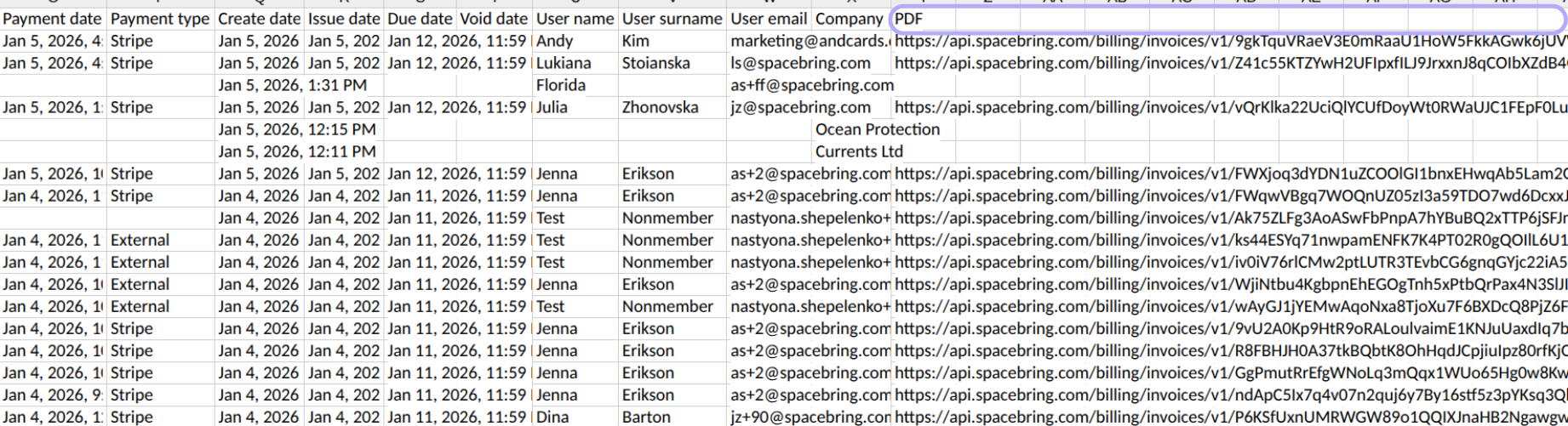
- To download individual invoices, click on the URL in this column. The invoice PDF will be downloaded to your device.
- To mass download all invoices, select a range of links in the PDF column. Then, click the (…) > View more cell actions > use the Open links feature (available in Google Sheets and other apps that handle hyperlinks). All selected links will open simultaneously, and all invoices will be downloaded.
- Once exported, upload all invoice PDFs to your accounting software.