

Prerequisites
- Have a Spacebring trial. To get one, book a trial setup call.
- Log in to Spacebring as an owner.
Sign up for Spacebring
- In the trial banner in the bottom-left corner, click Subscribe.
- If your trial has ended, click Subscribe on the Trial expired page instead, and skip the next step.
- On the Billing page, click Subscribe.
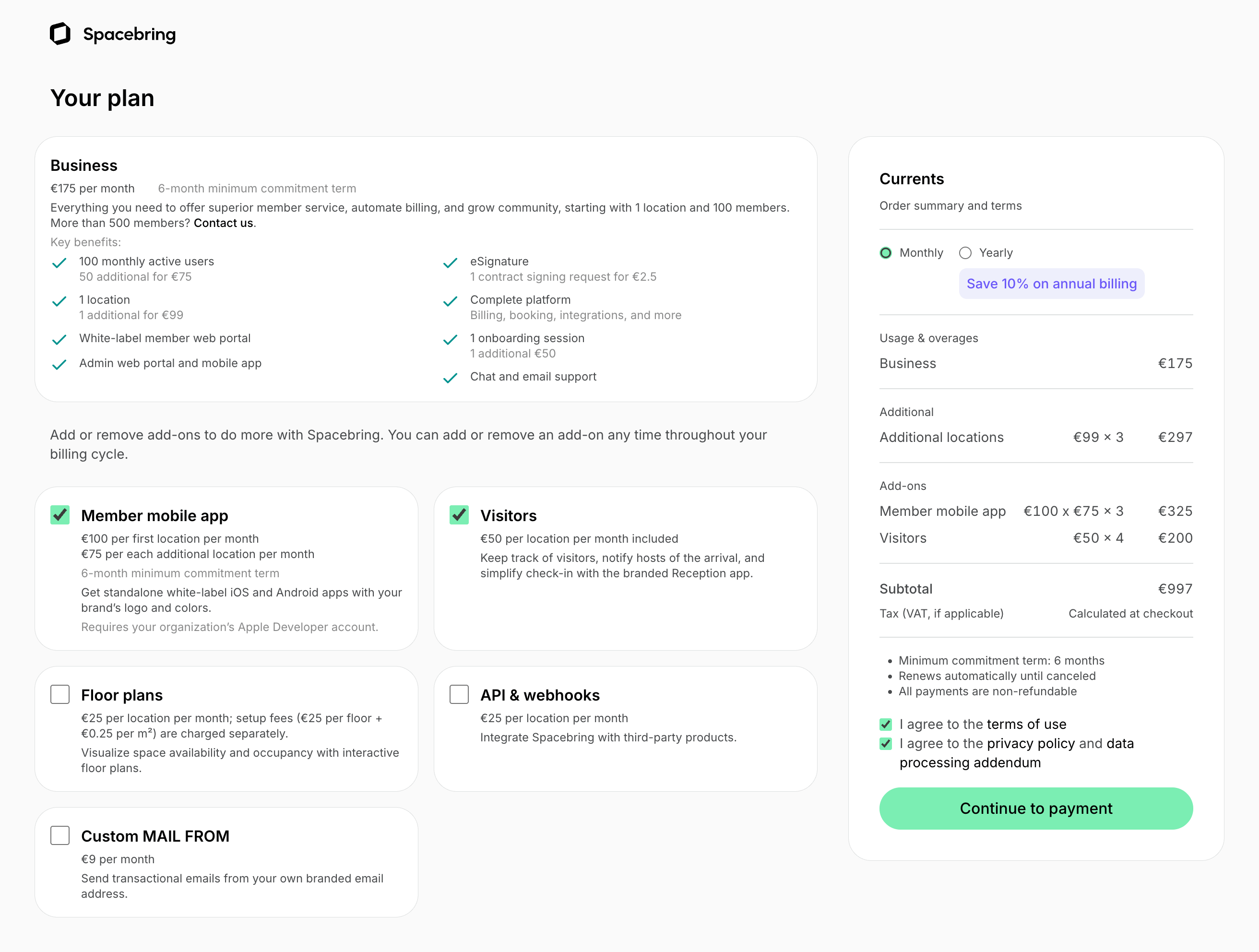
- Select the add-ons you need and the billing cycle: Monthly or Yearly.
- Agree to the terms of use, privacy policy, and data processing addendum.
- Click Continue to payment.
- Enter your contact and payment details.
- If you have a promo code, click Add promotion code and apply it.
- Click Subscribe with obligation to pay.

View your Spacebring subscription details
To check your subscription details, the owner should:- Click the network name in the top left corner.
- Go to Network settings > Billing.
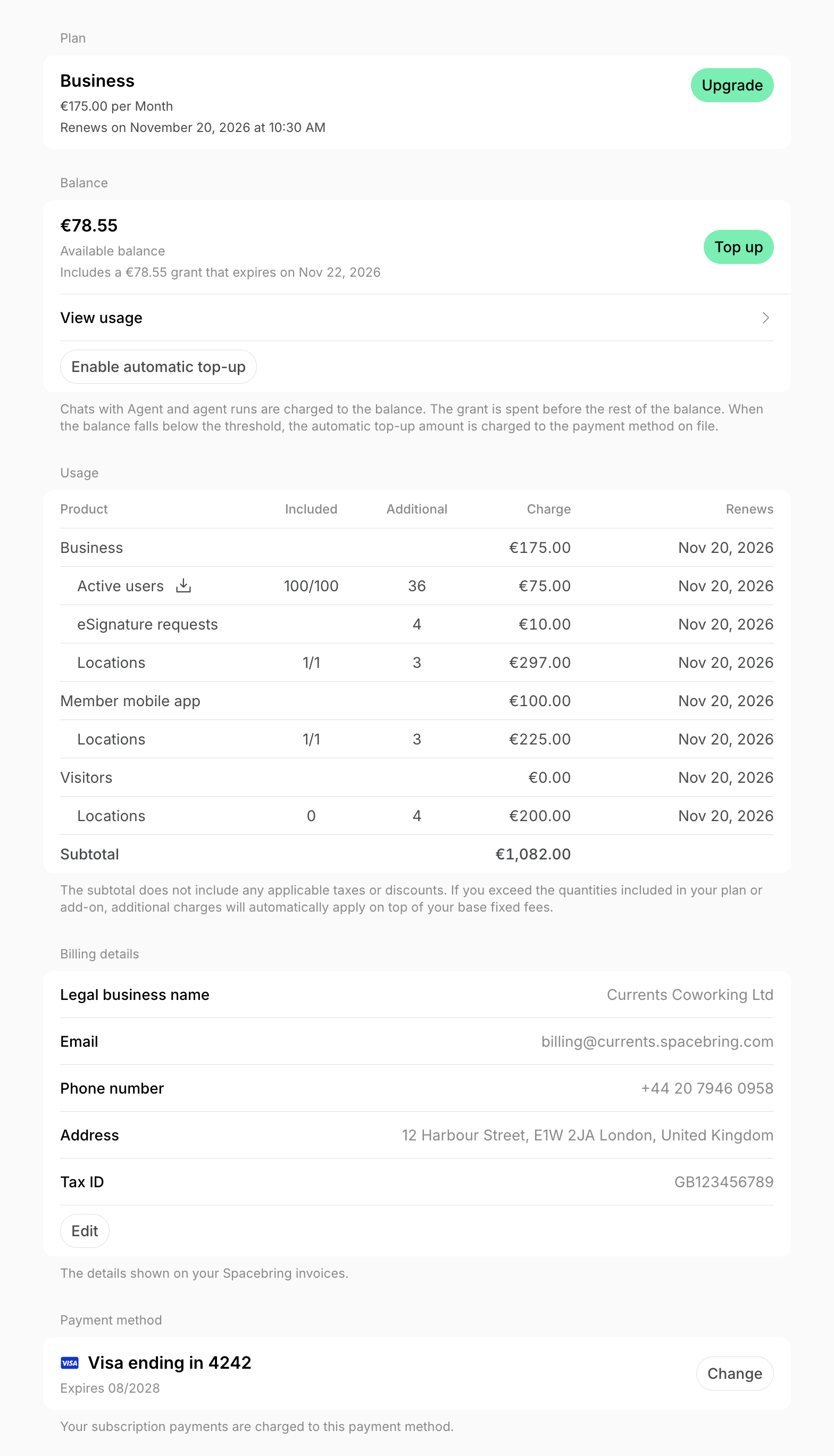
- Plan — your plan, its price, and its renewal date.
- Balance — your network balance, which pays for AI usage.
- Usage — each product in your subscription, with the active users and locations your plan and add-ons include, any additional quantities in the current billing period, and their charges and renewal dates.
- Billing details — the details that appear on your Spacebring invoices.
- Payment method — the card or bank account your subscription payments are charged to.
- Invoices — your past and outstanding invoices.
- Upcoming invoice — a preview of the invoice billed on your renewal date, with its line items, subtotal, any discount, tax, and amount due.
- Add-ons — the add-ons you’ve purchased and the ones you can add.
How the subscription fee is calculated
Your subscription fee has two parts:- The prepaid fee covers your plan, any extra locations, and your add-ons. It’s billed at the start of each billing period.
- The postpaid fee covers usage in a billing period and is added to your next invoice:
- Active users above the number your plan includes, charged in packages.
- Contracts sent for eSignature, charged per signing request.
For current prices, see Spacebring pricing.
If your invoice amount is different than expected
- Usage-based charges may have been added, such as extra locations, active user packages, or eSignature requests. To find them, go to Network settings > Billing > Invoices and click (…) > Download PDF next to the invoice.
- If you’re billed in EUR but pay in your local currency, your bank or card issuer converts the payment and may charge a conversion fee.
- If you subscribed in your local currency, Stripe, our payment processor, handles the conversion and may charge a conversion fee.
Subscription terms
- All subscriptions require a minimum 6-month commitment, starting from the order date.
- If you add the Member mobile app add-on later, it starts a new 6-month commitment from its purchase date.
- The subscription renews automatically until canceled, and all payments are non-refundable.
- The Visitors, API & webhooks, Floor plans, and Member mobile app add-ons apply to every location in your network, so their fees depend on how many locations you have.
- With yearly billing, prepaid fees are billed once a year and postpaid fees every month.
- Subscription payments are charged automatically to your payment method. We accept:
- Credit and debit cards (Visa, MasterCard, American Express, depending on the country)
- Apple Pay and Google Pay
- SEPA Direct Debit (a €10.00 fee applies for failed or disputed SEPA payments)
- You receive a receipt after each successful payment and a reminder before each upcoming charge.
- We can provide a contract if your country’s foreign economic activity laws require one.
- A €21.00 reactivation fee applies to disputed card payments.
- If a subscription payment fails and the invoice stays unpaid:
- After 7 days, your subscription is suspended. Administrators lose access to Spacebring, and users lose access to the member web portal and member mobile app.
- After 30 days, your subscription is terminated.
FAQs
How can I check the details of our current plan and pricing with Spacebring?
How can I check the details of our current plan and pricing with Spacebring?
The owner can check your plan, prices, usage, and upcoming invoice in Network settings > Billing.
Can we switch our Spacebring subscription payments to USD or another currency instead of EUR?
Can we switch our Spacebring subscription payments to USD or another currency instead of EUR?
Unfortunately, no. If your billing currency is EUR, it isn’t possible to change it. All invoices are issued in EUR, and your bank or card issuer automatically converts each payment to your local currency at its own exchange rate.You can pay in a different billing currency only if you subscribed after February 26, 2026, and selected your local currency at checkout.
Could you clarify what exchange rate is applied to our Spacebring payment?
Could you clarify what exchange rate is applied to our Spacebring payment?
It depends on your billing currency:
- If your billing currency is EUR but you pay in your local currency, your bank or card issuer converts the payment and may charge a conversion fee. For the exact rate, please check with your bank.
- If you selected your local currency at checkout, Stripe, our payment processor, converts the payment at the mid-market rate and may charge a conversion fee. Since Stripe is an external provider, unfortunately, we don’t have access to the exact rate it applies and can’t advise on it.
Can we change the date of our Spacebring payments?
Can we change the date of our Spacebring payments?
Unfortunately, no. Your subscription renews on the same date every billing period, and it isn’t possible to change this date.The owner can see the renewal date in the Plan section of Network settings > Billing. To avoid any interruptions, make sure your payment method has enough funds before each renewal date.
Can you resend us invoices from Spacebring (past or outstanding)?
Can you resend us invoices from Spacebring (past or outstanding)?
You can get them yourself. The owner finds all past and outstanding invoices in the Invoices section of Network settings > Billing, where they can pay and download them.
Why do I see a warning that my subscription will be suspended?
Why do I see a warning that my subscription will be suspended?
Your latest subscription payment failed. Unless the owner pays the
invoice, your subscription is suspended
automatically on the date the warning shows.
Can I delay the subscription payment and avoid suspension?
Can I delay the subscription payment and avoid suspension?
Unfortunately, no. Suspension is fully automated: it happens 7 days after a payment fails, and we aren’t able to postpone it.To avoid any interruption to your service, if there’s an issue with your payment method, the owner can save a different one and pay the invoice with it.
Why do I receive monthly emails about my subscription renewal if it's annual?
Why do I receive monthly emails about my subscription renewal if it's annual?
Even with yearly billing, usage-based charges, such as additional active users, are billed monthly.
- If you exceed your included active users, your monthly invoice shows the additional charges.
- If you stay within your limits, you still receive a monthly invoice for €0.
Are there any ways to lower my current bill?
Are there any ways to lower my current bill?
Yes. A higher bill usually means you exceeded the number of active users your plan includes, and the extra ones are charged in packages. To check, the owner should:
- Click your network name in the top left corner.
- Go to Network settings > Billing and check how many active users your plan includes in the Usage section.
- In the Invoices section, click (…) > Download PDF next to last month’s invoice to see the additional active user packages.
- To see who was counted, click (…) > Download active users next to the same invoice.