

- Automatically generating eInvoices and credit notes in the format required by the Greek tax authority (IAPR)
- Reporting them in real time to myDATA through Invopop’s certified provider, ILYDA
- Adding the myDATA MARK (the unique registration number returned by IAPR) and a QR code to the PDF invoices and credit notes sent to customers
- Tracking sync status for every invoice.
This feature is currently in beta. Its functionality and appearance are subject to change, and it may not be fully stable. We welcome your feedback at support@spacebring.com.
Prerequisites
To activate myDATA eInvoicing, ensure the following requirements are completed.Complete location billing details
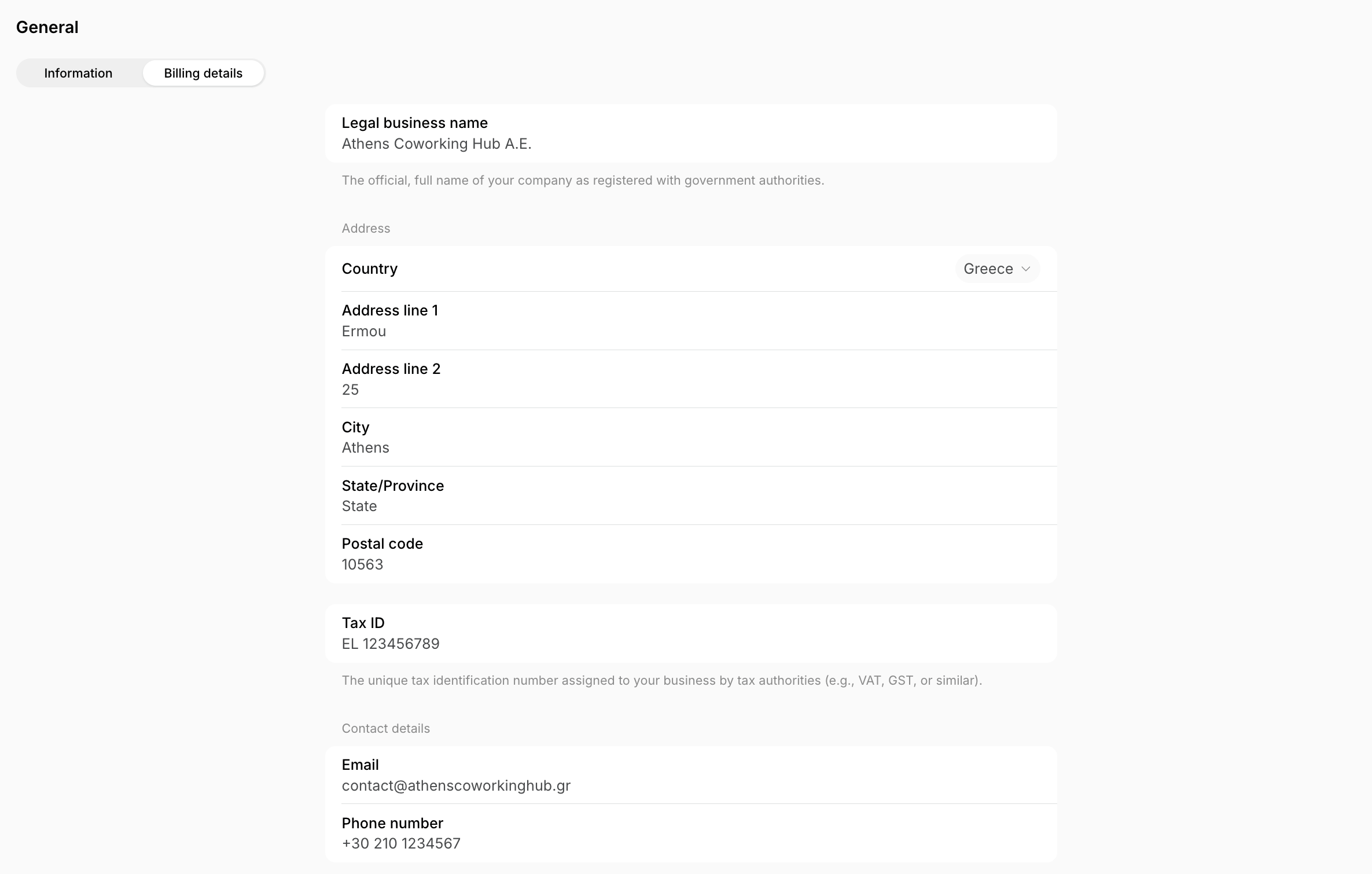
Your location billing details, tax, and currency must be complete and accurate.- Go to Location settings > General page > Billing details tab.
- Fill in your location’s billing details.
- Legal business name
- Address — Country (Greece), Address line 1, Address line 2 (your street number), City, and Postal code are all mandatory.
- Tax ID — a valid Greek VAT number (AFM)
- Contact details — Email and Phone number are both mandatory.
- Go to Location settings > Billing page > Invoices tab.
- Set Invoice type to Invoice.
- Go to Location settings > Billing page > Taxes tab.
- Set the Tax type to VAT.
- In the Tax rate field, enter a valid Greek VAT rate.
- If you use custom tax rates in individual customers’ subscriptions or invoices, ensure they are also valid Greek VAT rates.
If your income is rental income subject to Greece’s digital transaction fee instead of VAT, set Tax type to Digital transaction fee and Tax rate to the applicable fee percentage instead. This tax type requires the Exclusive tax option. Invoices are reported to myDATA as Rents – Income (type 8.1) without VAT and without a VAT exemption reason, with the fee reported separately. Their credit notes are reported as non-associated credit invoices (type 5.2), exempt from VAT under article 22 of the VAT code, because myDATA doesn’t accept records without VAT on credit invoices.
- Go to Location settings > Billing page > Currencies tab.
- Make sure your main location currency is set to EUR.
- If your primary location currency is different, add EUR as an alternative currency and apply it to all customer profiles for whom you want to generate eInvoices.
Only invoices issued in EUR can be reported to myDATA.
Complete customer billing details
Each customer must also have accurate billing details.- Go to Location settings > Customers and manage the billing details settings depending on your needs:
- Set the company billing details fields to Required.
-
Set the user billing details fields to Required too, if you need to generate eInvoices for individual users.
If a billing details field is set to Required for a customer type:
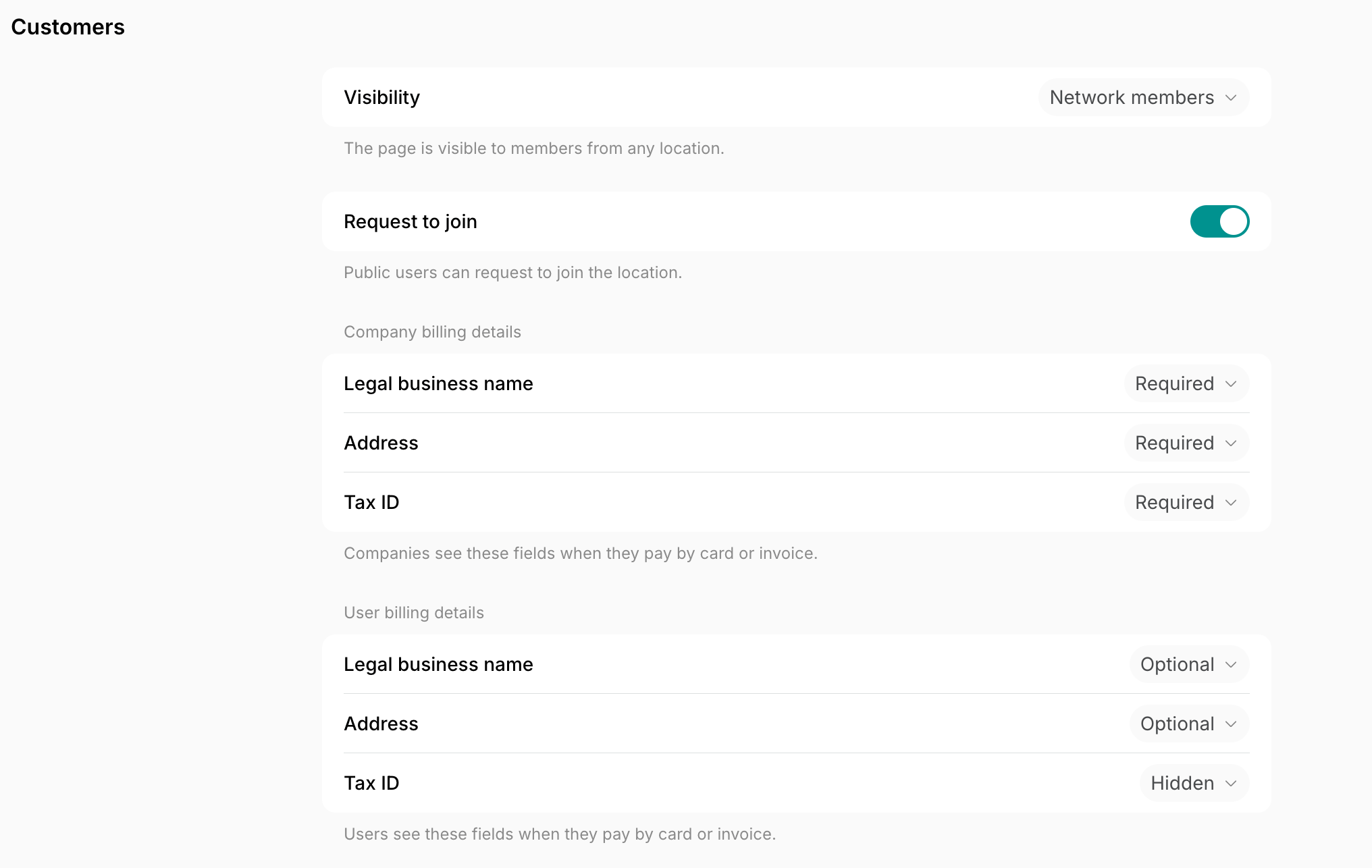
- New customers will be prompted to fill out their billing details at the first payment.
- Existing customers missing billing details will be prompted to update their details during their next payment.
- To review or update customer details manually:
- Go to the Customers page > open each customer profile > locate the Billing details section on the right side panel. Fill in any missing billing details as an administrator.
- Alternatively, ask customers to update billing details on their own under Membership > Billing.
Requirements for companies
For companies, complete billing details — legal business name, valid Tax ID (AFM), and full address — are required for eInvoices to be generated and reported. If a company’s billing details are incomplete or invalid, invoices for that company will remain in Draft status with a warning and cannot be issued.Requirements for individual users
For individual members, only fill in billing details if you want their invoices generated as eInvoices and reported to myDATA.- If you do not want to generate eInvoices for individual members, leave their billing details, especially the Legal business name and Tax ID, empty.
- If at least one of these fields is filled for an individual member, Spacebring will attempt to report their invoices as eInvoices to myDATA.
Activate myDATA eInvoicing
- Go to Location settings > Billing > Invoices tab.
- Enable the eInvoicing switch.
- In the myDATA registration section, click Start registration process.
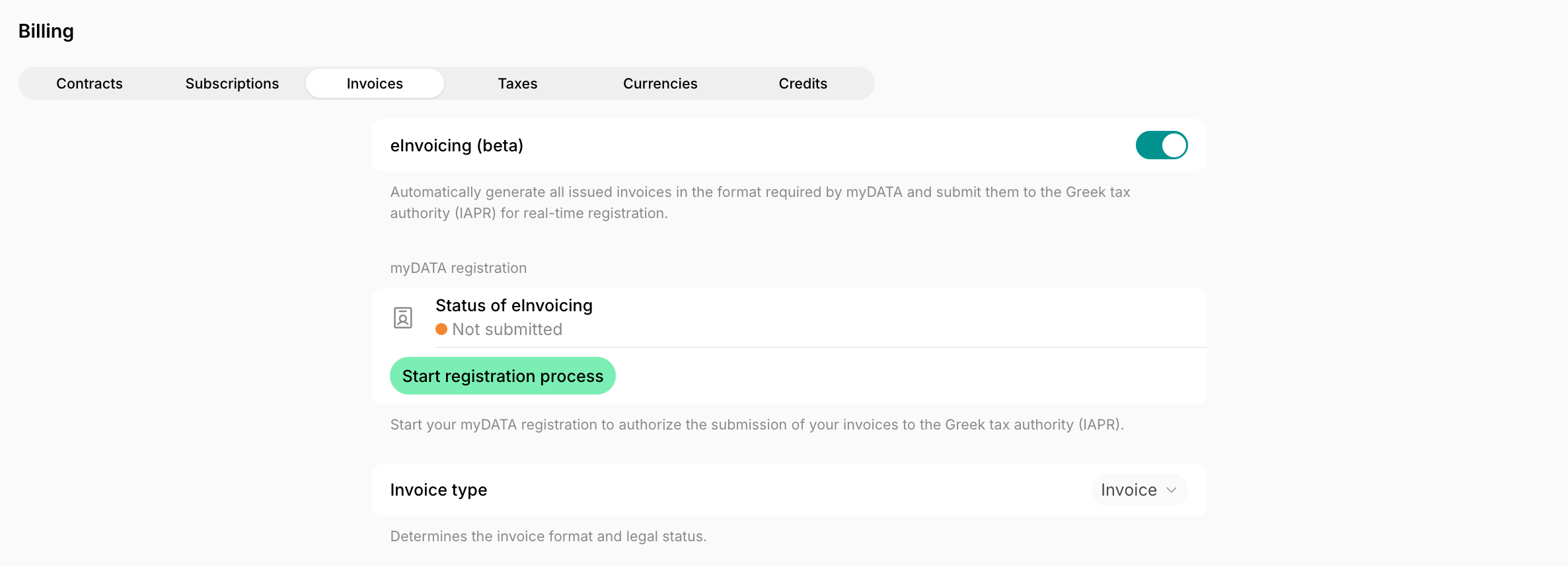
- The Spacebring team receives a notification and will get back to you to confirm more details and the next steps. You will need to:
- Authorize ILYDA as your eInvoicing provider and declare ILYDA as the issuer in myTaxisnet.
- Sign the ILYDA service agreement you receive soon afterwards.
- Once the registration is completed, your eInvoicing status in Spacebring becomes Connected.
Greek regulation does not allow two myDATA eInvoicing providers for the same VAT number at the same time, so ILYDA must be your authorized provider before invoices can be reported.
If the connection fails, administrators with the Integrations > Failures notification enabled are notified on the Inbox page, by push, and by email.
How myDATA eInvoicing works
After myDATA eInvoicing is activated and your registration is connected:- All invoices with valid billing details are automatically generated in the myDATA-compliant eInvoice format.
- During issuance, invoices are reported to the Greek tax authority (IAPR) through myDATA in real time and receive a MARK — the unique registration number assigned by IAPR — along with a QR code.
- Customers receive the PDF invoice with the myDATA MARK and QR code only after the MARK and QR code are returned by myDATA.
- Credit notes are also reported to myDATA. A credit note can only be issued after the original invoice has received its MARK from IAPR.
- When myDATA eInvoicing is active, voiding invoices and credit notes is not supported, because myDATA does not allow it. Instead, you can:
- Issue a credit note to correct the invoice.
- If necessary, issue a credit note for the full invoice amount to cancel it.
Track eInvoice syncing
Each invoice has the eInvoice sync status indicated.
- The invoice will not be issued.
- The system will display:
- “eInvoice sync failed” status
- A red warning triangle next to the affected invoice
- A red warning triangle next to the customer’s name on the Customers page.
- A notification to administrators with the Integrations > Failures notification enabled, on the Inbox page, by push, and by email.
