

Bring day-to-day coworking space operations into ChatGPT. Ask one question across your Spacebring locations, customers, subscriptions, invoices, and contracts, then have ChatGPT take care of the follow-through, from creating a booking to issuing an invoice.
Check what needs attention, then take care of it
- Connect Spacebring from its ChatGPT plugin listing, authorize your network, and start asking. No API keys or server setup required.
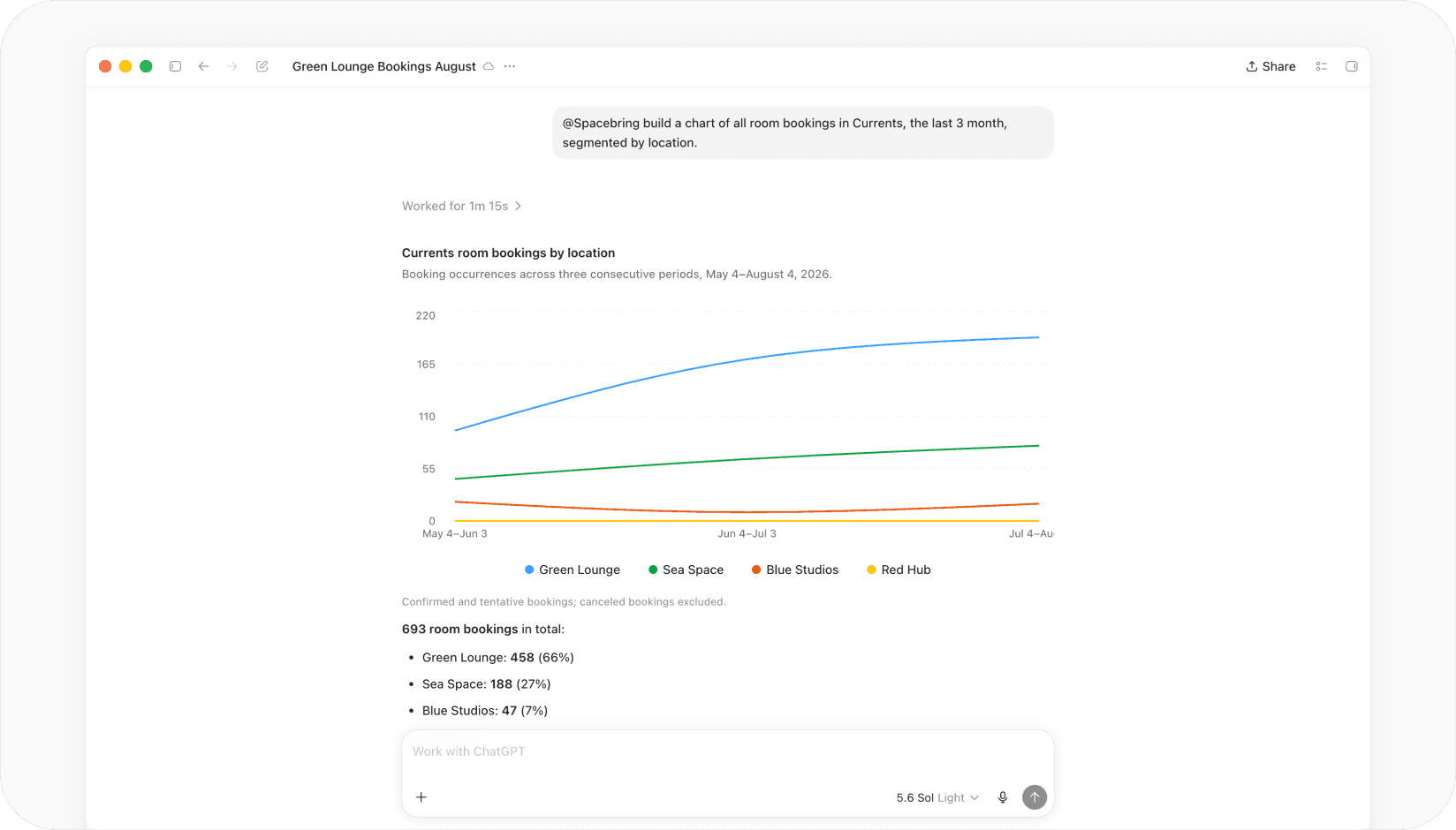
- Check details across one or multiple coworking space locations, including members and companies, plans and subscriptions, invoices and contracts, shop orders, benefits, and guides.
- Ask in everyday language instead of building reports or moving through filters in the admin portal.
- Tell ChatGPT what to change, like creating a booking, issuing an invoice, or adding an event.
- Choose what ChatGPT can change. When you connect, set each area to read only or write access.
- ChatGPT only does what your role allows, because Spacebring checks your admin permissions on every request.
- Combine Spacebring with email or messaging plugins in ChatGPT to turn information into a draft follow-up or an internal update.
What you can ask ChatGPT to do
- Create, update, and cancel bookings, and set up rooms, desks, and offices.
- Create, issue, and resend invoices, record payments, and issue credit notes.
- Update or cancel subscriptions, and manage plans and packages.
- Issue and terminate contracts, and manage contract templates.
- Create coupons and promo codes.
- Create and update events, products, and benefits.
- Update support tickets, add guides, and post to the feed.
- Check people in and out for bookings, events, and visits, and handle visitor requests.
- Add or deduct credits and day passes.
Put your coworking space to work
- Stay ahead of revenue follow-ups by asking "List unpaid invoices" or "Which subscriptions expire this month?", then have ChatGPT resend the invoices or prepare a follow-up using your connected email plugin.
- Prepare an owner or operations review with "List our locations, current membership plans, and most recent invoices" to gather an operating snapshot in one conversation.
- Respond to members with context by asking "Show [member name]'s profile, subscription, and recent invoices" before you answer a billing question or discuss a renewal.
- Fill the calendar with "Create a networking event next Thursday at 18:00 in the lounge."
- Keep contract work moving with "List active contracts", then "Issue the membership agreement for [member name]."
ChatGPT only sees what your Spacebring account can see, and it can only change the areas you set to write access when you connect. Changes ChatGPT makes count as your own changes in Spacebring, so check what you ask it to do, especially for invoices, subscriptions, and contracts. Access stays limited to the network you authorize and the permissions of your Spacebring role. Any data you bring into ChatGPT through this connector is handled under OpenAI's privacy policy and terms of use.