


If you're exploring coworking management software, you're probably not doing it for fun. You're doing it because something feels harder than it should.
Maybe your team is spending too much time on bookings, invoices, member questions, check-ins, reporting, or fixing little mistakes that keep repeating. Maybe your current tools technically work, but only if everyone remembers a dozen manual steps. Or maybe you're opening your first flexible workspace and trying to avoid choosing software you'll regret six months later.
That’s normal.
Choosing coworking space software can feel weirdly high-stakes. It affects your operations, your team’s daily routine, your members’ experience, and your future growth. And if tech is not really your thing, the whole process can feel even more intimidating.
The good news is that you do not need to be a software expert to choose well. You just need a practical way to compare options and a clearer sense of what actually matters.
This guide breaks it down in plain English: what to pay attention to, what to ignore, and how to choose a system your team will actually want to use.
First: what coworking space software is actually supposed to do
At its simplest, a coworking management system helps a flexible workspace run without turning every small task into a mini project.
That usually includes things like:
- managing members and companies
- booking desks, rooms, or offices
- handling invoices, payments, and memberships
- supporting check-ins, access, and day passes
- communicating updates and answering common questions
- giving your team visibility into occupancy, revenue, and operations
In other words, the software should help your workspace feel organized, predictable, and easy to use. If it creates more confusion than it removes, that’s not a feature-rich system. That’s clutter with a login.
Why choosing the right software matters more than people expect
Many operators wait too long to rethink their software because the pain arrives gradually. At first, it’s manageable. A spreadsheet here. A manual invoice there. A few workarounds. A few browser tabs. A few moments of “who changed this? Then one day, the team is spending real energy on things software should have made simpler.
Bad-fit coworking software often leads to:
- extra admin work every week
- inconsistent member experiences
- billing mistakes and avoidable support questions
- messy reporting and weak visibility
- team training that takes too long
- resistance to adoption because the system feels complicated
This is why software selection is not just an IT decision. It is an operations decision, a customer experience decision, and increasingly an AI readiness decision too.
Before you compare tools, get clear on what you need
A lot of teams start by asking, “Which platform has the most features?” That is usually the wrong first question.
The better questions are:
- What kind of workspace are we running?
- What are our biggest operational headaches today?
- What do members need most often?
- What does our team struggle to do quickly or consistently?
- What do we need the software to make simpler in the next 12 to 24 months?
A small community-led coworking space may care most about ease of use, member communication, and light-touch automation. A multi-location operator may care more about reporting, access control, role permissions, and standardized workflows. A hybrid workspace with meeting rooms, day passes, private offices, and virtual memberships may need flexibility more than anything else. If that sounds familiar, it helps to look at software built for hybrid workspaces rather than only traditional coworking setups.
There is no universal "best" coworking management platform. There is only the best fit for your business model, team, and members.
That may sound obvious, but it matches what operators actually say in reviews and forums. People rarely obsess over abstract feature counts. They talk about repetitive admin, booking conflicts, clunky billing, disconnected tools, and software that nobody enjoys using. In public coworking discussions, operators consistently come back to the same themes: simpler booking, less awkward payment follow-up, and fewer disconnected tools to manage (Reddit).
What real operators seem to care about most
After looking through operator discussions, review platforms, and customer stories, a clear pattern shows up. People do not just want more features. They want fewer headaches.
Again and again, the same practical concerns come up:
- software that staff can learn quickly
- a member experience that feels obvious, not confusing
- bookings that do not create conflicts or back-and-forth messages
- billing that works without constant manual fixes
- integrations that reduce admin work instead of creating more glue work
- reporting that helps operators make decisions without exporting everything
- automation that saves time without becoming fragile
- onboarding and support that make change feel manageable
This is useful because it brings the selection process back down to earth. Most operators are not searching for a magical all-singing, all-dancing platform from the future. They are just looking for software that helps them run the space well on a normal Wednesday.
The 10 things to evaluate when choosing coworking software
1. Ease of use for staff
This should be near the top of your list. If your team avoids the software, forgets how to use it, or needs constant retraining, that is usually not a team problem. It is a product-fit problem.
Good coworking space software should feel understandable quickly. Staff should be able to answer common questions, make updates, and complete everyday tasks without clicking through a maze.
A useful test is simple: could a new team member handle the basics after a short walkthrough without needing help every five minutes? If not, that friction will cost you every week.

2. Ease of use for members
Members do not want a “software experience.” They want to book a room, pay an invoice, open a door, or find information without confusion. The best member experience often looks boring in the best possible way. It is clear. Calm. Obvious. Fast. If a member needs a mini detective career to book a meeting room, something has gone wrong.
Look for software that makes common actions simple on mobile and desktop, with language and flows that feel intuitive even for less tech-savvy people. A strong member portal can make a big difference here.
It should also be friendly to people with disabilities. That includes clear navigation, readable text, sensible contrast, keyboard accessibility, and member-facing flows that do not depend on perfect vision, perfect motor control, or high technical confidence.
3. Support for your actual business model
Not every workspace runs the same way. Make sure the software fits how you sell and operate today, including:
- hot desks
- dedicated desks
- private offices
- meeting rooms
- day passes
- team memberships
- multiple locations
- add-ons and services
- different billing cycles and contract structures
Some products are strong for one use case but awkward for others. A beautiful room booking flow does not help much if membership management is painful.
4. Billing and payments
Billing is one of those things people overlook right up until it starts ruining someone’s afternoon. This also comes up constantly in reviews and operator conversations. Billing often works fine until real life happens: a member upgrades mid-month, a company needs more than one subscription each on its own cycle, a payment fails, or someone expects a credit, discount, or exception. That is why real billing outcomes matter.
Path Cowork, for example, reported that 90% of invoices were paid through the app after switching, which is a strong sign that the payment flow became easier for members and lighter for staff.
If billing is one of your main pain points, it is worth looking closely at how a platform handles billing and invoicing.
Check how the software handles:
- recurring invoices
- prorating
- taxes and local requirements
- failed payments
- credits and adjustments
- add-ons and extras
- payment reminders
- financial reporting
If your billing model is even slightly nuanced, test real scenarios instead of relying on sales demos. A demo will always show a sunny day. Ask about the rainy Tuesday version, when something fails, someone changes plans, and everybody suddenly needs an exception.

5. Automation without chaos
Automation can save time, but not all automation is helpful. The right automation removes repetitive manual steps, keeps data clean, and helps your team respond faster.
Examples might include:
- automatic invoice reminders
- booking confirmations
- move-in or onboarding steps
- recurring tasks for staff
- notifications based on occupancy or plan changes
What you do not want is a fragile web of rules that only one person understands. If an automation setup feels like a science experiment, it will eventually break at the worst possible moment.
6. Reporting and visibility
Can the software tell you what is happening in your business without exporting five CSV files and summoning the most spreadsheet-loving person on your team?
Look at whether it helps you understand:
- occupancy
- revenue trends
- membership mix
- room usage
- churn and retention signals
- unpaid invoices
- location performance
Good reporting supports decisions. Great reporting supports timely decisions.
7. Integrations and ecosystem
Your coworking software does not live alone. It usually needs to work with payment tools, access control systems, accounting software, websites, forms, or communication tools.
This is one of the biggest real-world friction points. A lot of spaces can tolerate imperfect software for a while. What wears teams down is the manual glue work between systems. You can hear that frustration directly in operator conversations, where people describe moving between multiple tools, patching gaps with workarounds, and trying to bring more operations under one roof (Reddit). If this is top of mind for you, our guides to coworking software integrations and the broader coworking tech stack are worth a look.
Ask:
- Which integrations are built in?
- Which ones require extra setup?
- Which ones are commonly used by similar operators?
- What happens when something fails?
A long integration list is nice, but reliability and relevance matter more than volume.
If a booking does not trigger the right access, invoice, calendar update, or notification, someone on your team becomes the integration. That is not a scalable workflow. That is unpaid software middleware.
8. Implementation and onboarding
Even strong software can become a bad experience if setup is painful.
Find out:
- how migration works
- how long implementation usually takes
- what data can be imported
- what support is included
- what the team will need to prepare
This matters a lot for busy operators. You are not choosing software in a vacuum. You are choosing a change process your team has to live through.
9. Customer support and product quality
When something breaks or behaves unexpectedly, support quality matters fast. Look for signs that the vendor understands the day-to-day reality of running flexible workspaces. Read reviews carefully. Ask existing customers what support feels like in practice, not only during onboarding.
Good questions include:
- Is support responsive?
- Are answers clear?
- Does the product improve over time?
- Does feedback appear to influence the roadmap?
Customer feedback is often one of the clearest signals of long-term fit.
10. Simplicity over feature theater
This one deserves its own section because it is where a lot of buyers get distracted. More features do not automatically mean better software. Sometimes they mean more settings, more confusion, more training, and more places for things to go wrong.
The best coworking space software often wins not by doing everything, but by making the important things easy and reliable.
Think of it this way: a Swiss Army knife is impressive, but most people still mostly need the blade, the scissors, and maybe the screwdriver.
This matters even more than it seems. In review after review, the products people love are often not the ones described as the most powerful. They are the ones described as easy to use, intuitive, clear, reliable, and simple to adopt.
We reviewed nearly 90 public Spacebring reviews across Capterra and G2, then cross-checked those themes against Spacebring customer stories and on-site testimonials. The same patterns kept showing up: ease of use, fast setup, strong support, smoother booking workflows, and less manual work (Capterra; G2; Spacebring case studies).
None of those points to complexity as the selling point. It points to clarity, smoother operations, and less manual work.
11. Accessibility and inclusive usability
Accessibility should not be treated as a niche requirement. In a coworking space, the software may be used by members, guests, community managers, front desk staff, finance teams, and operators with very different needs, abilities, and levels of technical confidence.
Good coworking software should make common tasks easier for everyone, including people with disabilities.
That can include:
- clear labels and instructions
- predictable navigation
- good color contrast
- support for keyboard navigation
- compatibility with screen readers and assistive technologies
- forms and booking flows that are easy to understand
- error messages that actually help people recover
Even if not every user asks about accessibility directly, it still affects usability, trust, and independence. And honestly, software that is more accessible is often just better designed.
A practical theory: simple interfaces are becoming more AI-ready
This is worth paying attention to. As software products add more AI capabilities, many teams assume the future belongs to the most advanced-looking interface. In practice, the opposite may often be true.
Simple, well-structured interfaces may be more ready for AI agents and AI-assisted workflows than overloaded ones. Why, because good AI systems depend on clarity.
When actions are clearly named, workflows are predictable, data is structured, and the product model makes sense, it becomes easier for humans and machines to use the system correctly.
A cluttered interface may look powerful, but if common tasks are hard to find or understand, that same complexity can make AI assistance less reliable too.
In plain terms:
- simple interfaces reduce human mistakes
- clear workflows make automation safer
- structured data makes AI outputs more useful
- predictable actions make agent-assisted work more trustworthy
This does not mean "simple" should mean limited. It means software should be understandable.
In the coming years, operators may increasingly benefit from systems that are not only usable by people, but also legible to AI agents that help with support, operations, reporting, and repetitive admin work. That is one reason simplicity should be treated as strategic, not cosmetic.
Common mistakes people make when choosing coworking software
1. Choosing for the demo, not the daily work
A polished demo can hide a clunky everyday experience. Always test the tasks your team does all the time, such as moving members, creating bookings, correcting invoices, updating plans, or answering member questions.
2. Overvaluing edge cases and undervaluing basics
Some teams spend hours comparing rare advanced features and too little time asking whether the basics are smooth. If everyday workflows are awkward, the edge cases will not save you.
3. Ignoring adoption risk
Even the most capable system fails if the team resists using it. Complexity has a real cost. So does unclear language. So does a setup that feels intimidating to non-technical staff.
4. Treating migration as a side note
Migration is part of the product experience. If moving data is painful, slow, or error-prone, that affects the real cost of switching.
5. Assuming everyone is tech-comfortable
They are not. And that is fine. The right software should support normal humans with normal attention spans on normal busy days. Not just power users with ten tabs open and a passion for configuration menus.
How to compare coworking software options without getting overwhelmed
Here’s a simple way to do it. Pick three to five options and score them against a short list of criteria:
- staff usability
- member usability
- booking and inventory fit
- billing fit
- automation usefulness
- reporting quality
- implementation effort
- support confidence
- flexibility for future growth
- accessibility and inclusive usability
- overall clarity and simplicity
Use a simple 1 to 5 score for each. Then run a few real-life scenarios, such as:
- a new member joins mid-month
- a company books a room weekly
- a member changes plans
- a payment fails
- a front desk teammate needs to solve a problem quickly
- a manager wants to understand occupancy or revenue trends
You will learn more from realistic scenarios than from broad feature lists. It can also help to use a plain comparison table that your team can copy, discuss, and score together.
A simple coworking space software comparison table
Copy this table and score each option from 1 to 5.
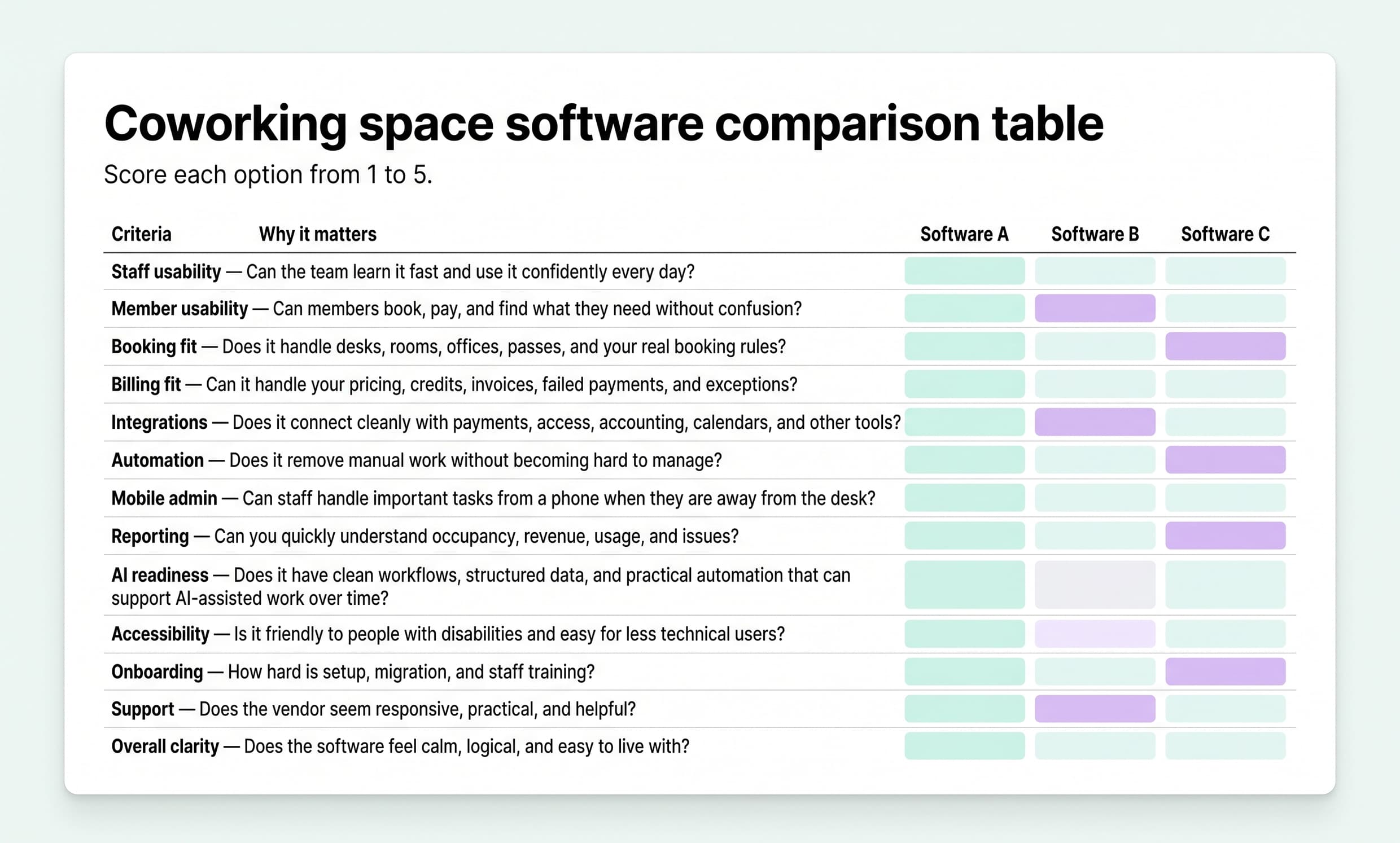
You can also add one final row called “Would our team actually enjoy using this?” It is not exactly scientific, but it is often surprisingly revealing. If it helps, you can also do one quick practice round with a real platform just to get a feel for the exercise.
For example, if a team were evaluating Spacebring, they might score it highly for member experience, self-service bookings, billing flows, and ease of use, then use the rest of the table to pressure-test whether it fits their specific setup, workflows, and growth plans.
That is the point of the table: not to crown a winner in the abstract, but to make your own priorities visible.
What customer stories can tell you
Case studies are not neutral documents, so read them with your eyes open. Still, they can be useful when you look for patterns instead of hype. The useful questions are:
- What problem did the operator actually want to solve?
- Was the pain about bookings, billing, member experience, admin time, or growth complexity?
- Are there concrete numbers attached to the story?
- Do the outcomes sound operationally believable?
When customer stories are useful, they usually reveal something practical: people wanted fewer booking conflicts, less admin work, better adoption, smoother self-service, clearer billing, or a more connected member experience. If you want to see how that plays out in practice, the case studies are more useful than most generic testimonials.
That is why the numbers matter.
Path Cowork reported 85% member adoption, 90% of invoices paid through the app, 15 hours of admin time saved weekly, and 90% self-service bookings.
Creative States reported 3x business growth, more than 200 admin hours saved monthly, and 83% self-service bookings.
MY WORKSPACE focused on a different pain entirely: booking conflicts, lost revenue, and wasted manager time before moving to a more self-service setup.
The details differ, but the pattern is the same: operators are not buying software theater. They are buying fewer mistakes, less admin, and calmer operations.
Questions to ask vendors before making a decision
When speaking with a software vendor, ask practical questions like:
- What types of workspaces is the product best suited for?
- Which workflows are easiest to manage in the platform?
- Which workflows are harder or need workarounds?
- How does migration usually work?
- What does onboarding support include?
- How does the product handle billing complexity?
- What can staff realistically do from mobile today?
- Which admin tasks work well on mobile, and which still require desktop?
- What integrations are most commonly used?
- How often do customers request help with setup or training?
- How does customer feedback shape product improvements?
- How is the product approaching AI in practical terms?
- Does it support AI-assisted workflows already, or is that still more of a future direction?
- How does the product support accessibility for staff and members?
- What does the product do to stay simple as it grows?
That last one may sound unusual, but it matters. A product that adds capabilities while preserving clarity is usually more durable than one that keeps layering on complexity.
What matters most for smaller or less technical teams
If your team is small, busy, or not highly technical, prioritize:
- ease of setup
- straightforward daily workflows
- clear member experience
- reliable billing
- simple reporting
- responsive support
- accessible, low-friction workflows
In many cases, these matter more than long lists of advanced features. A tool that is 90% capable and 100% usable can create more value than a tool that is 120% capable and 60% usable. Yes, the math is a little suspicious. The point still stands.
So, how should you choose?
Choose the software that helps your team operate confidently, not the one that sounds the most impressive in a sales conversation. Look for a product that:
- fits your current business model
- supports the member experience you want to create
- reduces manual work
- makes everyday tasks feel simple
- gives you useful visibility into the business
- can grow with you without becoming harder to use
And if you are choosing between a complicated platform with endless features and a simpler one that your team immediately understands, do not underestimate the simpler option.
Clarity scales better than people think.
Final thought
The best coworking software is not the one with the longest feature page. It is the one that helps real people run a better workspace with less friction. That means simpler operations, smoother member experiences, fewer avoidable mistakes, and a product your team can trust on busy days. If the software feels clear, capable, and easy to live with, that is not a small thing. That may be the advantage.
And if you want a head start, we’ve already compared some of the most popular coworking platforms in one guide — see our coworking software comparison.