


Picture a familiar conversation at reception.
Someone likes your space, but they don't need a desk. They work from home, meet clients elsewhere, and only want to know one thing:
“Could I use your address for my business?”
It sounds like a small request. You already have an address. Someone is already there to receive the mail. Why not?
Then come the questions. Can you forward a letter while they're traveling? Could you open another one and send a scan? Can their business partner collect a parcel? And does the membership include somewhere to meet a client on Thursday?
None of these requests is unreasonable. But together, they show what you're really offering: not just an address, but a service people need to trust.
A virtual office is a membership that provides a business mailing address and mail handling without a dedicated desk. You can add forwarding, scanning, meeting room time, or day passes, but the best place to start is with a simple promise your team can keep.
Let's work through what that looks like.
Start with the person, not the package
Before you decide what to include, ask prospective members what they need the address for and how they expect to use the service.
Imagine a freelance designer who works from home. They want to keep their home address off client invoices, collect a few letters each month, and occasionally book a room for a presentation.
Now imagine a consultant who spends weeks away. They want to know when important mail arrives and have it forwarded without arranging everything by email.
Both want a virtual office. They don't need the same plan.
A helpful first conversation might sound like this:
- “Will you usually collect your mail, or will you need us to forward it?”
- “Are you expecting letters, parcels, or both?”
- “Do you need somewhere to work or meet clients?”
- “Where are you planning to use the address?”
That last question matters. Receiving mail, registering a business, and satisfying a bank's address requirements are different things. Don't let someone sign up assuming you can promise all three.
Make your first offer easy to explain
You don't need an impressive-looking pricing table with three packages and fifteen benefits. You need an offer someone can understand without calling reception.
A sensible starting point is an address-and-pickup membership: a business mailing address, notifications when mail arrives, and collection during stated hours. Then decide which extras you're ready to offer.
For example, you might charge separately for forwarding and content scans. Members who visit regularly could choose a plan with a small meeting room allowance.
Keep the boundaries beside the benefits. If you include forwarding, say how often you dispatch mail, what the allowance covers, and whether postage costs extra. If you accept parcels, explain any size and storage limits.
Here's the difference:
“Meeting rooms included” leaves plenty of room for misunderstanding.
“Two hours of meeting room use each month, subject to availability. Extra hours are charged at our usual rate, and unused hours don't roll over” tells the member what to expect.
That's an example, not a suggested allowance. Choose terms that fit your space.
Clear limits aren't unfriendly. They save your team from awkward conversations and help members feel confident about what they've bought.
Price the work behind the address
It's tempting to think, “The building is here anyway, so this is almost free to provide.”
But the address isn't the part that takes time. Receiving, sorting, storing, notifying, scanning, forwarding, and answering questions are.
Before setting a price, walk through a typical month for one member. How much staff time will they use? What will you spend on storage, software, payment processing, supplies, and administration? Are you including room time that could otherwise be sold?
Then look at comparable local offers. Compare the services, not just the monthly price. A pickup-only membership and a plan with forwarding and workspace access are different products.
What the numbers can tell you
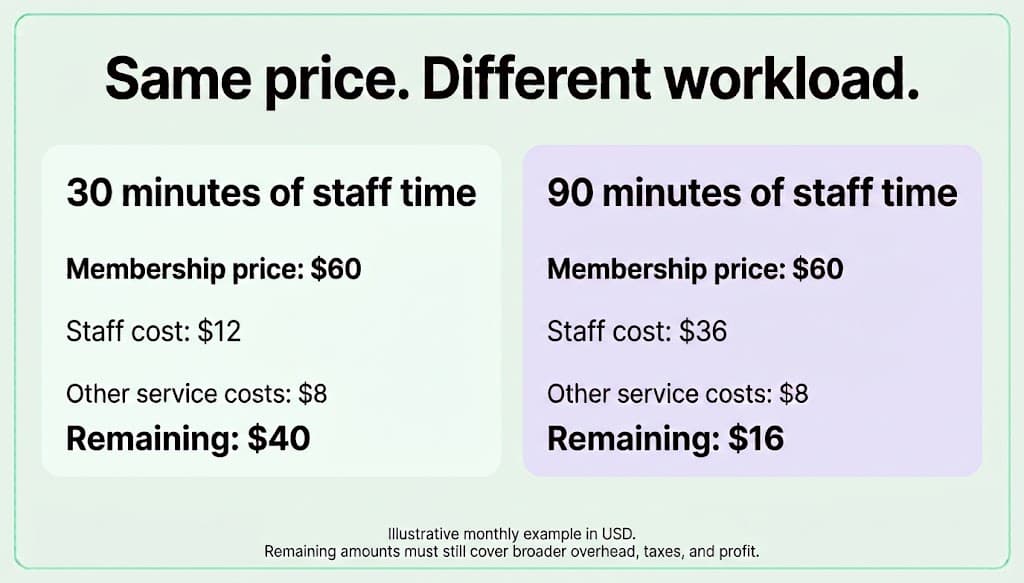
Let's use a hypothetical example in US dollars.
A member takes 30 minutes of staff time each month. At a staff cost of $24 an hour, that's $12. Add $8 for allocated tools, storage, and administration, and you've estimated $20 in service costs.
If the membership is $60, the remaining $40 still has to contribute to broader overhead, taxes, and profit.
Now imagine another member needs 90 minutes of staff time. The staff cost becomes $36. With the same $8 allocation, only $16 remains.
Same membership price. Very different economics.
This is why I'd be careful with unlimited forwarding or scanning. A clear allowance or paid add-on lets you serve a busy member properly without quietly asking your quieter members to subsidize them.
Use your own numbers, then revisit them after launch. Your team's actual workload will tell you more than an attractive margin on a spreadsheet.
Sort out permissions before anyone uses the address
This isn't the most exciting part of the launch, but it belongs near the beginning—not after the first letter arrives.
Check that your lease, building rules, and local requirements allow the service you intend to provide. Be clear about which address uses you can support and which ones the member must verify with the relevant authority or service.
If you're operating in the United States, review the official USPS requirements for Commercial Mail Receiving Agencies. Where those rules apply, the process includes agency registration, customer authorization and identity checks, and ongoing recordkeeping. It is more than collecting a form at signup.
Confirm the setup with your local postmaster before accepting customer mail. Outside the US, check your own postal, business-registration, and privacy requirements rather than borrowing another country's process.
This is general guidance, not legal advice. Get qualified local help where you need it.
You can still make this feel welcoming. Explain what the member needs to provide, why you need it, and when their service will become active. A clear explanation is much better than a mysterious request for paperwork halfway through signup.
Follow one letter through your space
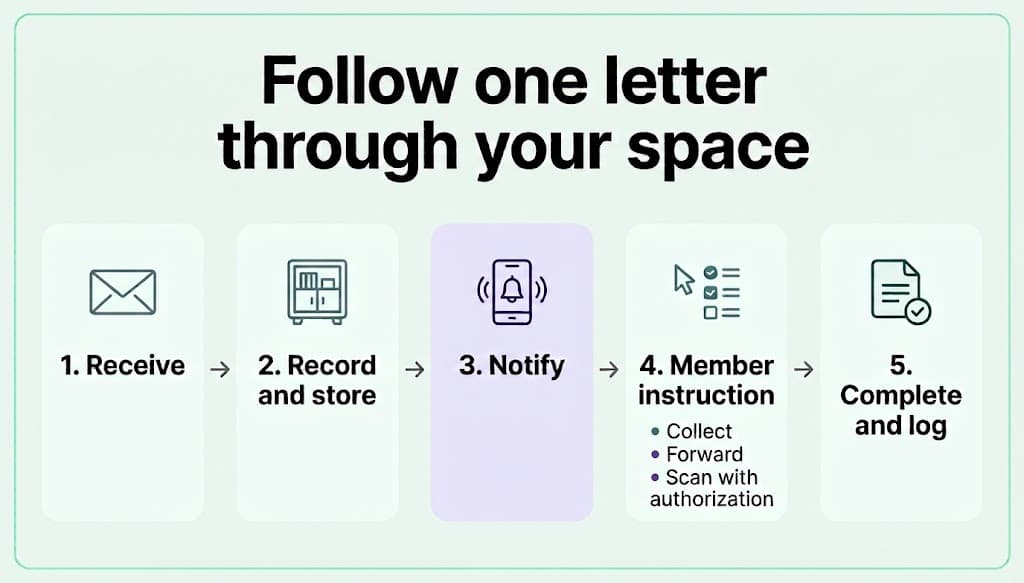
Before launching, try a small exercise: imagine a letter arriving while your usual front-desk person is away.
Would their colleague know who it belongs to, where to put it, and how to notify the member? Could they see whether the member asked for forwarding? Would they know when the request had been completed?
If the answer depends on asking someone, the process needs a little more work.
A reliable routine can be simple:
- Match the recipient to their account and check the applicable authorization and mail-handling instructions, including any requirements after cancellation.
- Record the arrival and storage location.
- Notify the member within your promised timeframe.
- Record their instruction and any applicable charge.
- Complete the task and update the record.
Keep mail in secure storage, restrict access, and make sure opening or scanning it is properly authorized. Set retention and disposal procedures that follow applicable requirements.
Think back to the traveling consultant. Three letters arrive. They want two forwarded and one scanned. That should become three clear instructions in one place—not an email thread that only one receptionist understands.
The best test of your process isn't whether your most experienced person can manage it. It's whether a trained colleague can take over without making the member repeat themselves.
Make the welcome message genuinely useful
Once the checks and payment setup are complete, tell the member their service is active. Don't make them guess whether paying means they can already use the address.
Give them the exact address format, collection hours, instructions for requesting extra services, and a clear way to reach your team.
Explain the things people tend to discover too late: who can collect mail, how long you store it, what forwarding costs, and what happens when the membership ends. Don't assume your mail-handling responsibilities end when the subscription does. Check the applicable postal requirements before setting your cancellation terms.
Keep the welcome message short enough to read. Link to the full terms for the detail.
Let software carry the routine work
Your team shouldn't have to remember who has paid, which plan someone has, and where their last mail request ended up.
Spacebring's virtual office management software supports online signup, onboarding, billing, and mailroom management. The point is to keep the service organized so staff can spend less time piecing information together.
Use Spacebring's membership management features for recurring plans and workspace booking for members who visit. Set clear booking rules for any included room time.
Decide what you're promising first, then configure the software around it. A system can help you deliver your service, but it can't decide your terms or replace the checks you're responsible for.

Discover how hundreds of spaces worldwide unlock success and grow better with Spacebring
Start small enough to learn
Before promoting the service widely, test it with a small group.
Follow the whole experience: signup, activation, first payment, first mail notification, collection, and any extras. Ask members what was confusing. Ask staff which steps took longer than expected.
You don't need a complicated dashboard to learn something useful. Start with staff time, notification delays, unfinished requests, and the questions members keep asking.
If several people ask whether postage is included, change the plan description. If mail requests regularly take more time than you've allowed, adjust the service or staffing before accepting more members.
There isn't a magic number of virtual members one receptionist can handle. Ten members receiving parcels and requesting scans may create more work than a larger group collecting occasional letters. Let the workload guide you.
And remember: these are members, even when you rarely see them. Invite them to relevant events, share useful updates, and make it easy to visit. Don't turn every message into an upgrade pitch.
Help members choose the right kind of access
Sometimes a virtual office enquiry turns out to be a workspace enquiry.
If someone says, “I only need an address—although I'll probably work here three days a week,” pause and explore that. A desk membership or combined plan might fit better.
A virtual office mainly provides address and mail services. A day pass mainly provides occasional workspace access. A dedicated desk provides a reserved place to work. Your plans may bundle these differently, so explain the actual inclusions.
Before you launch, check these five things
- Can you explain your base plan and extra charges in a few sentences?
- Have you confirmed address permissions and the applicable requirements?
- Can a trained backup handle mail without relying on someone else's memory?
- Does a new member know exactly when the service is active and how to use it?
- Have you tested the workload and price with real service activity?
If one answer is no, fix that part first. You don't need to redesign everything.
A good virtual office makes life a little easier
Return to that first question at reception: “Could I use your address for my business?”
What the person really needs is confidence. Confidence that their mail won't go missing, that they'll hear when something arrives, and that asking for help won't become a chore.
Start with a small, clear offer. Price the work honestly. Make the routine easy for your team, and the next step obvious for your members.
That's a much stronger foundation than a long list of benefits you struggle to deliver. You can always add more once the basics feel dependable.
Ready to connect signup, billing, and mail handling?
Explore Spacebring's virtual office solution.
Frequently asked questions
1. What is a virtual office at a coworking space?
It's a membership providing a business mailing address and mail handling without a dedicated desk. Forwarding, scanning, meeting rooms, and day passes can be included or sold separately.
2. How much should I charge for a virtual office?
Estimate the cost of staff time and the services you include, then compare similar local offers. Review the price against actual workload after launch. The figures in this article are hypothetical examples, not market averages.
3. Can a member use the address to register a business?
That depends on the applicable requirements and the service your space can provide. Don't promise approval for every use. Ask the member to verify the requirements of their registration authority, bank, or other service.
4. Should I include mail forwarding?
Include it when you can define and price it clearly. State the dispatch schedule, allowance, handling charges, and whether postage costs extra. A paid add-on can suit members whose needs vary.
5. Can my existing team manage virtual offices?
Possibly, but test the workload first. Measure mail intake, requests, administration, and support against available staff hours. Train a backup and add capacity before requests begin to pile up.