
Choosing desk booking software gets easier once you look past the calendar. The real question is whether it can handle an ordinary day in your coworking space without your team stepping in at every turn.
Imagine a member reserving a desk with their day pass while an outside customer pays for a meeting room. Both need the right price, a clear confirmation, and a way into the building. That's the experience to test.
Here's how to compare your options, understand the tradeoffs, and make a useful shortlist.
What is desk and room booking software?
Desk and room booking software shows available workspaces and lets people reserve them for a particular time. Operators use it to manage availability, booking rules, and reservations in one place.
Coworking booking software also needs to support the commercial side. A reservation might use a membership allowance, require payment, or give someone door access. The calendar is only one part of that journey.
Choose the right type of booking tool first
Two tools can look similar and serve quite different needs. Start by checking who each one is built for.
| Type | Typical use | What to explore in a demo |
|---|---|---|
| Workplace booking tools | Employees sharing their company's desks and rooms | How the tool handles paying customers, memberships, and invoices |
| General scheduling tools | Appointments or a simple resource calendar | How it handles multiple desks, rooms, credits, and access |
| Coworking and flexible workspace platforms | Operators selling workspaces and memberships | How booking, billing, and member management work together |
A coworking platform is usually the most relevant starting point for a coworking space, business center, or flexible office. Still, consider how much of it you'll use. A broader platform only helps when its parts fit your operation. Our guide to comparing coworking software goes deeper into that decision.
Start with what you sell
Before a demo, write a short description of your business model. Include how you sell hot desks, whether you rent dedicated desks or offices monthly, and what members receive in credits or day passes. Note room charges, public booking rates, and your current and planned locations.
For example, imagine you offer full-day hot desks, monthly dedicated desks, and two meeting rooms with member discounts. Those are three different arrangements. Ask a vendor to demonstrate each one rather than letting a polished room-booking demo stand in for everything.
Your description becomes a practical test for any desk booking system you consider.
Follow a booking from discovery to payment
Can people book without asking your team?
Try the member experience on a phone. Can someone find a suitable desk or room, understand the price, and finish the booking? Check both the web portal and mobile options, including whether a branded app costs extra.
Then try as an outside customer. Someone visiting for the first time may have no membership or credit balance. Find out how public booking, payment, and any approval step work for them.
Does pricing match your memberships?
A booking price can depend on who's booking, which resource they choose, and when they need it. Ask vendors to show member and nonmember rates, credit prices, and any quieter-day pricing you use.
Follow the allowance, too. If a plan includes day passes or credits, see how they're issued, spent, and topped up. A price that looks right on screen can still create admin work if someone has to adjust the member's balance afterward.
What happens at checkout, cancellation, and refund?
Check which payment gateways work in your country and which payment methods each customer can use. For company accounts, ask whether eligible bookings can go on a consolidated invoice and who has permission to charge it.
Then cancel the test booking. Ask vendors to show cancellation deadlines, refund options, and any different public-booking policy you need. Treat partial refunds or automatic no-show cancellation as features to verify, never assumptions. Your team should be able to explain the policy before a customer pays.
Do booking rules suit the space?
Minimum and maximum durations and advance-booking limits affect how people share rooms. If your team needs preparation time between meetings, ask how the tool handles it rather than assuming there's a universal buffer setting.
A hypothetical example makes this easier to test. A member wants a room for a short call; another needs it all afternoon. Can your rules accommodate both while keeping the calendar useful to everyone else?
Check what happens after the booking
Can the customer get in?
Ask which access-control systems connect and what happens for members and outside bookers. Test a booking outside staffed hours, including when access starts and ends. If Wi-Fi access matters, ask about that separately.
“Integrates with access control” is a starting point. You still need to know whether your particular doors, hardware, and booking workflow are supported.
Can you distinguish reservations from attendance?
A booked desk isn't proof that someone arrived. Check-in tools and occupancy reports answer different questions, so ask what each metric measures.
For example, a busy booking calendar can help you understand demand. To investigate unused reservations, you'll also need attendance information. Ask about reporting by resource type, booking exports, and check-ins for desks, rooms, and events where relevant.
Will it fit the rest of your operation?
Check how members add bookings to Google Calendar or Outlook. Review the accounting, marketing, and access integrations you actually need, along with API availability.
For multiple locations, test cross-location booking and ask which currencies, languages, and settings can differ by location. Finally, ask who will move existing members and bookings, what migration includes, and how support works. These details matter long after the demo.
Give desks and rooms their own tests
Desks need a clear capacity model
A hot-desk area and a dedicated desk work differently. For a shared area, ask how overlapping hourly bookings count against available seats. If you sell more flexible memberships than you have desks, distinguish membership sales from the number of simultaneous reservations allowed.
For dedicated desks, check how a long-term assignment connects to a rental plan. A floor plan can also help members choose a place to work, so try selecting a desk from one if that's important to your space.
Our guides to hot desking and hourly hot desk booking explore these setups further.
Rooms need rules for the way you use them
Suppose, for example, you have a large room that splits into two smaller ones. Ask whether booking the large room blocks both smaller rooms. Without that relationship, separate calendars can look available when the physical space isn't.
Check approval for selected rooms and how prices vary by day or demand. If you sell catering or other extras, distinguish checkout products from equipment that needs its own reservation. They aren't necessarily managed the same way. Our meeting room booking system guide covers room rules, credits, and displays.
Compare two or three tools using the same scenarios
Give each vendor your business-model description and ask them to show your desk types, rooms, plans, and prices. Then make a desk booking and a room booking as a member, an outside customer, and an admin. Notice where you hesitate or need help.
Bring your front desk team into the trial. They'll often spot the awkward correction or unclear payment step that a feature list misses. Contact support with a real question, too.
Compare the full cost, including required add-ons and migration. Ask whether charges grow with active users, locations, or resources, then calculate the cost for your expected setup next year. The aim is to understand what you're buying before you commit.
How Spacebring handles desk and room booking
Spacebring brings booking together with memberships, billing, access, and community in one coworking platform. Here's how that connects to the decisions above.
Desks, rooms, and the member experience
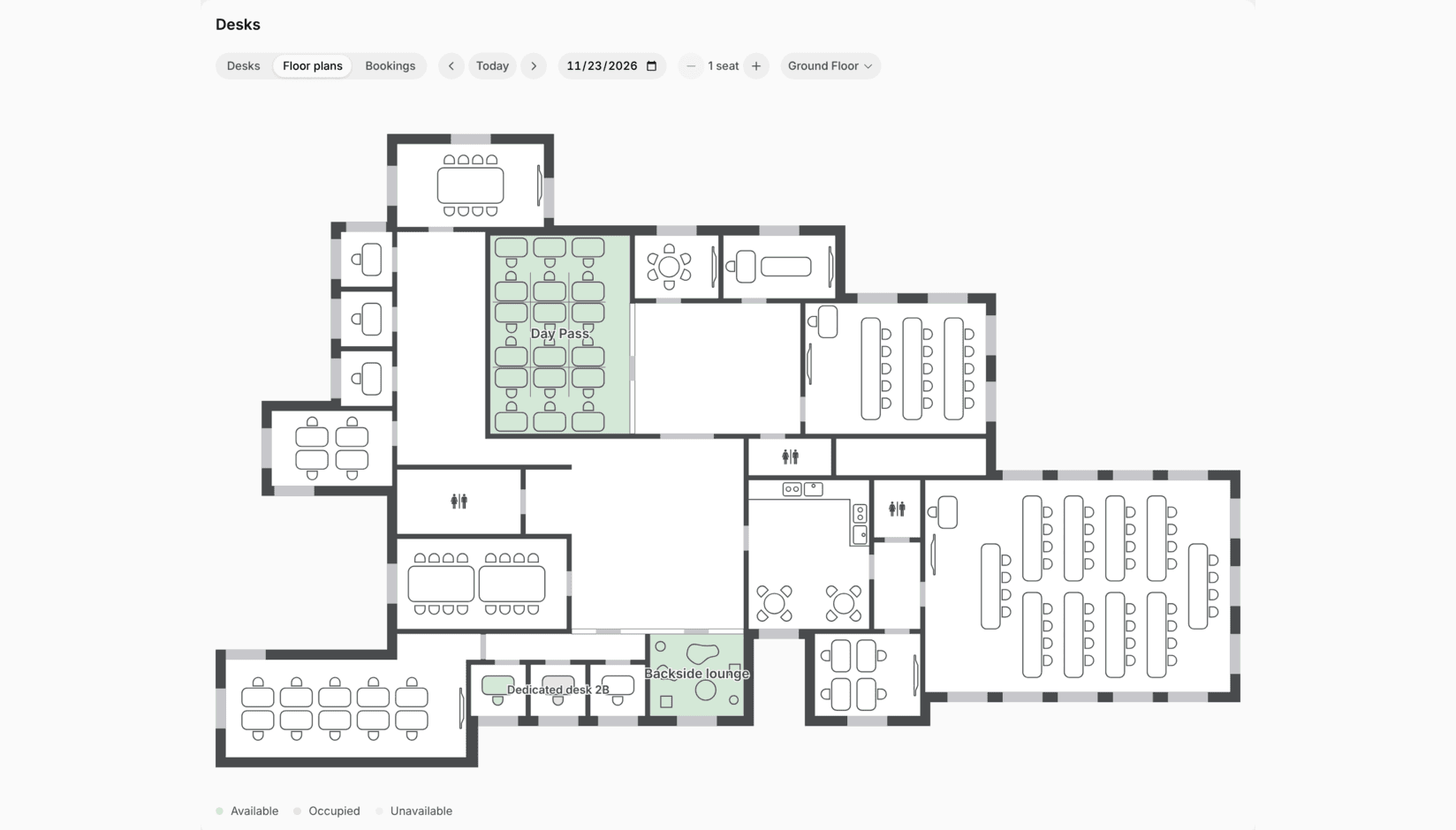
Members can check desk availability on a floor plan for their selected date and number of seats.
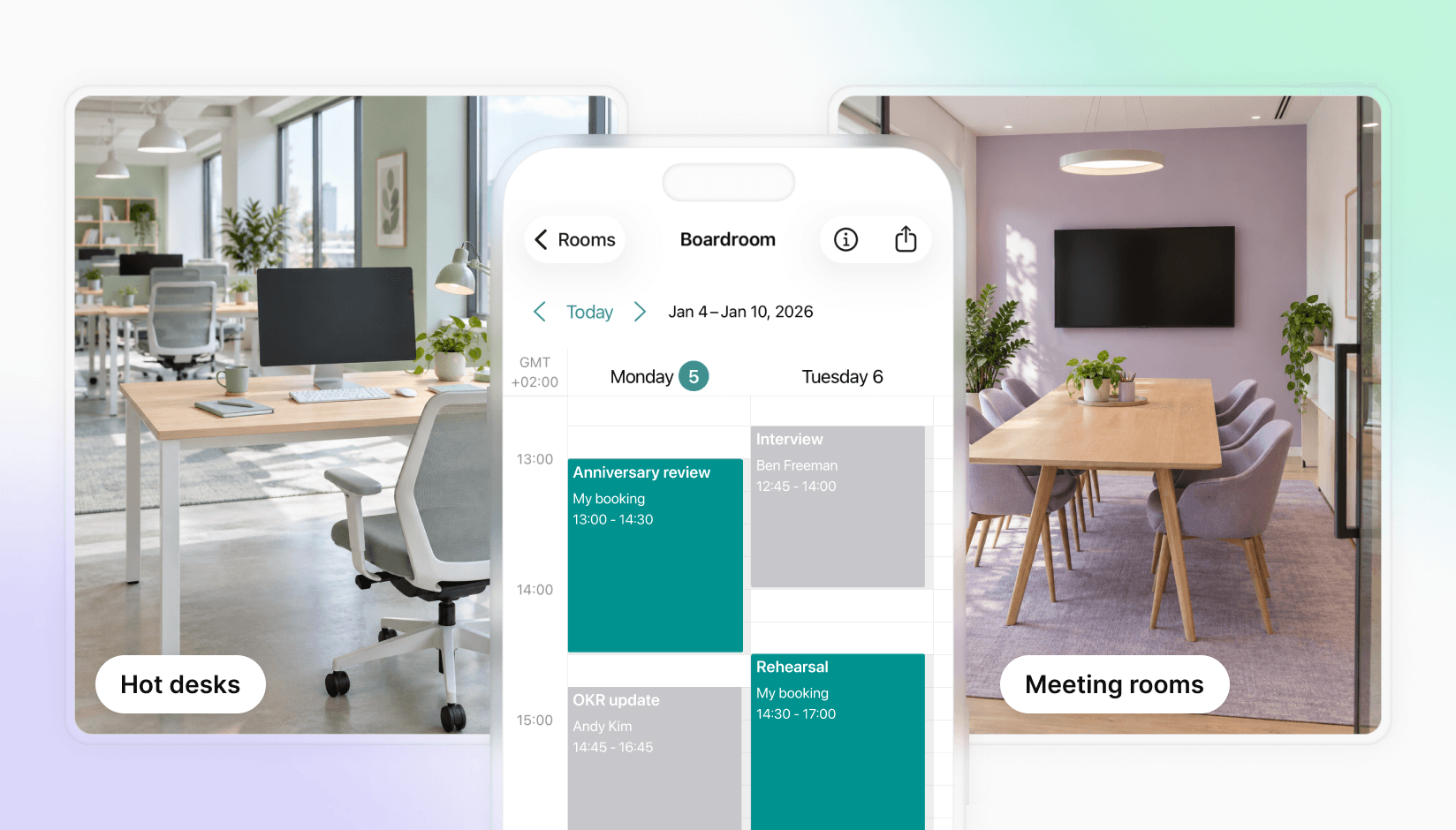
Members and outside customers can book desks, rooms, offices, parking, and equipment through a branded member web portal. A branded mobile app is an optional add-on.
Desk booking covers hourly, half-day, and full-day hot desks, dedicated desks with their own rental plans, and day passes included in plans. Optional floor plans show availability visually.
Room booking includes booking rules, approval for selected rooms, linked rooms, and a room display app with QR booking. Each resource can use selected-day price variations or demand-based dynamic pricing as alternative pricing modes.
Eligible bookings can include shop-product extras at checkout. Extras aren't available for recurring bookings, approval requests, day-pass bookings, or existing bookings. Equipment can instead be offered as a separately bookable resource.
Payment, access, and reporting
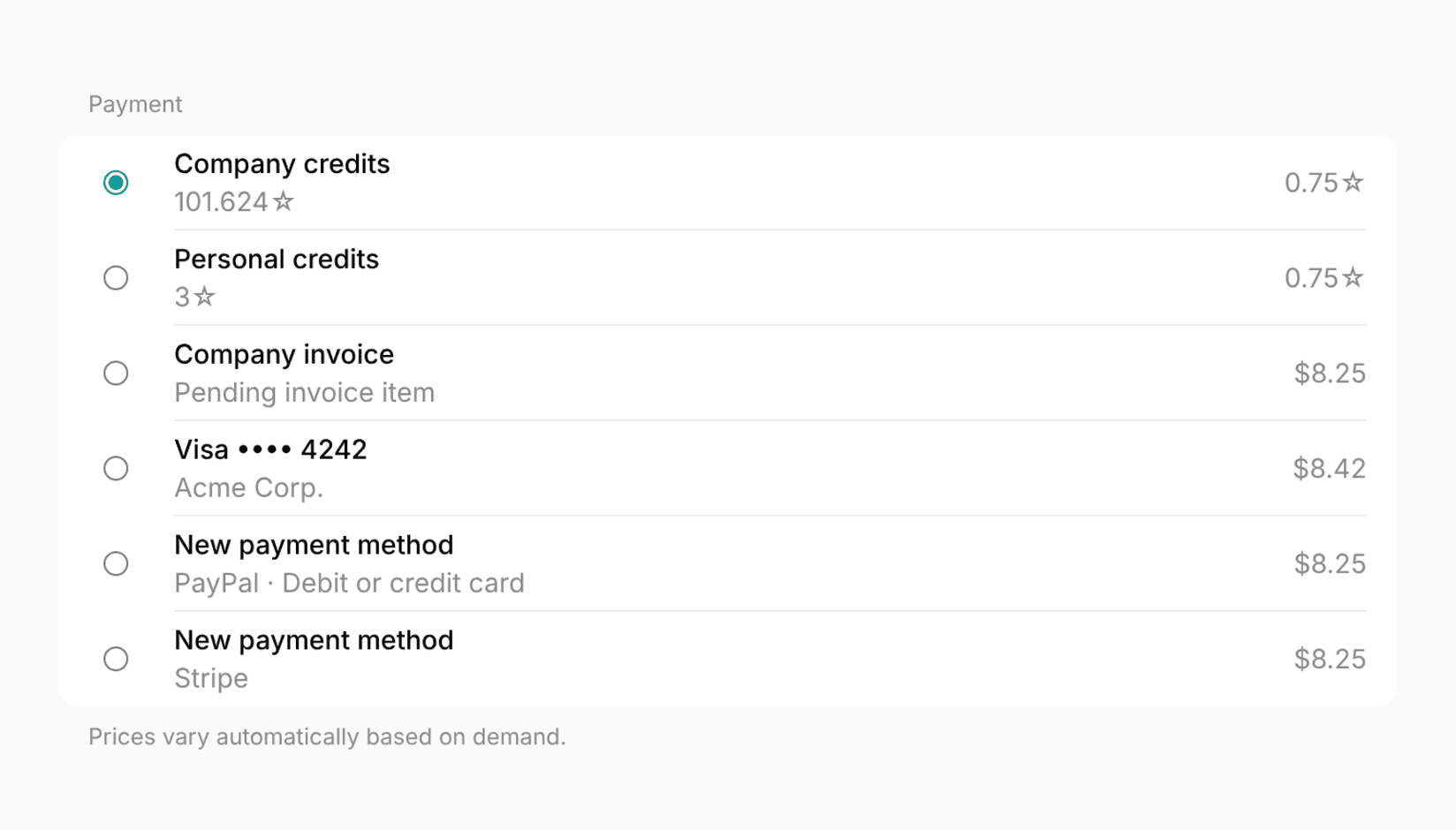
Booking checkout can offer credits, a company invoice, or card payments, depending on the location’s configuration and the booker’s permissions.
Members can pay by card, credits, or invoice when enabled. Eligible company bookings can be consolidated on a company invoice, depending on payment permissions and configuration.
Access control connects bookings to door access through supported integrations. Supported workflows and access timing depend on the integration.
Check-ins confirm who arrived. Analytics show occupancy by resource type based on bookings and assignments, rather than actual attendance. Multi-location networks manage locations from one admin portal, with location-specific currencies, languages, and settings.
Spacebring is used by coworking spaces in 60+ countries. To explore your own setup, book a demo or review pricing.
FAQ
1. What's the difference between desk booking software and a desk booking system?
Both terms usually describe software that shows desk availability and lets people reserve desks. “System” can also include the surrounding rules and hardware, such as displays and door access.
2. Do I need separate software for desks and meeting rooms?
Usually not. One platform can keep desk and room bookings, member credits, payments, and reporting together. Check that it supports the different rules and pricing you need for each resource.
3. What is hot desk booking software?
Hot desk booking software lets people reserve unassigned desks for a few hours or a day. In coworking spaces, it can connect bookings to memberships, day passes, or credits.
4. Is workplace desk booking software right for a coworking space?
It may suit simple internal desk sharing. A coworking space should also check support for paying customers, memberships, external bookers, and invoicing before choosing a workplace tool.
Over to you
Start with a normal day in your space and ask each shortlisted tool to walk you through it. When the booking, payment, and arrival all make sense to your customers and your team, you'll have a much stronger basis for choosing.