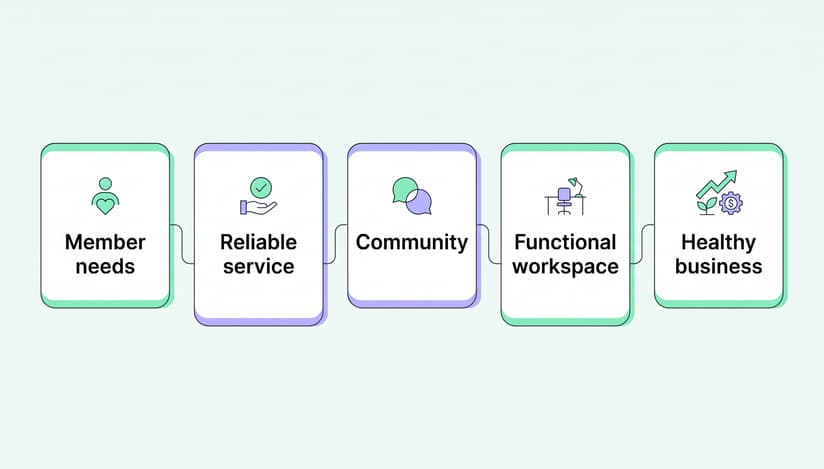


Every coworking space reaches the same moment sooner or later. You stop renting desks and start selling memberships.
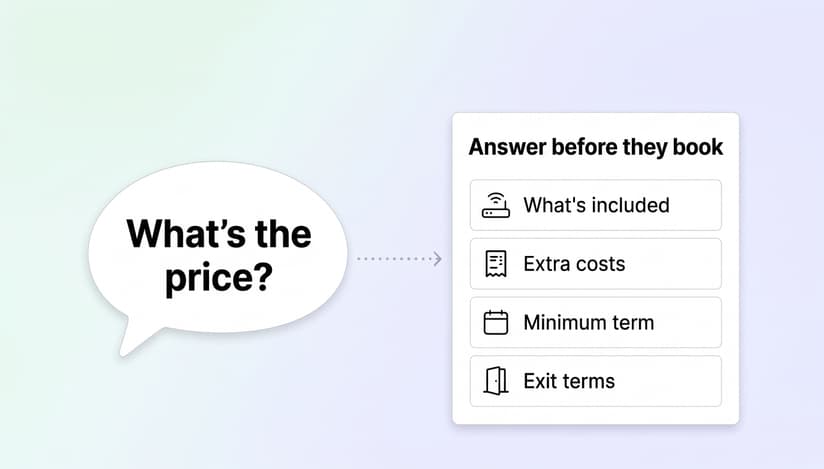
When you first open your doors, it’s completely normal to list a few prices and figure out the rest as you go. As your community grows, though, those prices need to become real products. A well-built membership plan bills people automatically, attracts the members you want, and answers “what do I actually get?” before anyone has to ask.
In this guide, we’ll walk you through how to build, package and price your plans. We didn’t want to rely on rules of thumb, so we looked at what operators actually do: every live membership plan on the Spacebring platform, plus every membership that ended between January 2024 and July 2026. Where the data backs up common advice, we’ll say so. Where it doesn’t, we’ve updated the advice.
Quick answer: A coworking membership plan is a recurring subscription, usually monthly, that gives a member access to your workspace plus a set of allowances such as meeting-room credits, day passes and discounts. Most spaces show a handful of plans publicly, about four on average. Each plan comes down to four decisions: the price and billing cycle, what access it includes, what allowances come with it, and whether someone can buy it without talking to your team.
What the data tells us
Here are six things we learned from the data. They come up again throughout the guide.
1. Most plans have room to do more
Beyond a name and a price, a plan has about ten optional settings: credits, day passes, discounts, a minimum commitment, a setup fee, a description, exclusive access, door access, printing and online sign-up. The typical live plan uses two of them, and one plan in three has no description yet.
2. Ten day passes is the favorite
If you’ve ever wondered how many days a flexible plan should include, operators have already settled on an answer: ten a month is both the most common setting and the median.
3. Companies tend to stay longer
Memberships billed to a company lasted 7.0 months on average before they ended, and memberships billed to a person lasted 3.1. Within the same space the gap is smaller but still clear: company memberships last longer at 77% of locations, usually by about one and a half times.
4. Many one-month memberships are intentional
45% of individual memberships that ended lasted about one month. Plenty of people buy a month, use it and move on, and that’s a product worth designing for.
5. More plans could be sold online
57% of live plans can only be set up by someone on the team, including 43% of hot desk plans. Almost one location in five has no plan open for online sign-up yet.
6. A dedicated desk usually costs about 50% more than a hot desk
Where a space sells both, a dedicated desk typically costs around one and a half times as much. Fewer than one space in ten prices them (almost) the same.
What are coworking membership plans
A coworking membership plan is a recurring service, renewed weekly, monthly or less often, that gives members access to your workspace, amenities and shared areas. The best plans are built for a specific kind of person.
A plan for full-time founders might include the whole month with 24/7 access. A plan for a parent who needs two days a week out of the house might include ten day passes. Same building, two very different products.
Before you write your first plan, take a look at who already walks through your door. Ask them whether your current offer works for them or whether they’d like more flexibility. If you haven’t opened yet, start with your location: a space in a small town serves a different crowd than one in a city center, and a space near a university might build something just for students who need a quiet place between lectures.
Plans and rentals are two different products
One distinction will save you a lot of confusion later.
A general access plan sells access to shared space: a hot desk membership, a flexible plan with day passes, a virtual office. Nobody owns a particular seat.
A rental sells one specific thing for as long as the subscription runs: desk 14, office 3B. That resource is assigned to the member, and nobody else can book it.
Both renew automatically, but they work a little differently. A rental takes a desk or office off the market and shows up in your occupancy numbers, so it’s usually priced and contracted differently. In most coworking software, Spacebring included, you set up rentals on the desk or office itself rather than as a standalone plan, so the system knows the seat is taken. Dedicated desks and private offices are rentals. Everything else in this guide is a plan.
The anatomy of a membership plan
At first glance, a plan is just a name and a price. In practice it’s a dozen small decisions, and each one either adds admin work or takes it off your plate.
1. Price and billing cycle
Weekly, monthly, every three or six months, or yearly. The cycle is a helpful business tool, not just paperwork: an annual plan brings cash in earlier and keeps members longer, which is why it’s worth offering a discount for it. About eight in ten live plans bill monthly.
2. Minimum commitment
The minimum number of billing cycles a member signs up for. Most plans don't have one. When operators do set one, it's usually three to six months, and twelve for virtual offices. It’s worth using sparingly: only 14.5% of live plans set one.
3. Notice period
How much warning you need before someone leaves. It’s different from a commitment, though the two are easy to mix up. It usually lives in your terms or contract rather than on the plan itself, so write it down once and make sure it matches how your billing actually ends a subscription.
4. Setup fee
A one-off charge on the first invoice for access cards, onboarding or mail registration. Only 1.9% of live plans have one. If you have real costs to cover, it’s fair to charge one, as long as it’s clearly shown.
5. Credits
Spending power for room bookings and, often, for the shop and event tickets. 42% of live plans include them.
6. Day passes
One pass covers one day at a hot desk. 18% of live plans include them, and they’re a great fit for anyone who comes in two or three days a week.
7. Discounts
A reduced rate on rooms, events, packages or other services that members get for as long as they hold the plan. 26% of live plans include one.
8. Door access and printing
The access group and printing group the plan puts a member into, so their key fob and print quota switch on automatically when they subscribe and off when they leave.
9. Exclusive access
Whether the plan unlocks something only its members can book, such as a podcast studio, a lab bench or a quiet floor. 5% of live plans do this.
10. Description
Three to five plain sentences about what’s included. A third of live plans don’t have one yet.
11. Sign-up
Whether people can buy the plan online right away, apply for it, or get it through your team. This choice also shapes your legal setup, which we cover further down.
Add-ons such as a parking space, a locker or a dedicated phone line aren’t part of the plan itself. Set each one up as its own plan with sign-up turned off, then add it to a member's subscription, so the same add-on works with any plan.
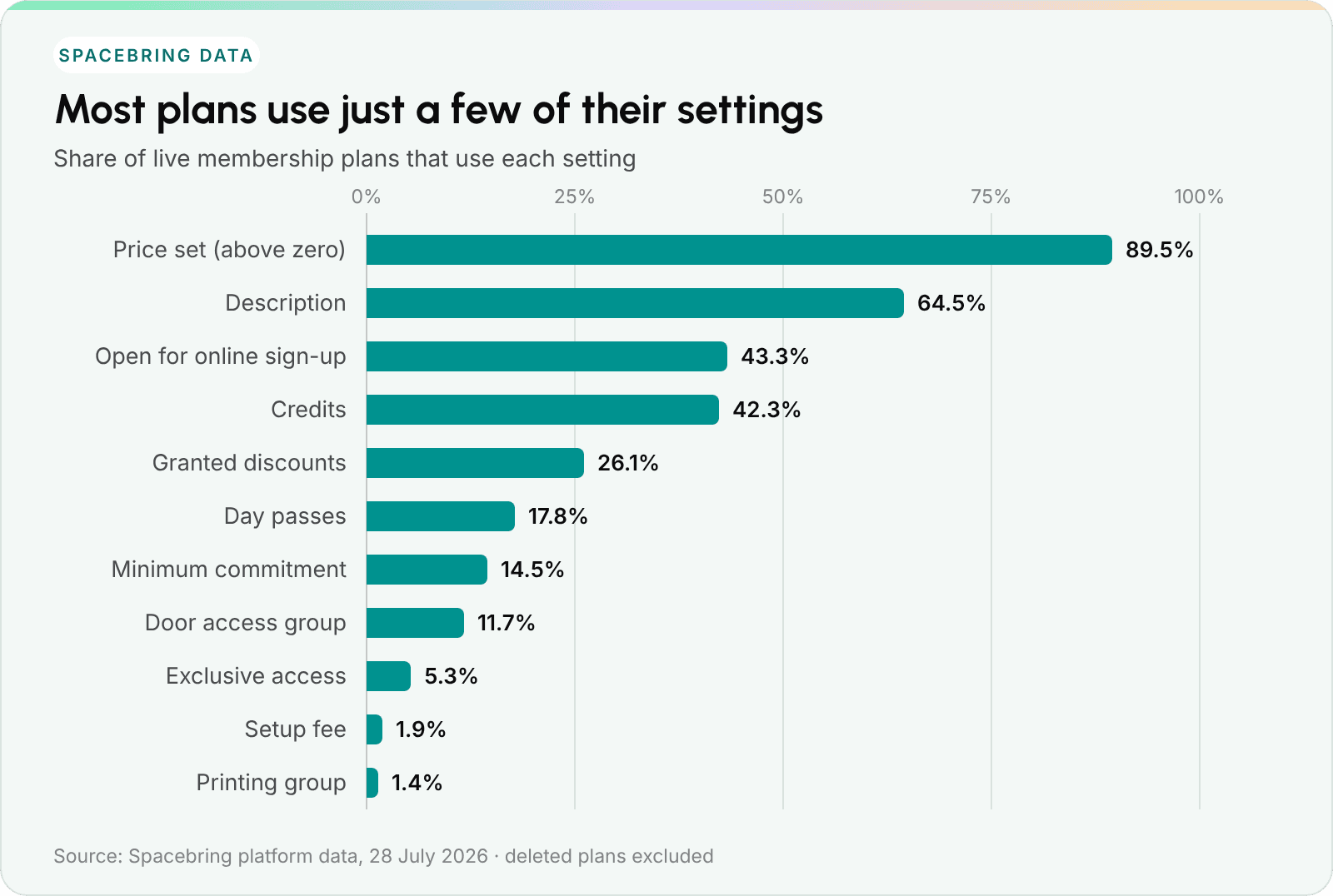
Which plan settings operators use, as a share of live plans.
Setting a price is close to universal. Most of the settings that save your team time later are used by a minority of plans, and eight in ten plans use three optional settings or fewer.
The good news is that this is an easy win. A description, a credit allowance, a day-pass allowance and online sign-up cost nothing to switch on, and each one saves your team a conversation they’d otherwise have by hand.
How to use this: Before you publish a plan, try writing down an answer for every setting above. If one is still blank, that’s a sign the plan needs a little more thought.
Credits, day passes and discounts: what is the difference
These three words often get used as if they mean the same thing. They don’t, and members will ask you about them often. It helps to define them once and use the same words everywhere.
1. Day passes are visits. A member uses one pass each time they book a hot desk for the day. They answer “how often can I come in?”
2. Credits are spending power. Members spend them on room bookings and, if you allow it, shop orders and event tickets. You decide what a credit is worth. Some operators set one credit to one unit of currency. Others link it to something members understand, such as one credit = €10, or one hour in a standard meeting room. Whatever you choose, price every bookable room in credits on the same scale: if a credit is worth €10, a €20-an-hour room costs 2 credits an hour. Credits answer “how much can I book?”
3. Discounts are something else. A discount lowers what a member pays for as long as it applies. A member with 50% off rooms and no credits still pays every time they book. They just pay less.
Why the difference matters for your revenue
Plan allowances run out. Discounts don’t, unless you give them an end date.
Credits and day passes from a plan reset with each renewal, and unused ones expire. A member who has just used their last day pass has a good reason to talk to you, and they’re often happy to buy more. That’s the perfect moment to offer a top-up package. A member with a permanent 20% discount never runs out of anything, so that natural moment to reconnect never comes.
The data shows operators lean the same way: 42% of live plans include credits, and 26% include a discount. Where discounts are used, the most common rates are 50% and 100%. One in six plans with a discount offers 100% off, which works like unlimited room use. If you go that way, it’s wise to add a fair-use rule to your terms.
How to use this: Discounts work nicely as a standing perk on your premium plans. Credits and day passes are better for encouraging top-ups.

Build plans that do more than bill. Bring credits, day passes and member discounts together in Spacebring.
How to choose the right membership model for your space
There’s no single best model, and what works for the space down the street may not work for you, because your members are different. These three questions will help you find your fit.
1. Who exactly are you serving?
Try to be specific. Remote corporate teams, hybrid freelancers, consultants with lots of meetings, digital nomads, a particular community? A nomad passing through needs a day pass. A ten-person agency needs a private office and one invoice. Picture the people first, then build the plan around them.
2. How will they actually use the space?
Full-timers value predictability and 24/7 access. Hybrid workers want flexibility within a budget, and they’d rather not pay for days they spend at home. Companies want one subscription with individual access for each employee. Write down the days and hours each group really needs, and the shape of the plan will start to appear.
3. What do the perks really cost you?
Coffee, printing and good Wi-Fi all have a cost. Work out the real cost per member and include it in the base price. If something only matters to a few members, such as a parking space or a storage locker, there’s no need to raise everyone’s price. Offer it as an add-on instead.
The 6 most common coworking membership plans
You can create as many plans as you like, but most successful spaces offer a mix of these six.
1. Hot desk membership
Any open seat in the shared area, billed weekly, monthly or for longer. This is usually your entry plan, so it works best at an accessible price, with easy ways to add meeting-room credits or event access on top.
Tip. If your hot desk area spans several floors or locations, consider letting people move around freely. Flexibility is a big part of what people value in this plan.
2. Dedicated desk membership
A specific workstation, assigned to one member, usually monthly or longer, often with 24/7 access. Members are paying for a place that’s theirs, so it’s nice to make the step up from a hot desk feel worthwhile: a bigger credit allowance, or a drawer that locks.
Where a space sells both, a dedicated desk typically costs about one and a half times as much as a hot desk. Fewer than one space in ten prices the two within 5% of each other. If yours are that close, a bigger gap can make the choice clearer for members.
Tip. Because these desks are real seats, you can price them by location. A desk in a quiet window corner can reasonably cost more than one next to the kitchen.
3. Flexible membership
Made for part-timers and hybrid workers: a set number of days each month. So how many days should you include?
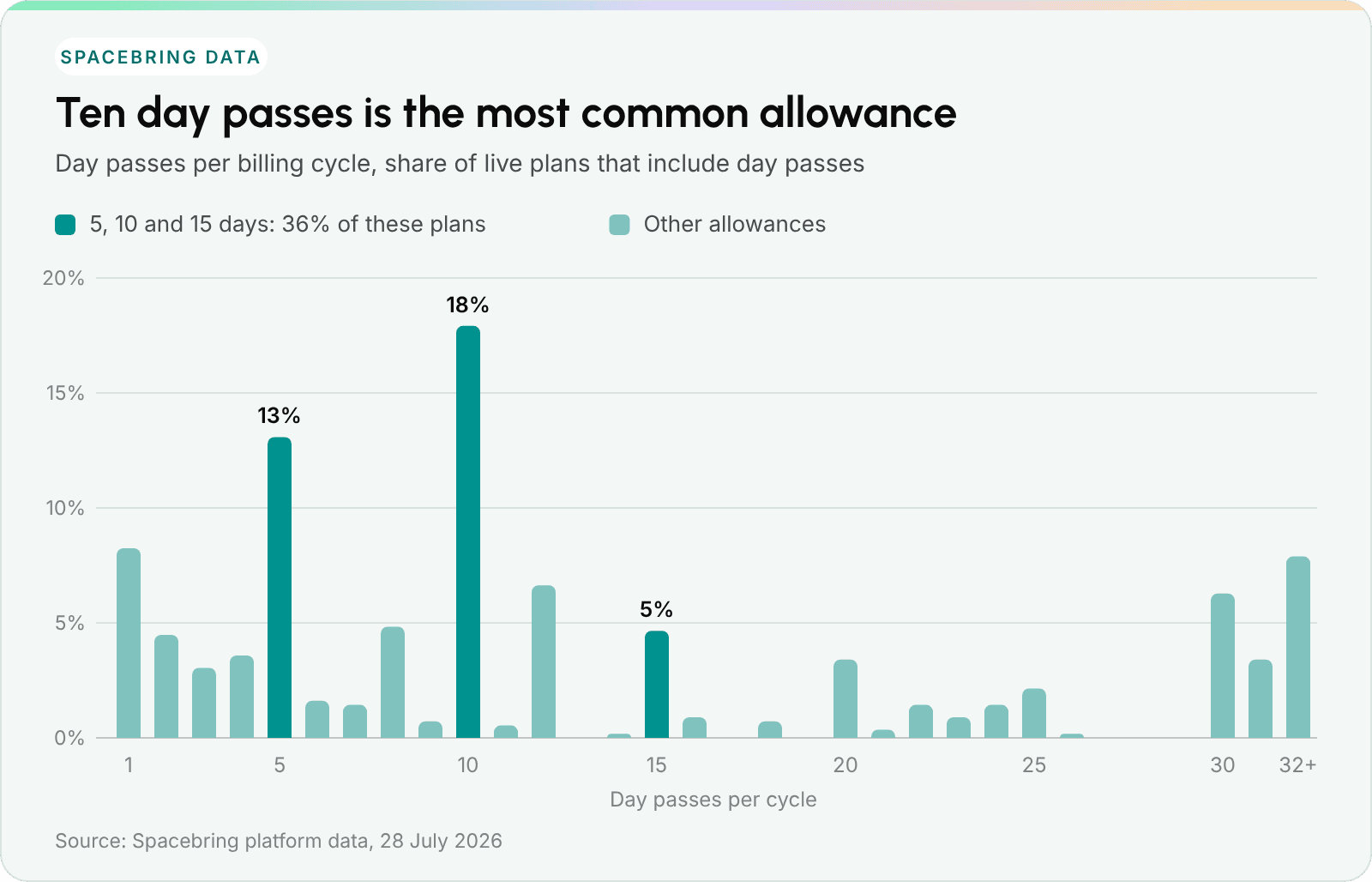
Day passes per cycle on plans that include them.
Ten is a great place to start. It’s the most common setting and the median, and five, ten and fifteen days together make up more than a third of all plans with day passes. You could start at ten, then add a five-day option below it and a fifteen-day option above it.
Ten days also fits nicely with someone coming in two or three days a week, which is probably why it’s so popular.
One practical tip: it works best when the pass is used as the member books their desk for the day, rather than ticked off by hand at reception. That way the count is always right, and members can see in the app how many days they have left. When they use the last one, they can buy a pack of extra passes right away, without having to email you.
4. Virtual office membership
This plan offers your address without a desk. It rarely includes coworking access, but a small allowance, such as two day passes or a few credits, gives these members a reason to drop by and meet everyone.
Worth knowing. You’re lending your business address to a company you may not know yet, so this is the one plan where an identity check before approval makes sense. Many operators do this: 19% of virtual office plans require an application, the highest share of any plan type. Virtual offices also have the longest commitments: 32% include a minimum commitment, typically twelve months.
Mail handling is the other half of the product. It helps to log every letter and parcel in a way that notifies the member straight away, ideally with a photo of the envelope, so nobody has to call and ask.
5. Private office membership
Usually your highest-priced product: a private room for a team, plus access to everything shared. Because the price is already high, this is a great place to include your best perks, such as generous credits, good discounts and priority booking, rather than charging extra for them.
Where a space sells both, a private office typically costs about three and a half times as much as a hot desk. That’s per office, not per person: the offices behind that number range from one-person studios to large team suites.
6. Company memberships
One subscription, many people. You don’t need a separate “team plan” for this. Any plan can be sold to a company instead of a person: the company is the customer, its employees share the subscription’s credits, day passes and discounts, and one invoice goes to one billing contact. Adding a person simply means adding a seat.
Setting this up saves you from combining several individual invoices by hand each month. It can also make memberships more stable. A person might leave when they change jobs. A company usually stays until it moves offices, which happens much less often.
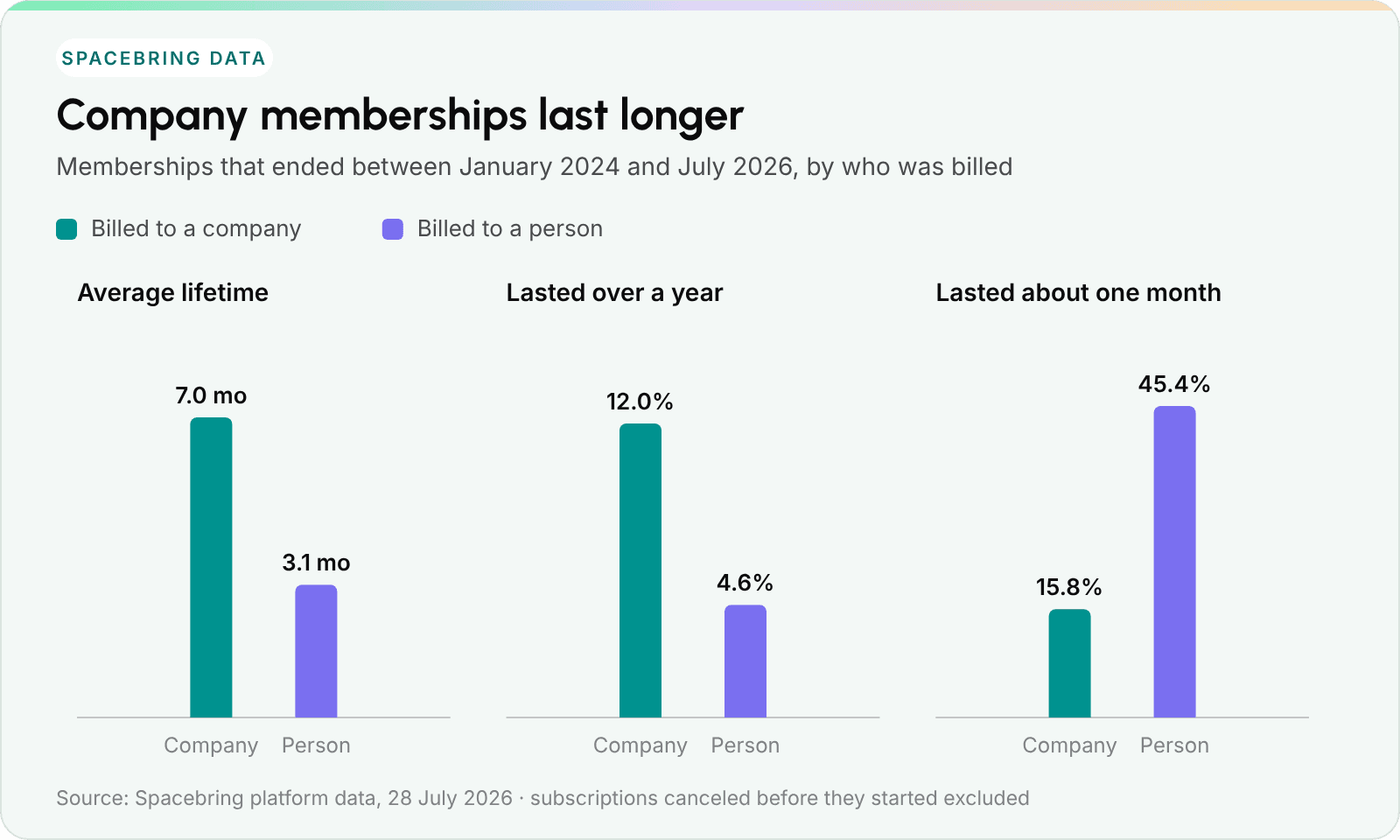
How long memberships lasted when the bill went to a company rather than a person.
Among memberships that have ended, company memberships lasted 7.0 months on average, compared with 3.1 for individuals, and 12% of company memberships lasted more than a year, compared with 5% of individual ones. Part of that gap may come from what companies buy, such as private offices. But even within the same space, companies stay longer at 77% of locations, usually by about one and a half times.
The other side of the chart is interesting too. 45% of individual memberships lasted about one month, a single billing cycle. Many of those people only needed a month, for a project or a visit. It’s worth offering that month as a product of its own, at a fair price and with an easy way to come back.
How to use this: If you’d like to try one new thing this quarter, let companies sign up for the plans you already have.
For a wider view of how company demand is shaping flexible workspace, take a look at our coworking industry growth stats for 2026.
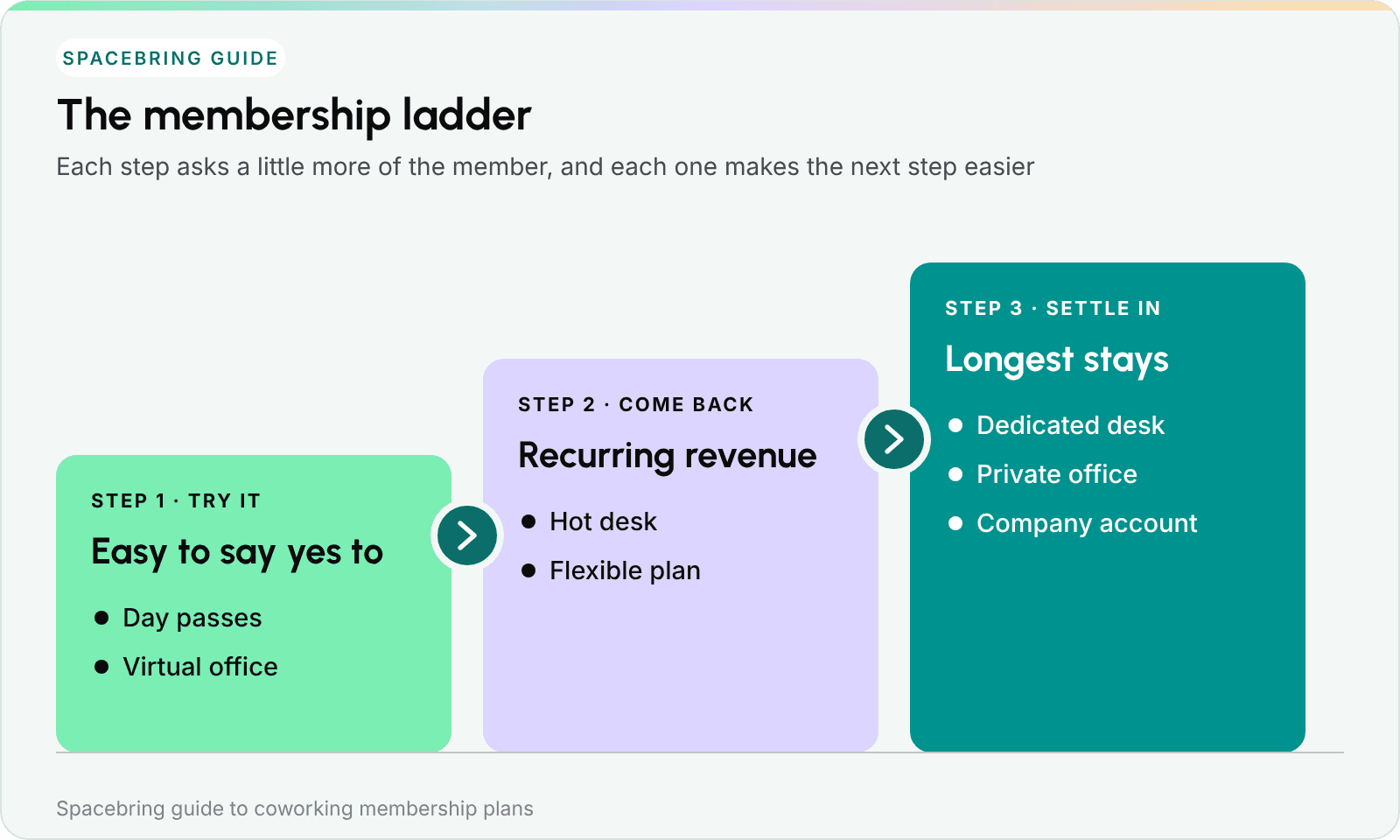
The membership ladder: each step makes it easier to take the next one.
Each step plays a different role. The first is easy to say yes to and asks very little of the buyer. The middle turns that interest into recurring revenue. The last is where members tend to stay the longest. Offering all three gives people a comfortable path in, instead of asking them to make a twelve-month decision on day one.
Plans for specific audiences
Once your core plans are in place, a few specialized plans can help you welcome particular groups or make use of quiet hours.
1. Student membership
A discounted hot desk that builds a relationship with people early in their careers. A discount of 30–50% off the standard price is a common range.
2. Nonprofit membership
Friendly pricing for registered charities. Usually your hot desk or a company subscription with a generous discount.
3. Meeting-room-only membership
For consultants or therapists who need a professional room to meet clients but no desk. A monthly bundle of credits works well here.
4. Nights and weekends membership
A nice way to earn from hours when your building is quiet. A lower price for access outside regular office hours, with the schedule handled by your door-access system. It often attracts people with side projects who don’t overlap with your daytime members. Tillage’s Nights & Weekends plan, in the examples below, is a lovely model.
Student and nonprofit plans have something in common: members need to show they’re eligible. If someone needs to show a student card or a charity registration, the plan works best as an application. That way your community manager can ask for the document and check it before approving.
Coworking membership pricing: the price ladder
Rent and costs vary a lot from city to city, so a single euro figure for “the price of a hot desk” doesn’t tell you much. What travels well is the shape of a price list: how each plan is priced compared with the hot desk in the same building. That’s what we measured. For local prices, our coworking pricing guide is a great companion to this section.
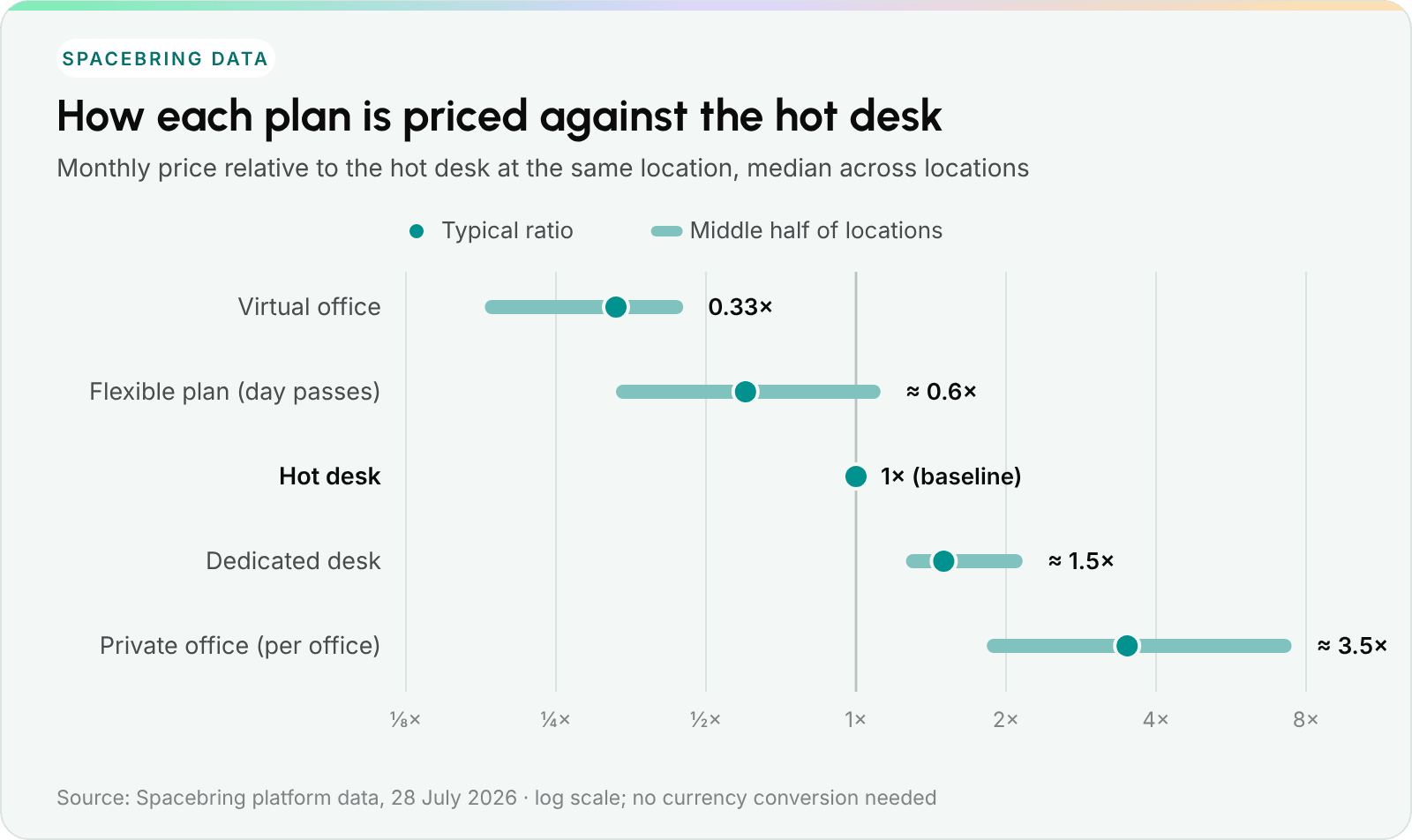
Typical monthly price of each plan type compared with the hot desk in the same space.
| Plan type | Typical price vs. hot desk |
|---|---|
| Virtual office | about one third (0.33×) |
| Flexible plan with day passes | about 60% (0.6×) |
| Hot desk | 1× (baseline) |
| Dedicated desk | about 1.5× |
| Private office (per office) | about 3.5× |
Here’s what stands out.
- A virtual office costs about a third of a hot desk. You’re offering an address, mail handling and a reason to visit, rather than space, and the price reflects that.
- A dedicated desk usually costs noticeably more. Around 50% more is typical. A clear price difference helps members see what they get by stepping up.
- A private office is a different kind of product. At about three and a half times the price of a hot desk, you’re pricing a room rather than a person, and the conversation, the contract and the time it takes to close all change with it.
Real-world plan examples
Here’s how operators present these plans in practice. We checked every example on its live, public plan page in October 2026, and each is quoted in the currency that space uses, exactly as a member sees it. Prices can change, so the screenshots show each page as it looked when we checked.
1. Hot desk memberships
- Billing cycles: weekly, monthly, quarterly
- Who buys it: freelancers, digital nomads and remote workers who want flexibility more than a fixed seat
Mox.E Chicago, Open Coworking
Mox.E lists everything that’s included—unlimited coworking during business hours, printing, coffee card, phone booth—right next to a clear monthly price. Someone can compare it and check out without waiting for a sales call.
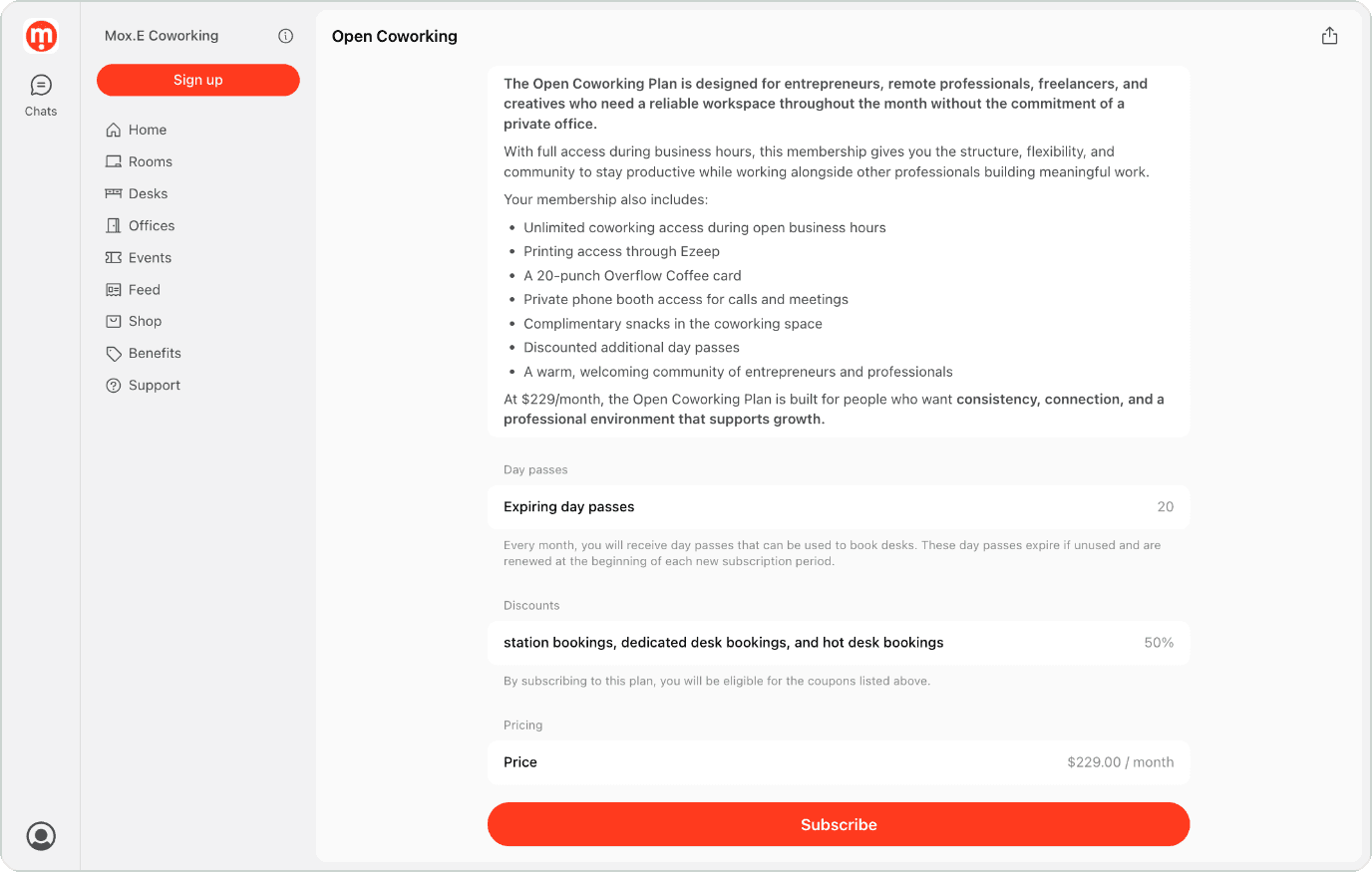
Open Coworking, Mox.E Chicago. See the live plan page
More ideas worth borrowing:
Hatch Coworking, Week Pass
$100 a week, including general access and five conference-room credits. Including room use in a weekly plan works well for short-term visitors who need proper meeting space but not a monthly commitment.
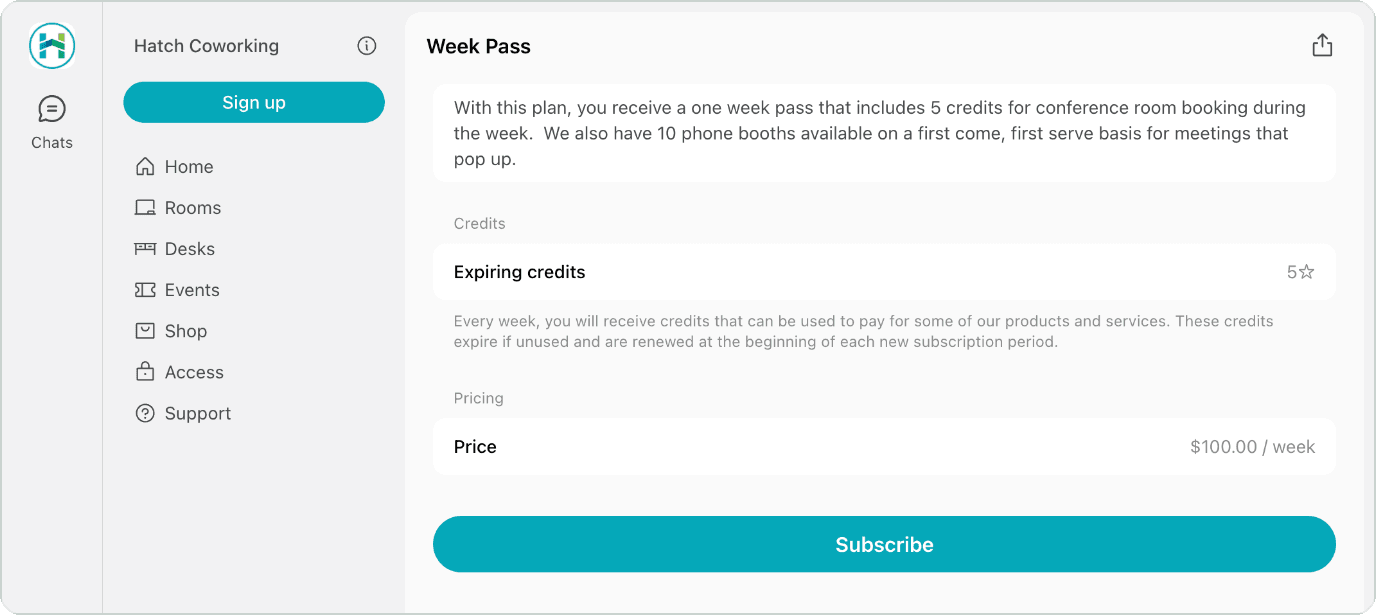
Week Pass, Hatch Coworking. See the live plan page
Spark Plaza, Hot Desk Month-to-Month
$300 a month for an unassigned desk, with a lot included: 24/7 key-code access, two hours of conference room time a month, discounts at 20 local businesses and free monthly lunches. Clear, concrete perks make a standard hot desk feel generous.
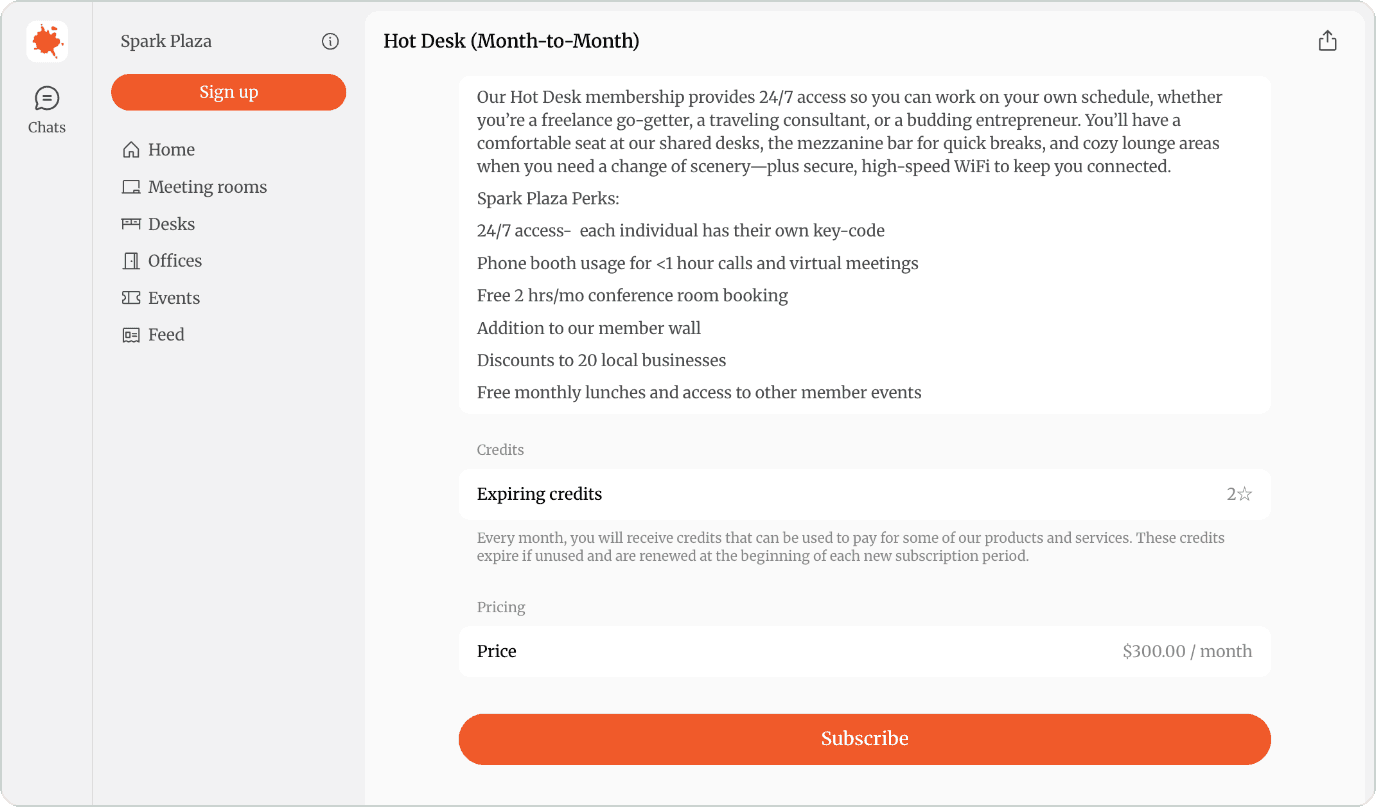
Hot Desk (Month-to-Month), Spark Plaza. See the live plan page
Mindville Spaces, Focus Week
2,250 EGP a week plus a 150 EGP setup fee, for six day passes to use within the week. It’s a nice option for a short, focused stretch of work.
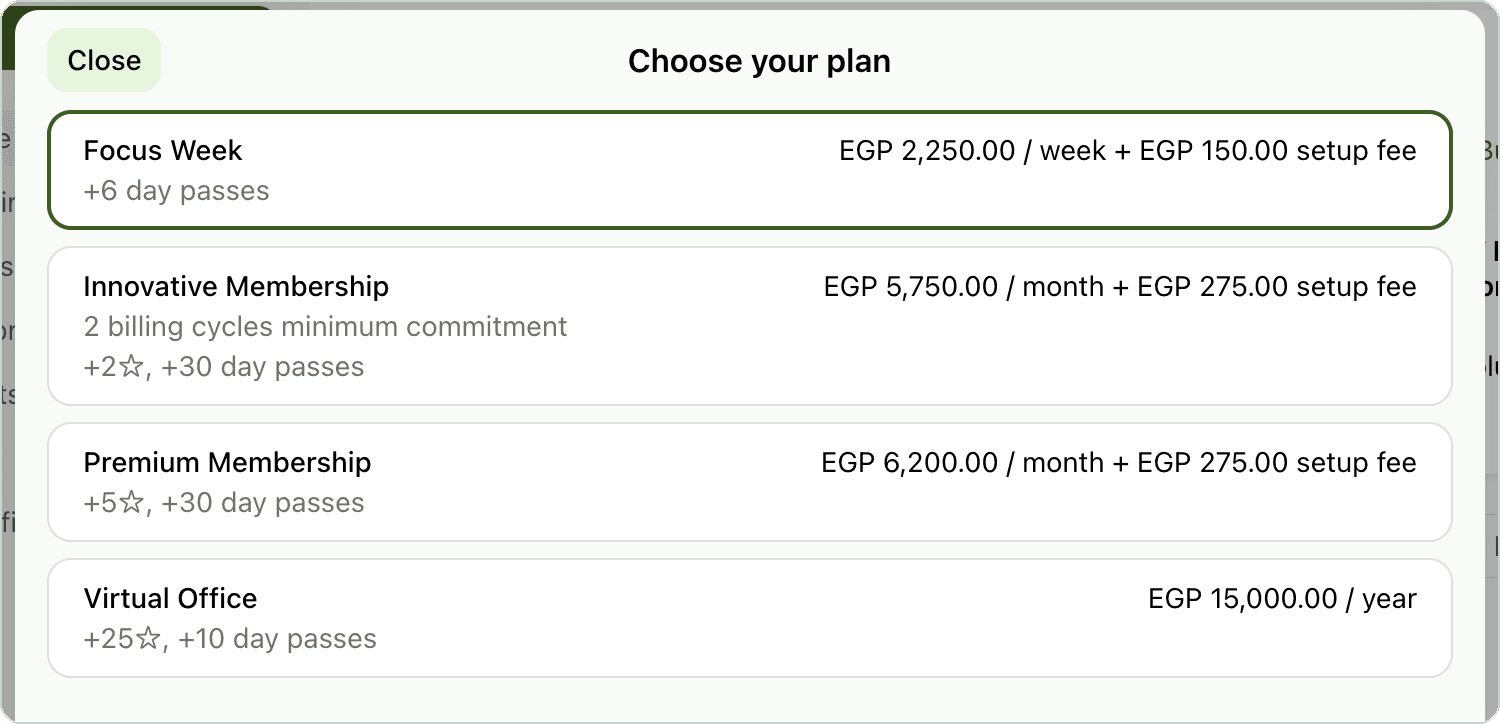
Plan options at Mindville Spaces, including Focus Week. See the live plan page
2. Dedicated desk memberships
- Billing cycles: monthly, six-month or annual
- Who buys it: solo founders, agency owners and remote executives who like their setup to stay put
The Village Hub, Permanent Desk
The Village Hub talks about belonging rather than square meters: “Your own desk, your own mug… where everyone knows your name.” Warm, community-focused language helps the higher price feel like being part of something.
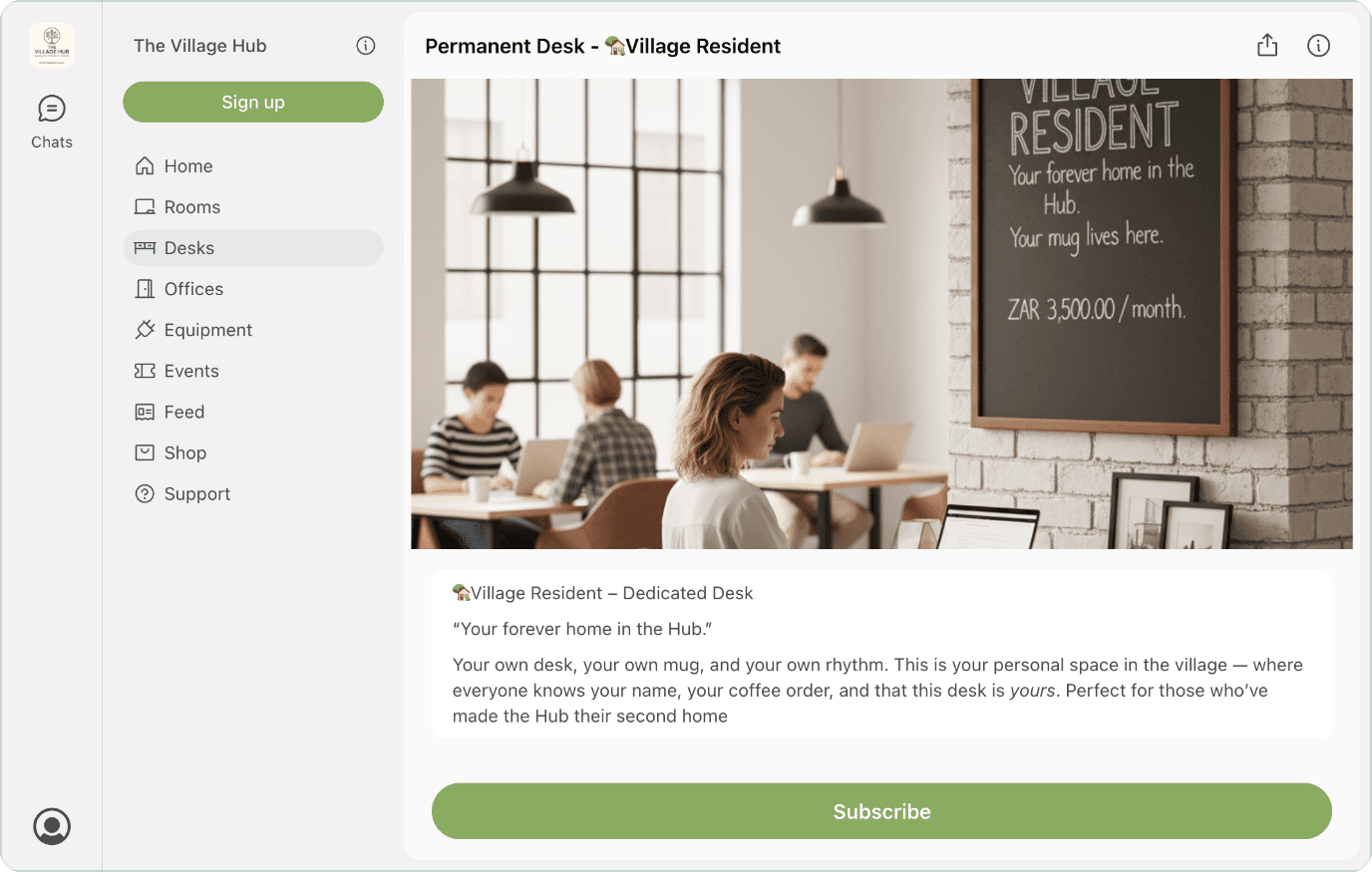
Permanent Desk, The Village Hub. See the live plan page
More ideas worth borrowing:
Foundervine Spaces, Grow & Scale
Names desks after the stage of the member’s business. Calling the £399 and £499 plans “Grow” and “Scale” connects a desk to the member’s goals.
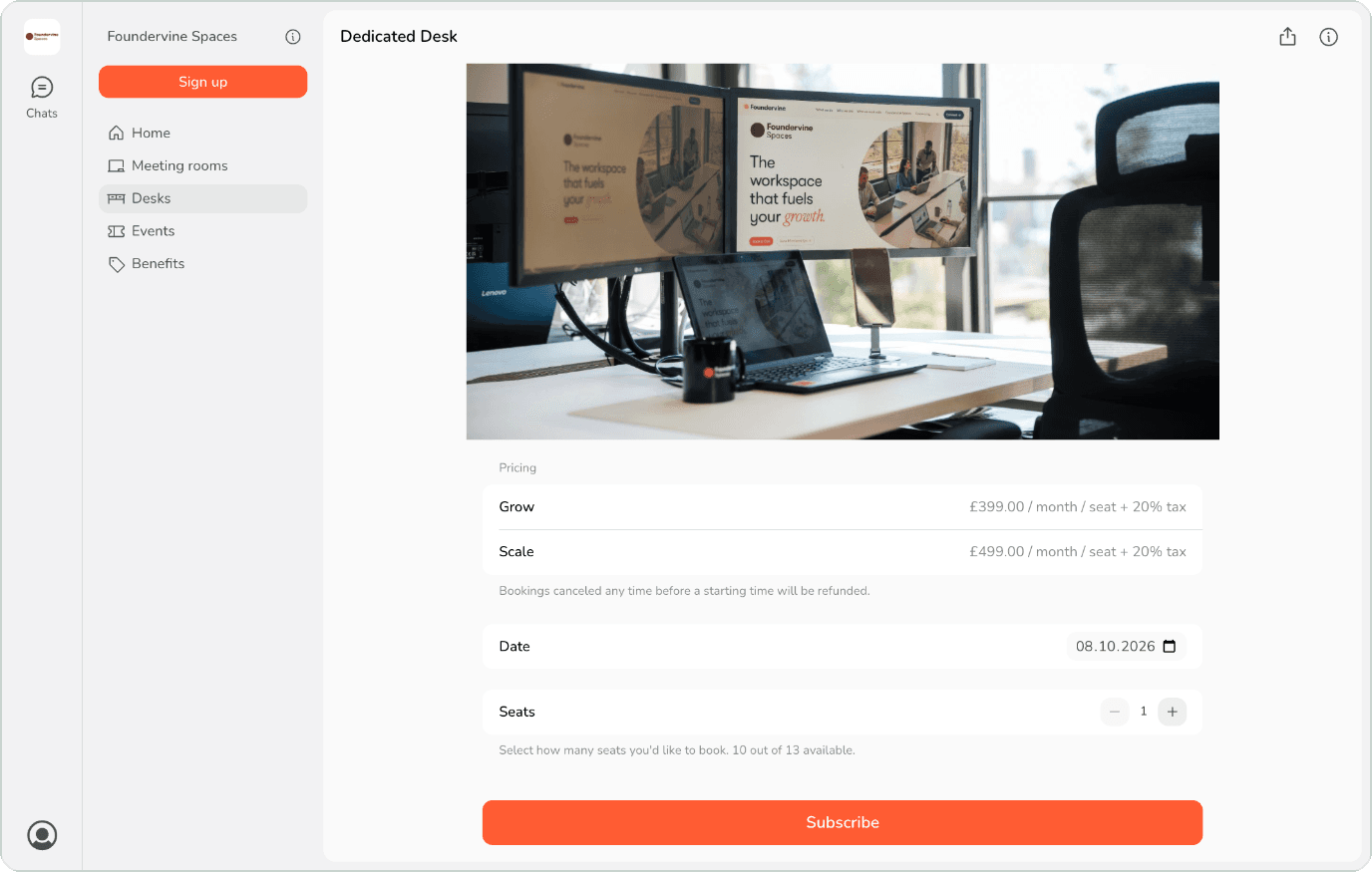
Dedicated Desk with Grow and Scale pricing, Foundervine Spaces. See the live plan page
Annex Business Center, Dedicated Desk
Shows $289.99 a month next to discounted 3-, 6- and 12-month terms, going down to $229.99 for the year. The benefit of committing is right there when people are deciding.
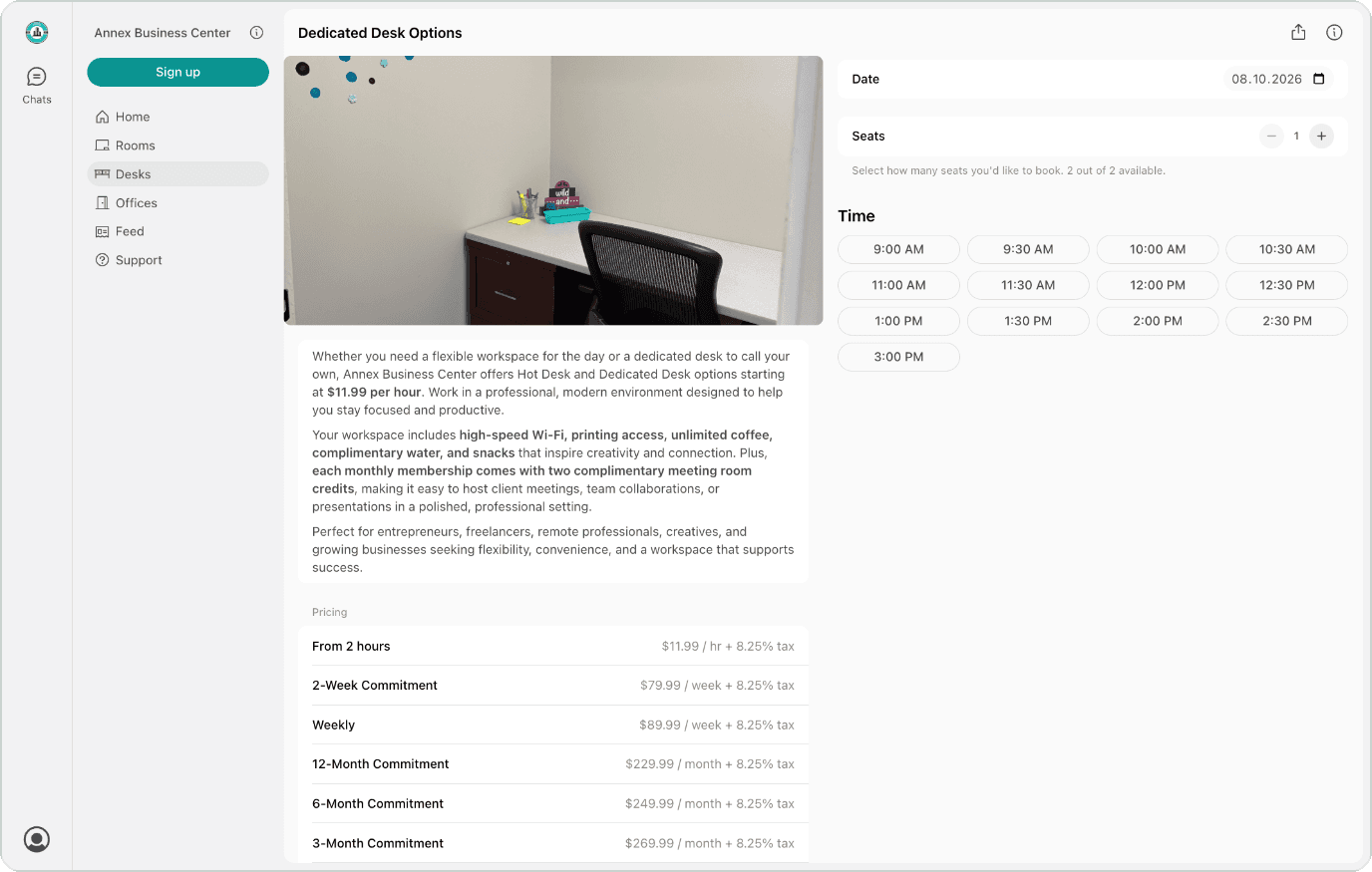
Dedicated Desk Options, Annex Business Center. See the live plan page
3. Flexible memberships
- Billing cycles: a recurring monthly allowance, or a bundle of passes
- Who buys it: hybrid workers coming in one to three days a week, and companies offering staff a remote-work perk
House of Business, Business Privilege
Flexible plans are easiest to understand when the expiry rules are clear. House of Business spells it out: ten days a month, use them within the month, €299 plus 27% VAT, all on the checkout card. Clear rules upfront mean no surprises later, and the plan suits people who aren’t ready to go full-time.
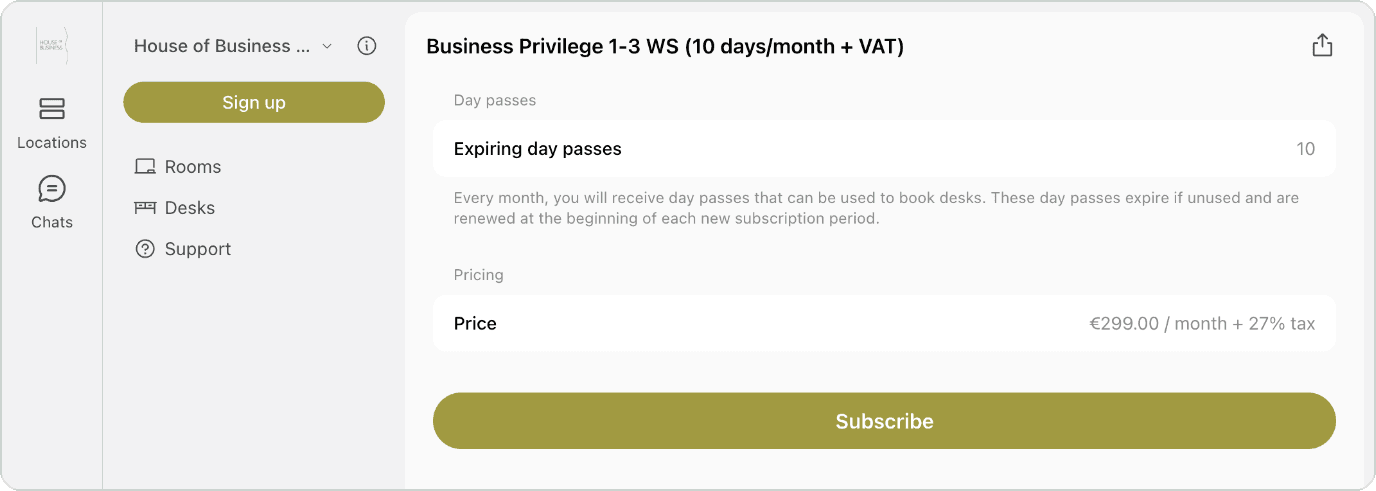
Business Privilege (10 days a month), House of Business. See the live plan page
More ideas worth borrowing:
Let’sCo! Oldsmar, 5-Day Flex Pass
$200 for five full-day visits, presented as an easy way to try the space before joining. A good fit for someone who’d like to test the waters first.
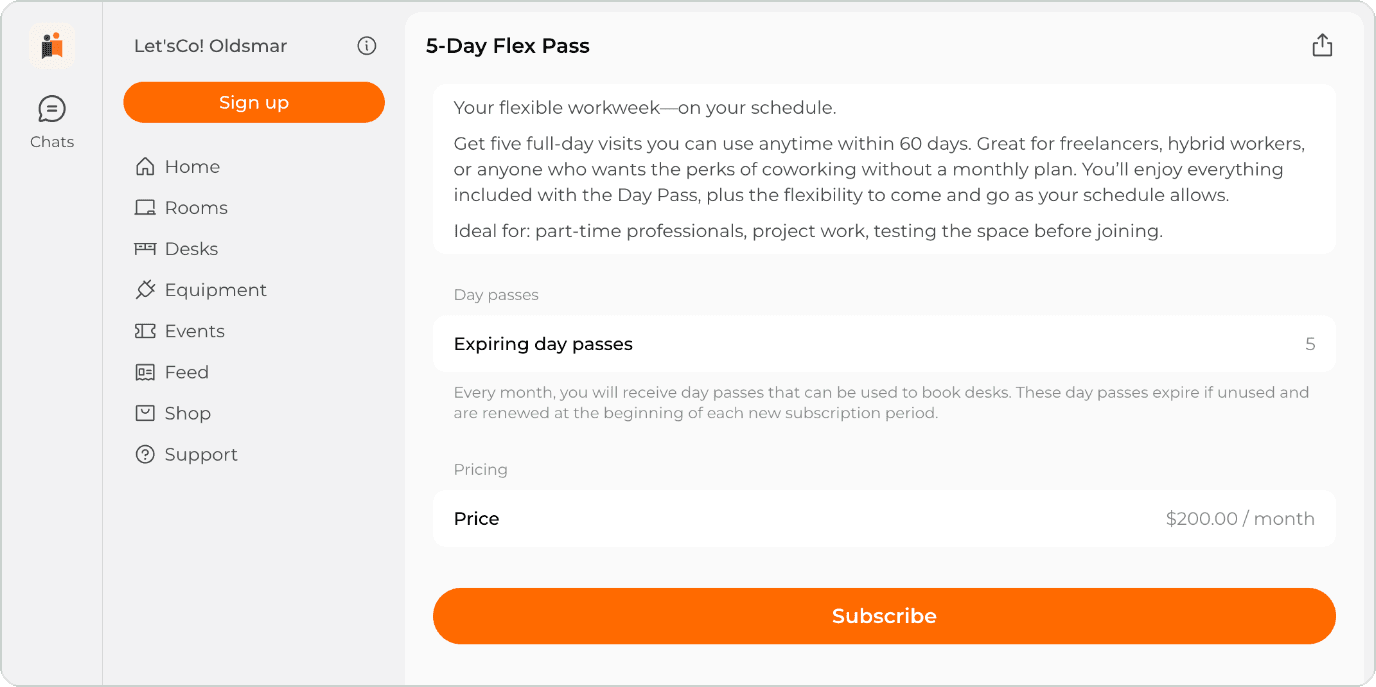
5-Day Flex Pass, Let’sCo! Oldsmar. See the live plan page
The Residence Coworking, Flex 2
A small plan measured in hours — 18 hours for £60 — with 20% off rooms. It’s a friendly starting point that introduces members to the rest of the space.
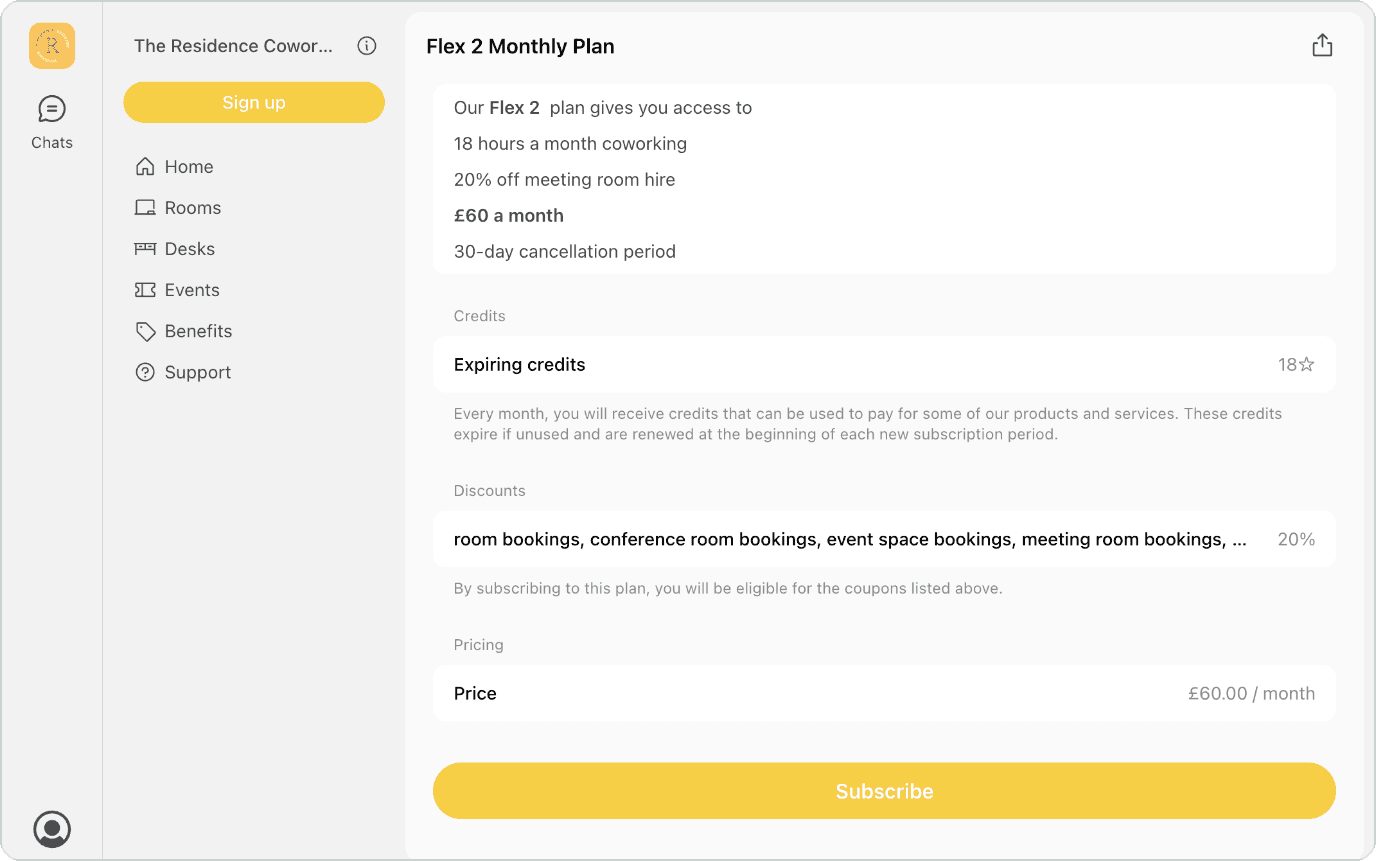
Flex 2 Monthly Plan, The Residence Coworking. See the live plan page
Mox.E Chicago, Work From Home
Ten days at $145 a month with community perks and 50% off extra desk bookings, so there’s a simple next step when the tenth day is used.
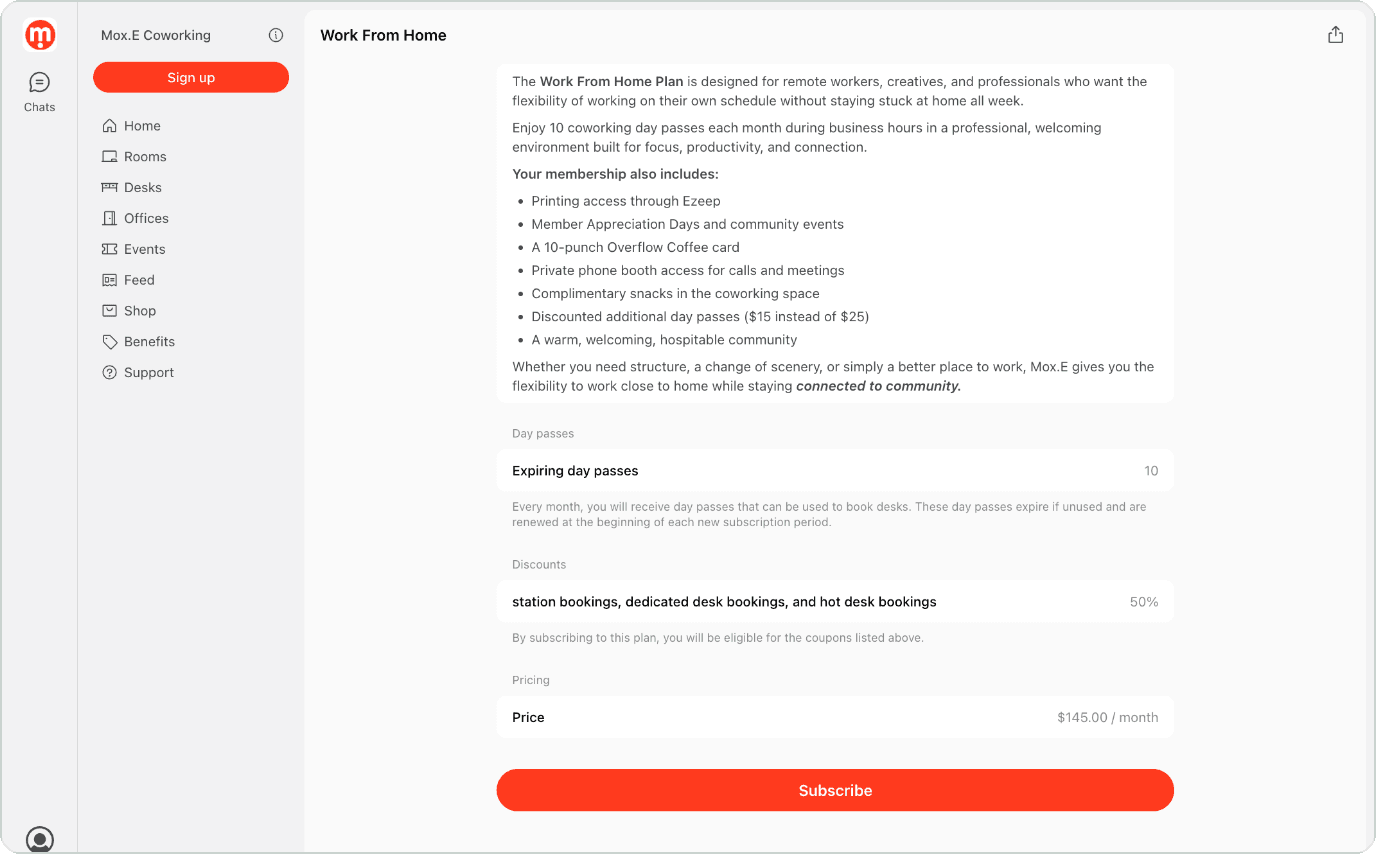
Work From Home, Mox.E Chicago. See the live plan page
4. Private offices and team suites
- Billing cycles: monthly, annual or multi-year
- Who buys it: growing startups, small businesses and satellite teams from two to twenty-plus people
Office & Co, Office 317
Many operators describe a private office by how many desks fit. Office & Co also shows how reliable the space is, right on the checkout page: 20 Mbps fibre, backup solar and generator power, borehole water, and rates that include taxes, water and electricity. For a company about to sign, that kind of detail builds trust before anyone books a tour.
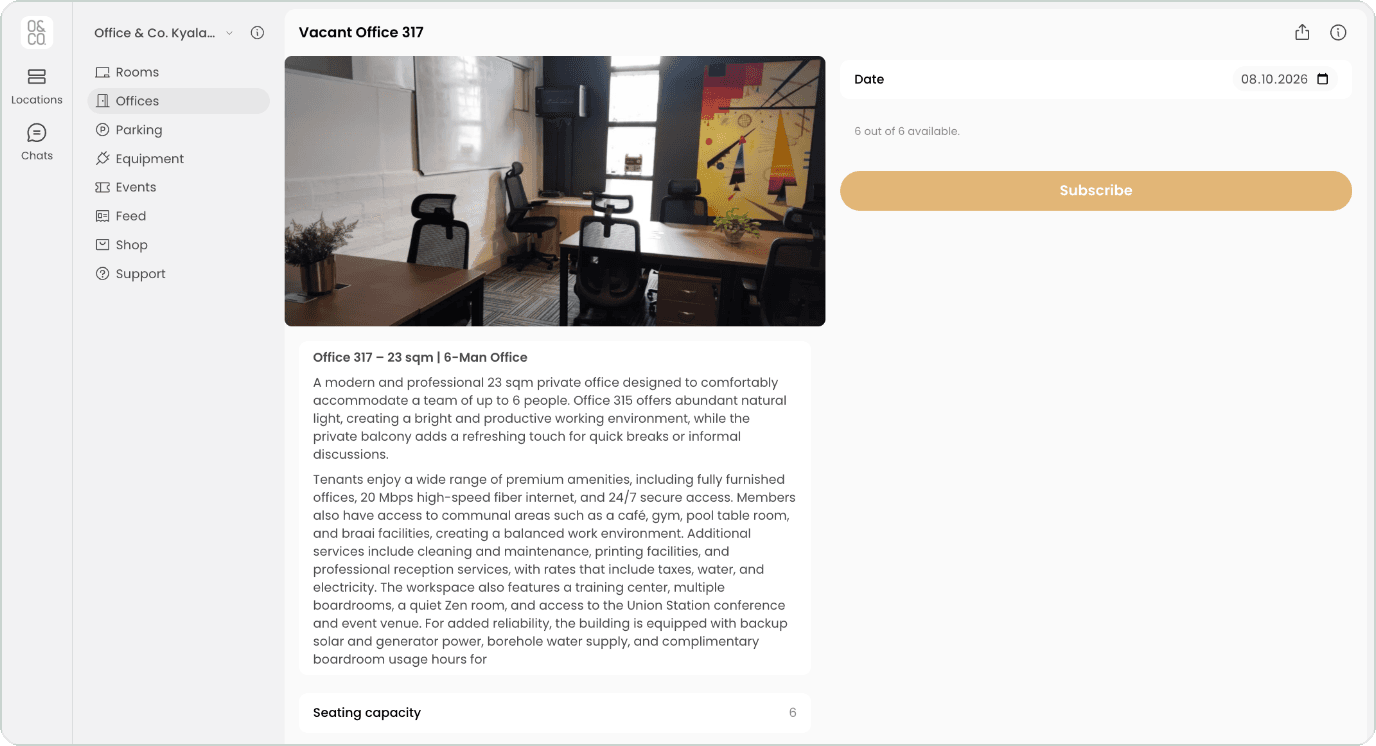
Office 317, Office & Co. See the live plan page
More ideas worth borrowing:
Democracy House, Private Office Suite 5
A furnished suite for up to 14 people at £1,600 a month, with free onsite parking and 24/7 key-code access. Everything says “ready to move in.” And when the suite is taken, visitors can join a waitlist instead of leaving empty-handed.
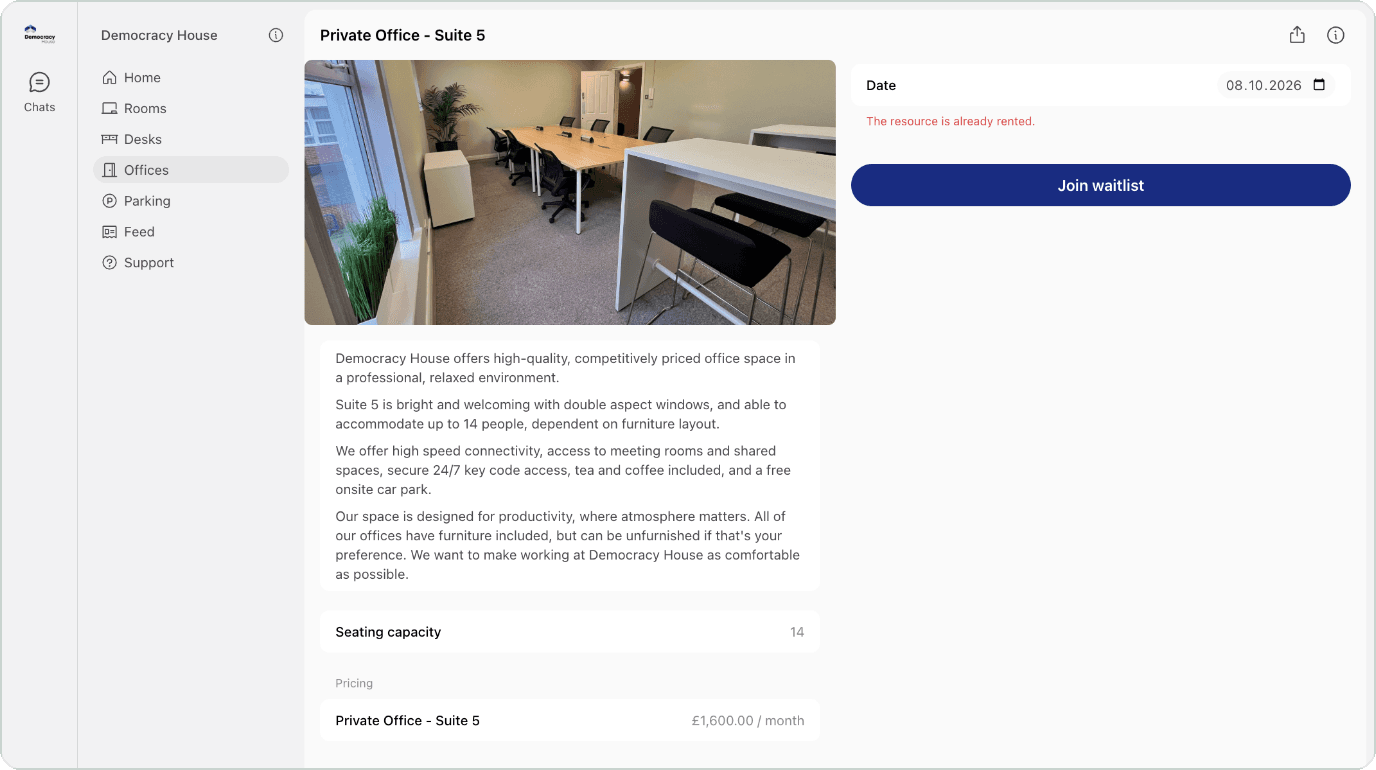
Private Office Suite 5, Democracy House. See the live plan page
Annex Business Center, Private Office B
Prices step down from $379.99 for one month to $309.99 on a twelve-month term, with four meeting room credits a month included. The longer-term discount speaks for itself.
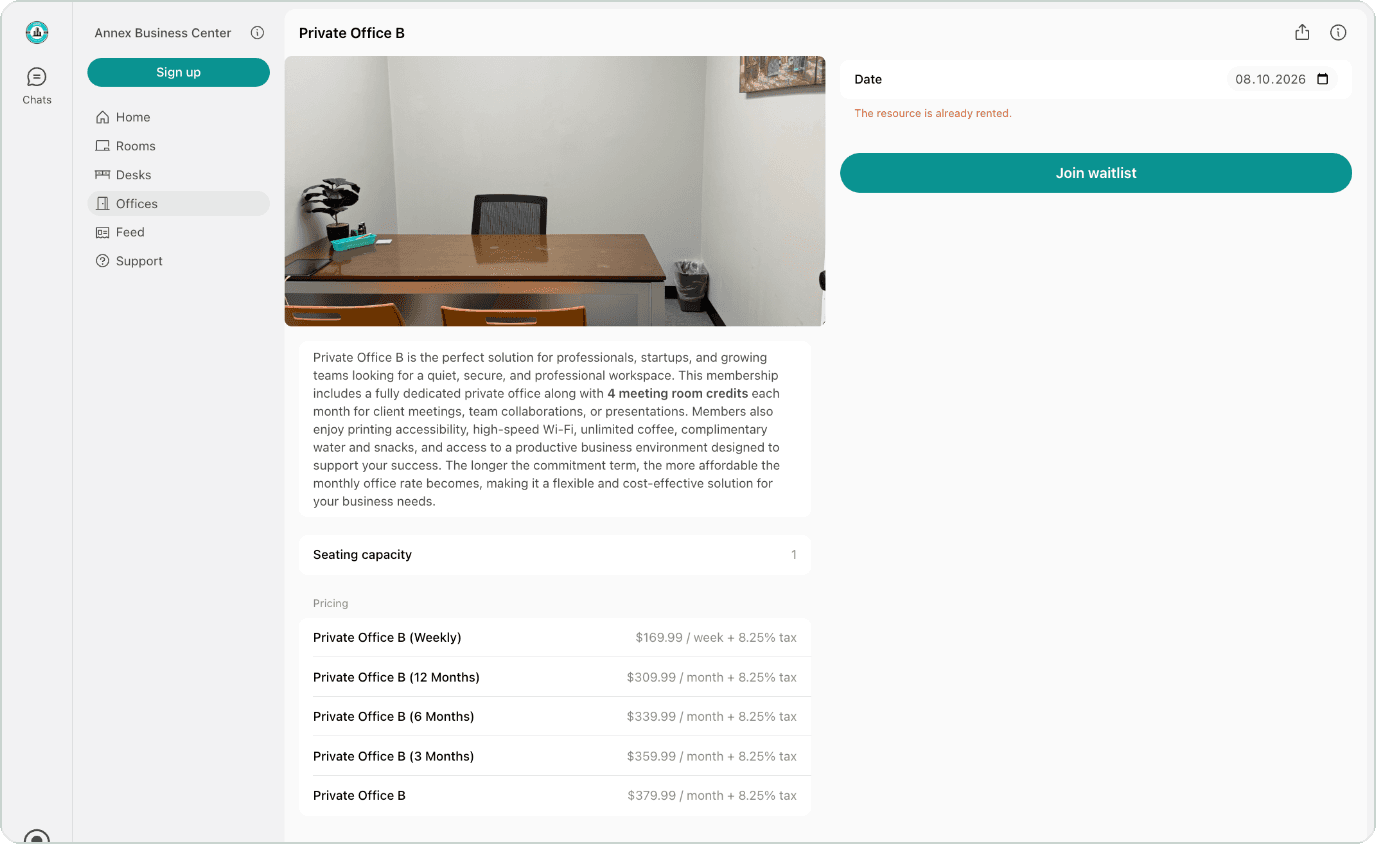
Private Office B, Annex Business Center. See the live plan page
5. Virtual office memberships
- Billing cycles: monthly or annual prepaid
- Who buys it: home-based businesses, international companies and remote teams who need a business address
Mindville Spaces, Virtual Office
Mindville includes ten day passes and 25 credits in an annual 15,000 EGP plan with clear expiry rules. The space gets a year of steady income, and remote companies get a real reason to visit.
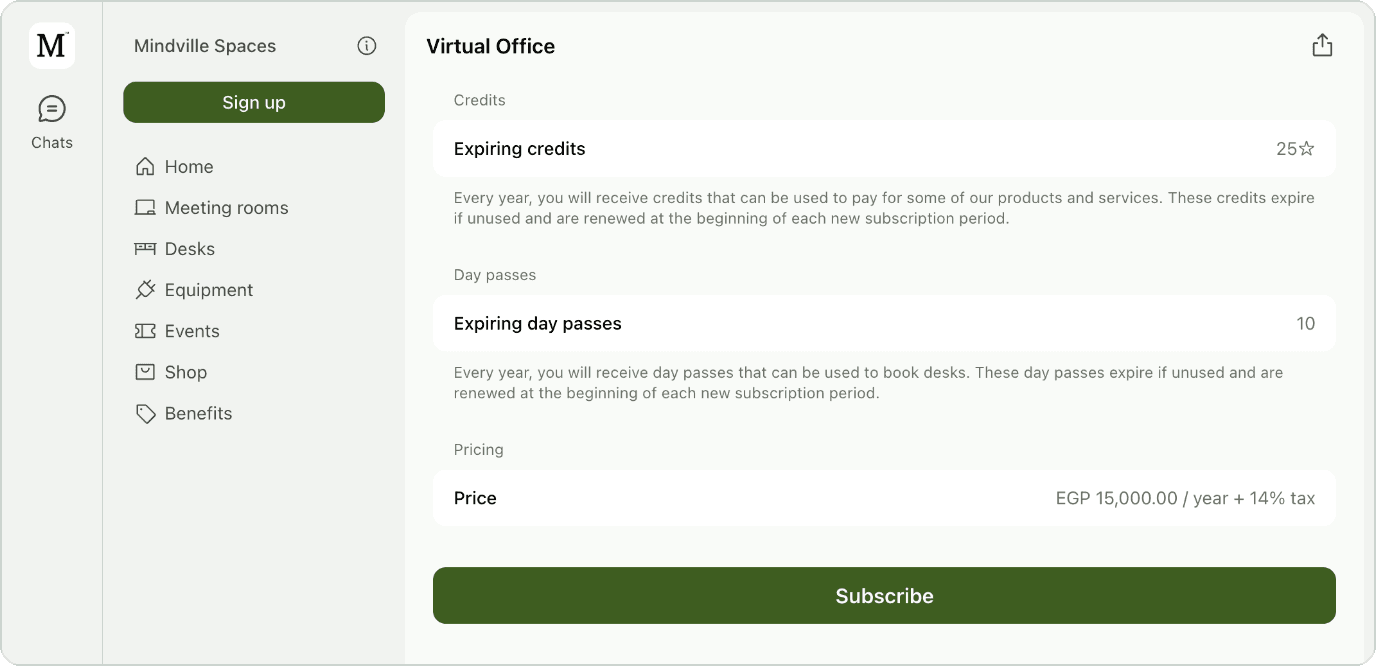
Virtual Office, Mindville Spaces. See the live plan page
More ideas worth borrowing:
Spark Plaza, Virtual Office Premium
A $150 monthly plan without a desk, pairing the address with a choice of three coworking days or five room hours, plus local discounts.
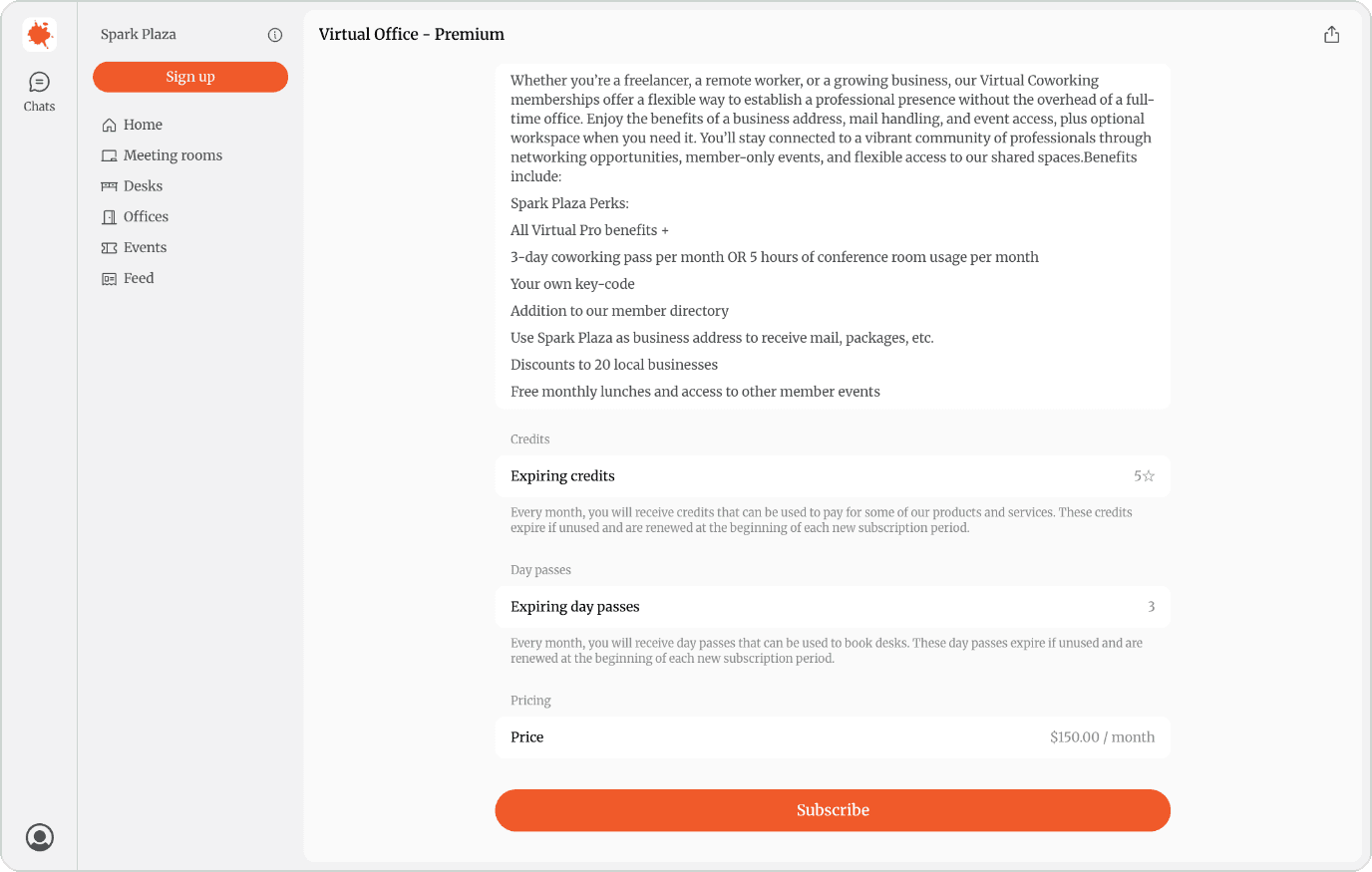
Virtual Office Premium, Spark Plaza. See the live plan page
The Flamingo House, Social Bird
A $150 virtual plan that combines community access with a few small in-person perks: one coworking day and one room hour.
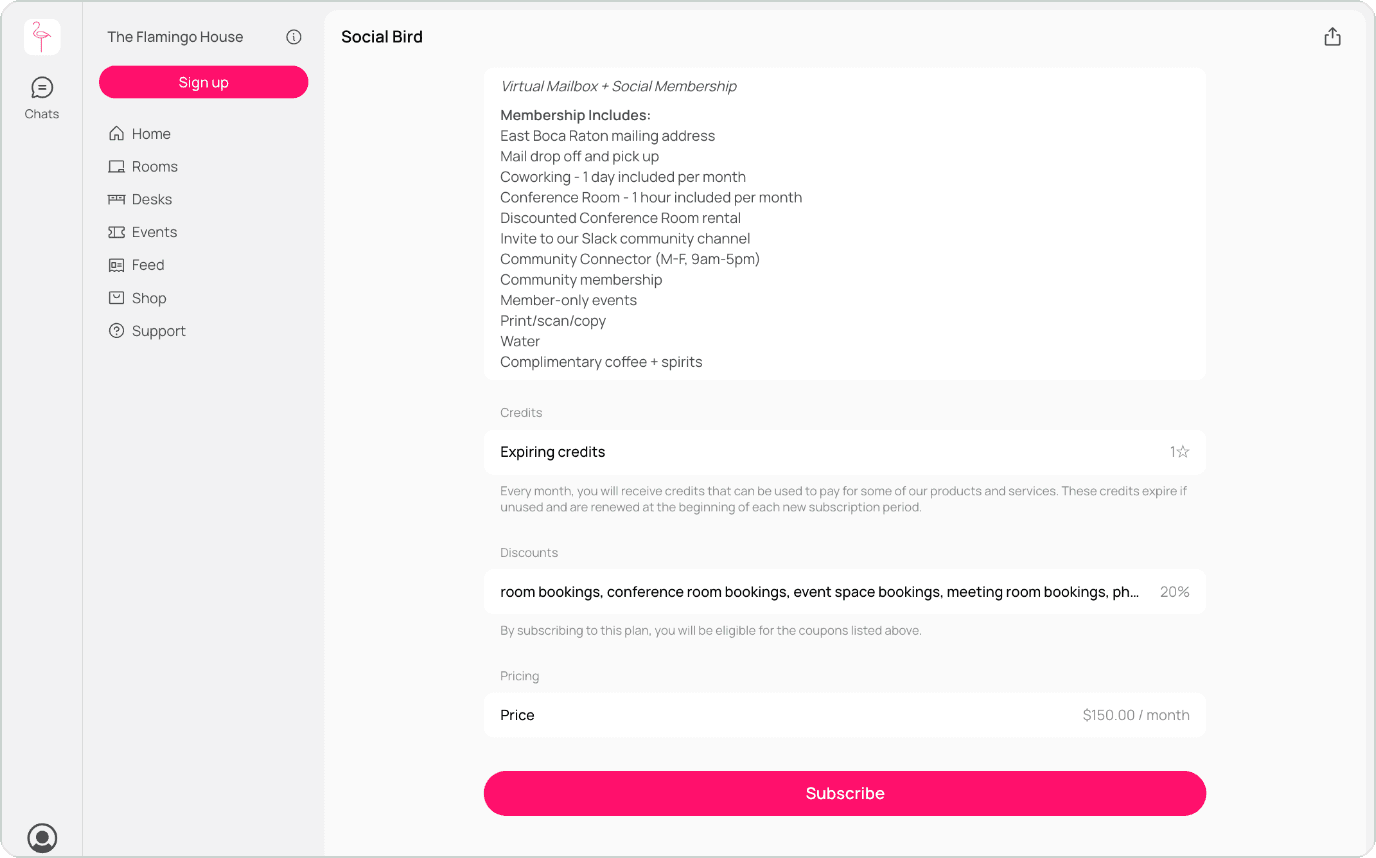
Social Bird, The Flamingo House. See the live plan page
Foundr, Virtual/Mailbox
A flat $60 a month for 60 credits, to use within the month. Simple to understand, and easy to manage.
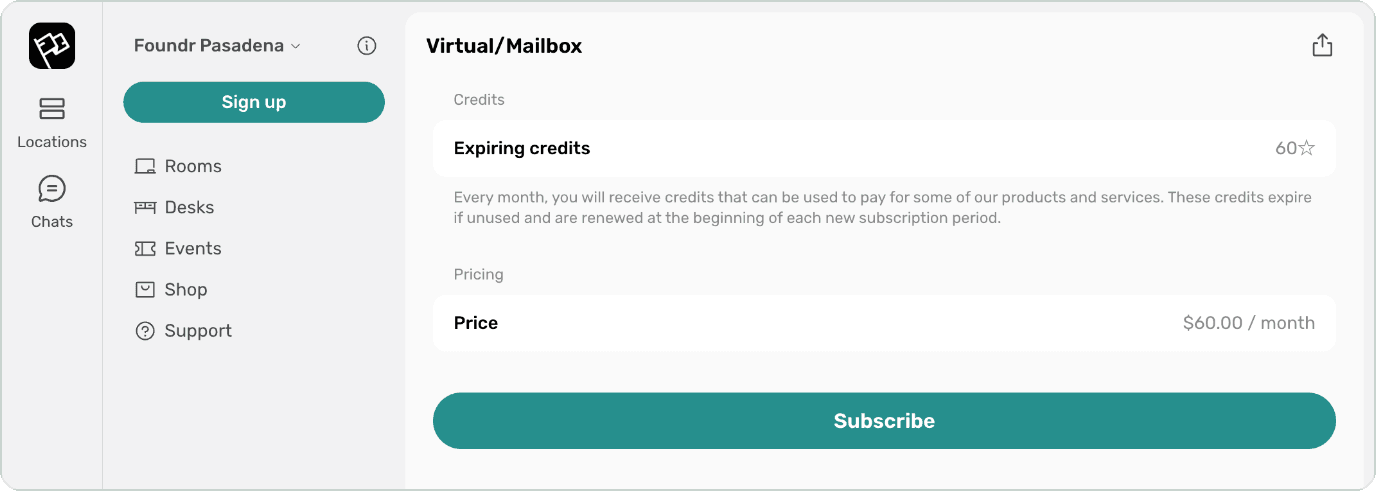
Virtual/Mailbox, Foundr. See the live plan page
6. Other plans worth a look
- Billing cycles: annual prepaid or a recurring monthly plan
- Who buys it: specific communities, and people who use the building outside busy hours
Queermunity MN, Senior Membership
This plan is about belonging: $60 a year plus tax for members aged 60 and over, with members-only app areas and 10% off the café, events and room rentals. It welcomes a new group without using any desk space.
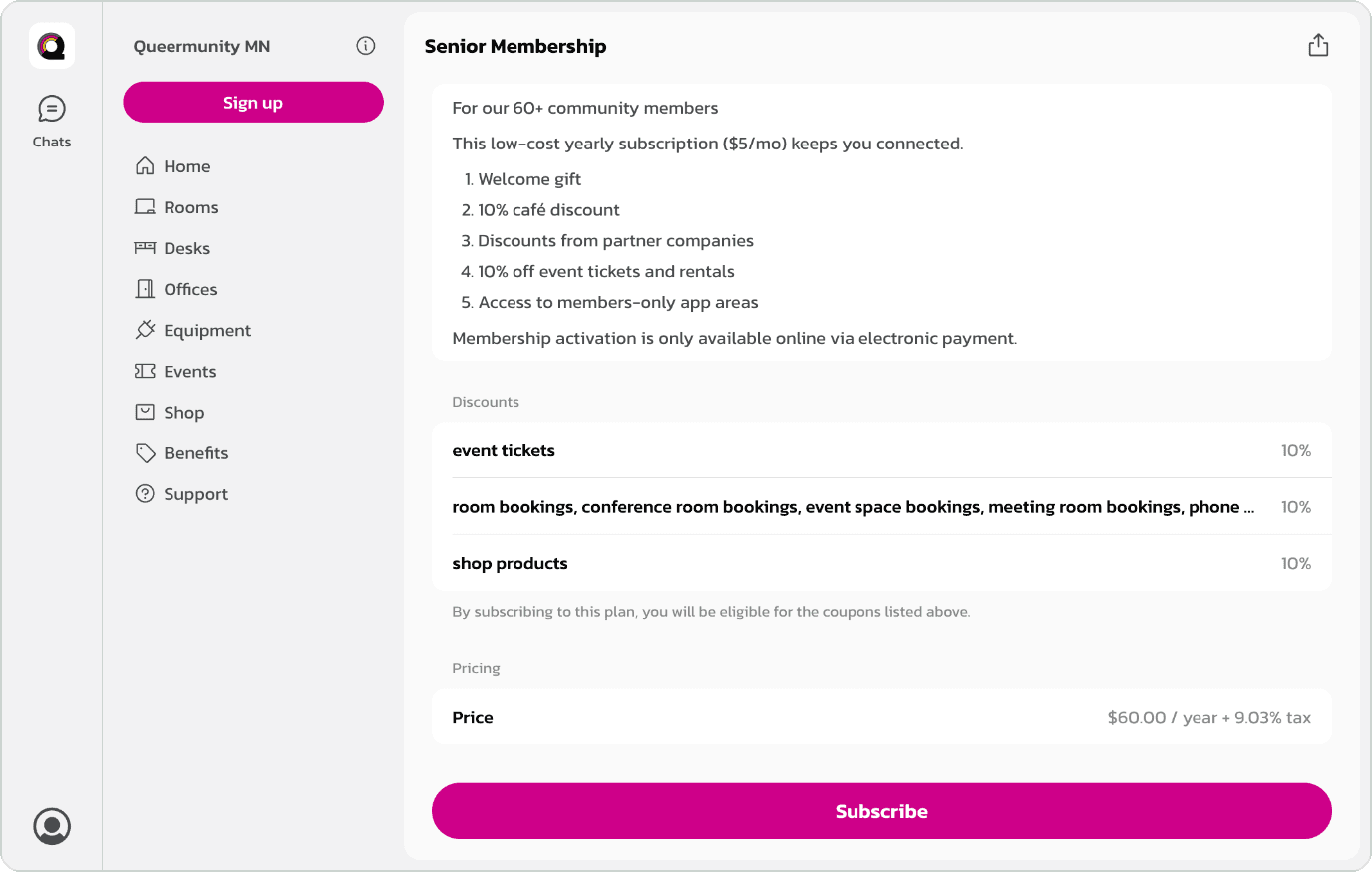
Senior Membership, Queermunity MN. See the live plan page
More ideas worth borrowing:
Mox.E Chicago, Work on Demand
A small monthly fee for better prices: $25 a month unlocks $15 day passes. Steady monthly income for the space, and good value for regular visitors.
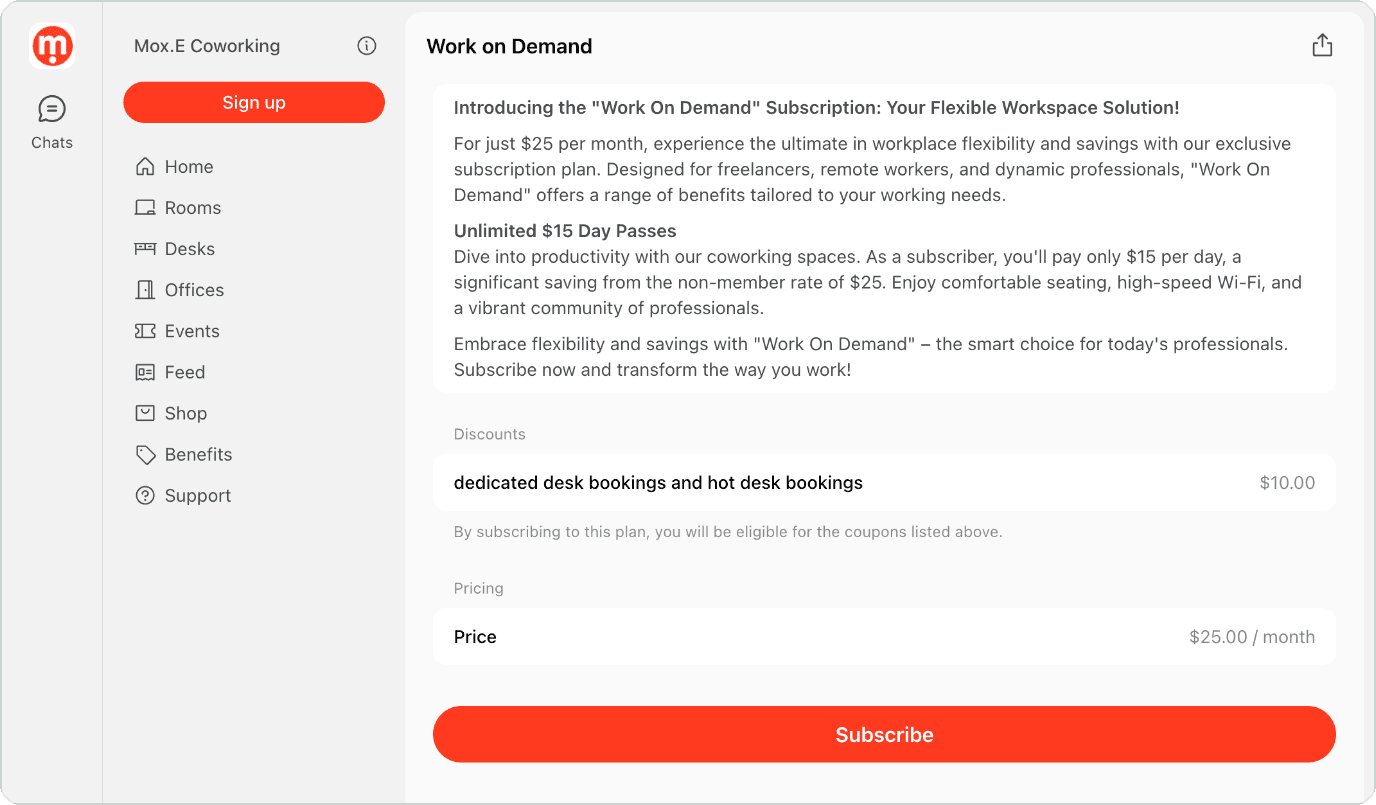
Work on Demand, Mox.E Chicago. See the live plan page
Tillage, Nights & Weekends
$115 a month, or $996 for the whole year, which is more than three months free compared with paying monthly. Members get badge access after 4 PM Monday to Thursday and anytime Friday to Sunday, plus 50% off the conference room and free event tickets. A great example of earning from quiet hours.
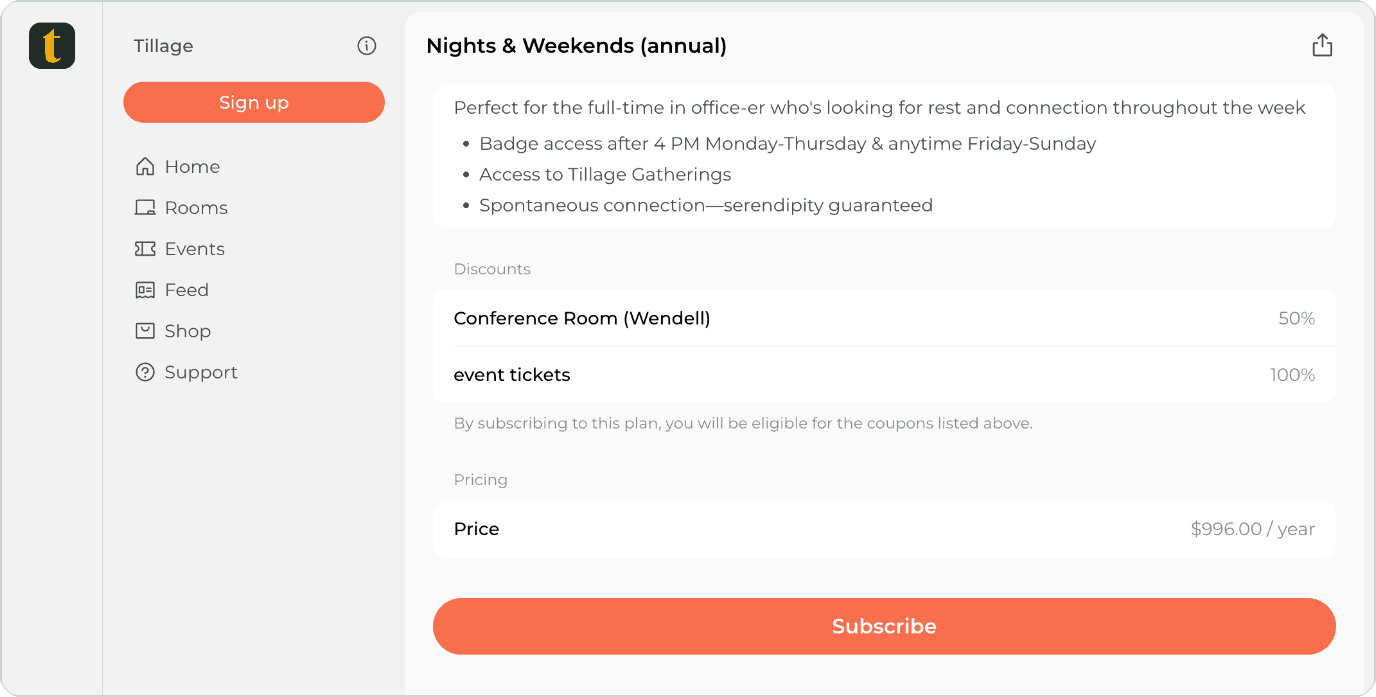
Nights & Weekends (annual), Tillage. See the live plan page
Village Coworking, Social Member
£35 a month for community access, member events and 20% off meeting rooms and event space, with day passes available for anyone who wants desk time. It’s also a nice example of a £49 setup fee shown clearly on the plan.
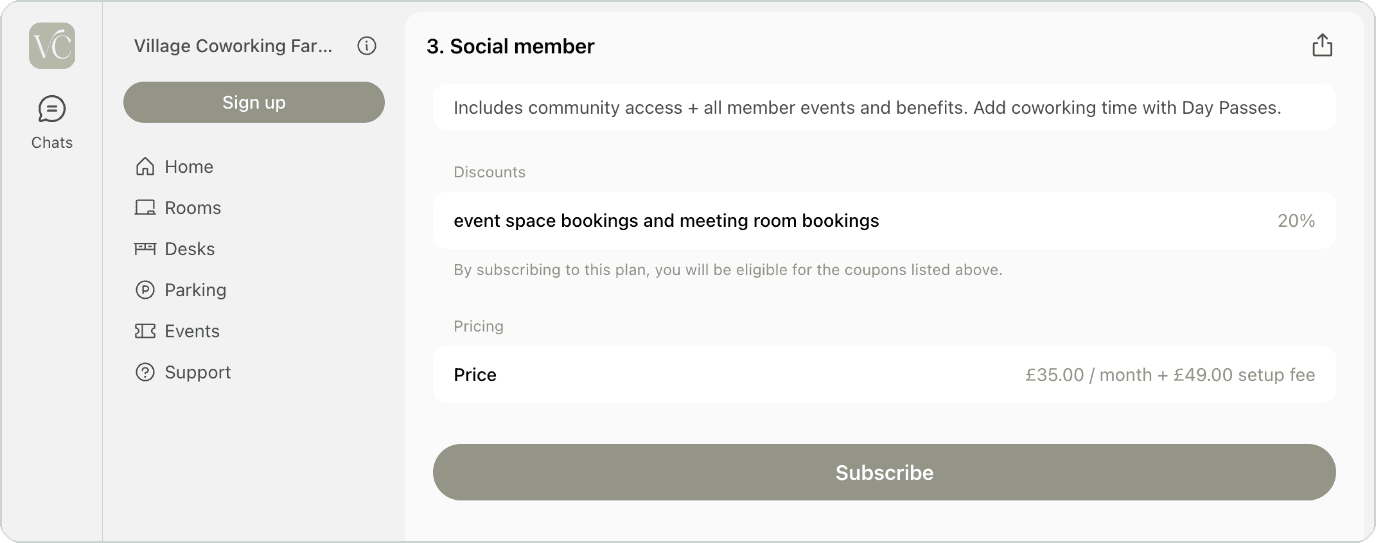
Social member, Village Coworking. See the live plan page
What these examples have in common
Prices vary a lot. One thing stays the same: every plan above is public and has a clear price, with no form to fill in first.
Visitors can read what’s included, see the price, work out what their team would spend, and decide on their own. That’s the difference between a website that describes your space and one that can welcome new members while you sleep. It also means fewer “how much is it?” emails for your team.
Let your next member join online. Make your coworking plans available for self-service sign-up with Spacebring.
Which plan works best for each type of coworking space
Different spaces need different plan structures. Here’s how operators match their plans to what they offer.
1. Traditional coworking spaces
The approach. A clear hot desk membership, weekly and monthly, plus a simple daily price for part-timers.
Charlie’s Coworkspace keeps it to two self-serve options: a daily rate at €50 plus VAT, and “Charlie’s Unlimited” at €350 a month plus VAT. Both can be bought without a sales call, so drop-in visitors and full-time members can each find what they need on the same page.
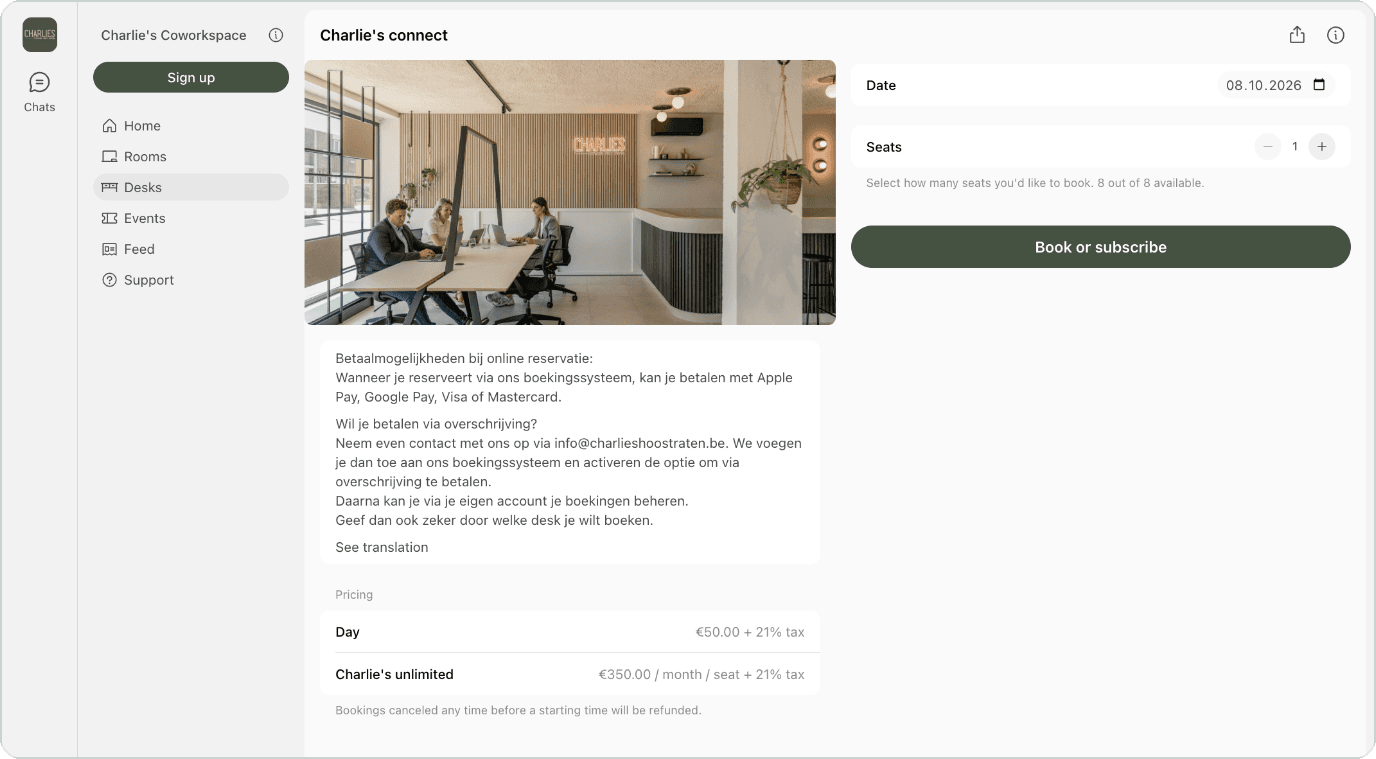
Day and monthly desk pricing, Charlie’s Coworkspace. See the live plan page
2. Multi-location operators
The approach. Offer a membership that works at every location. Decide how much of a member's credits they can use at other sites, from a small share to all of it. Day passes work across your whole network automatically. Price this plan a little above a single-location plan. The freedom to move around is what members are paying for.
PYHEX | WORK offers a multisite membership at $250 a month plus tax. It gives members the freedom to work near home, meet a client across town, or switch between sites easily.
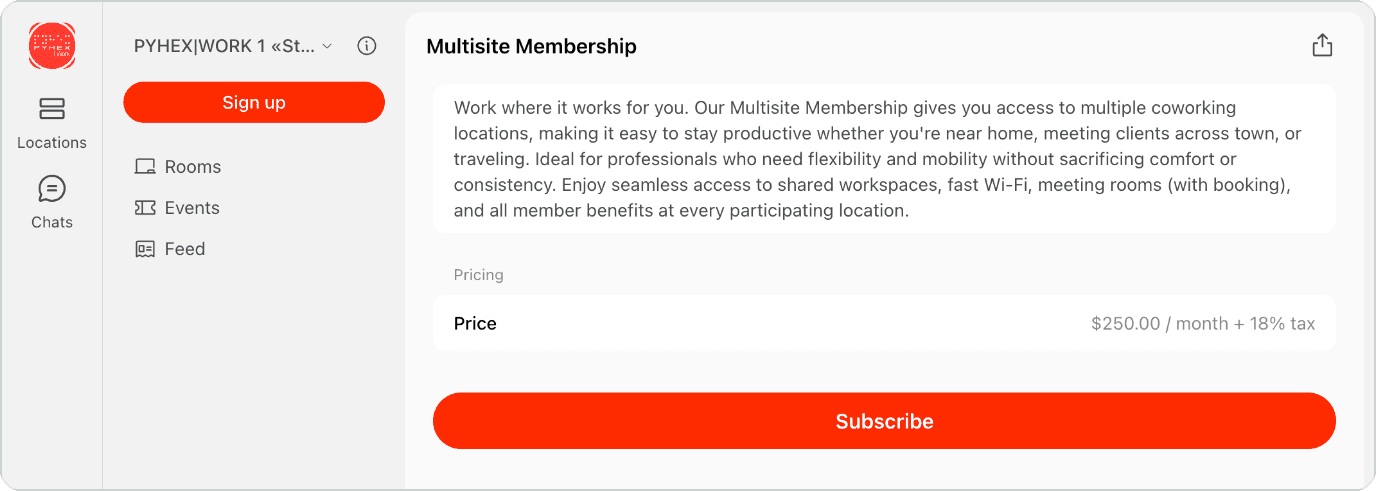
Multisite Membership, PYHEX | WORK. See the live plan page
3. Flexible office centers
The approach. Rent empty offices by the day, so a team can try the room before committing. Offer flexible terms with a simple way out. And if an office is hard to rent, you could turn it into a dedicated desk area for individual members.
House of Business does both. It rents its campus desks and day offices by the hour, and offers flexible plans on top: a basic “Campus Desk” at five or ten days a month, and “Business Privilege” options up to fifteen. There’s something for teams at every stage.
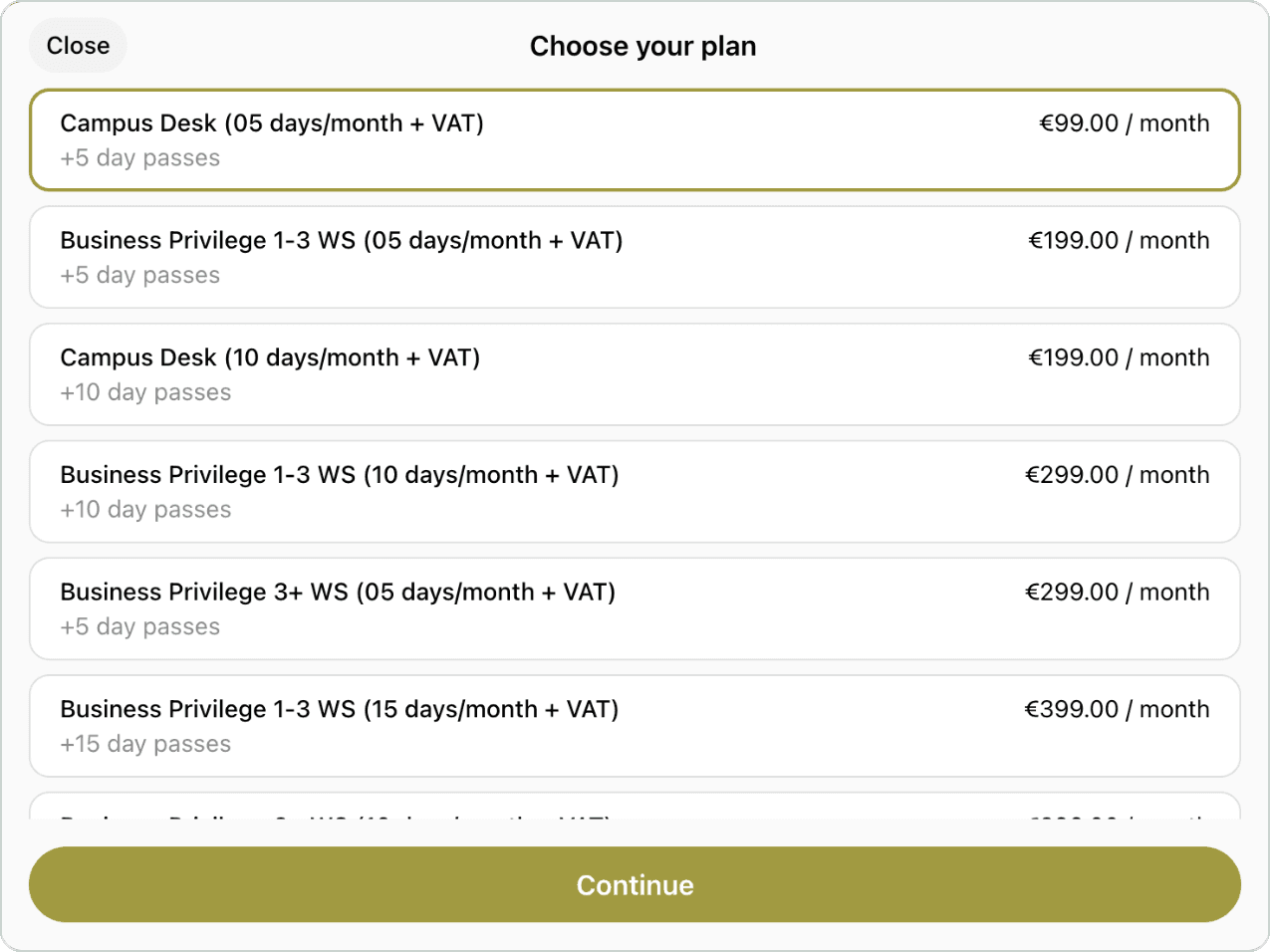
Flexible plan options, House of Business. See the live plans
4. Spaces for nomads
The approach. Plan around travel schedules rather than office calendars. Offer workcation packages in the quiet season, and give bulk passes longer expiry windows so travel changes don’t mean losing days.
Neighbors & Nomads in El Nido, Philippines, builds its offer around exactly this. Its low-season Staycation & Coworking bundles start at 30,200 PHP a month and combine 22 day passes with villa accommodation and a daily food and drink credit on working days.
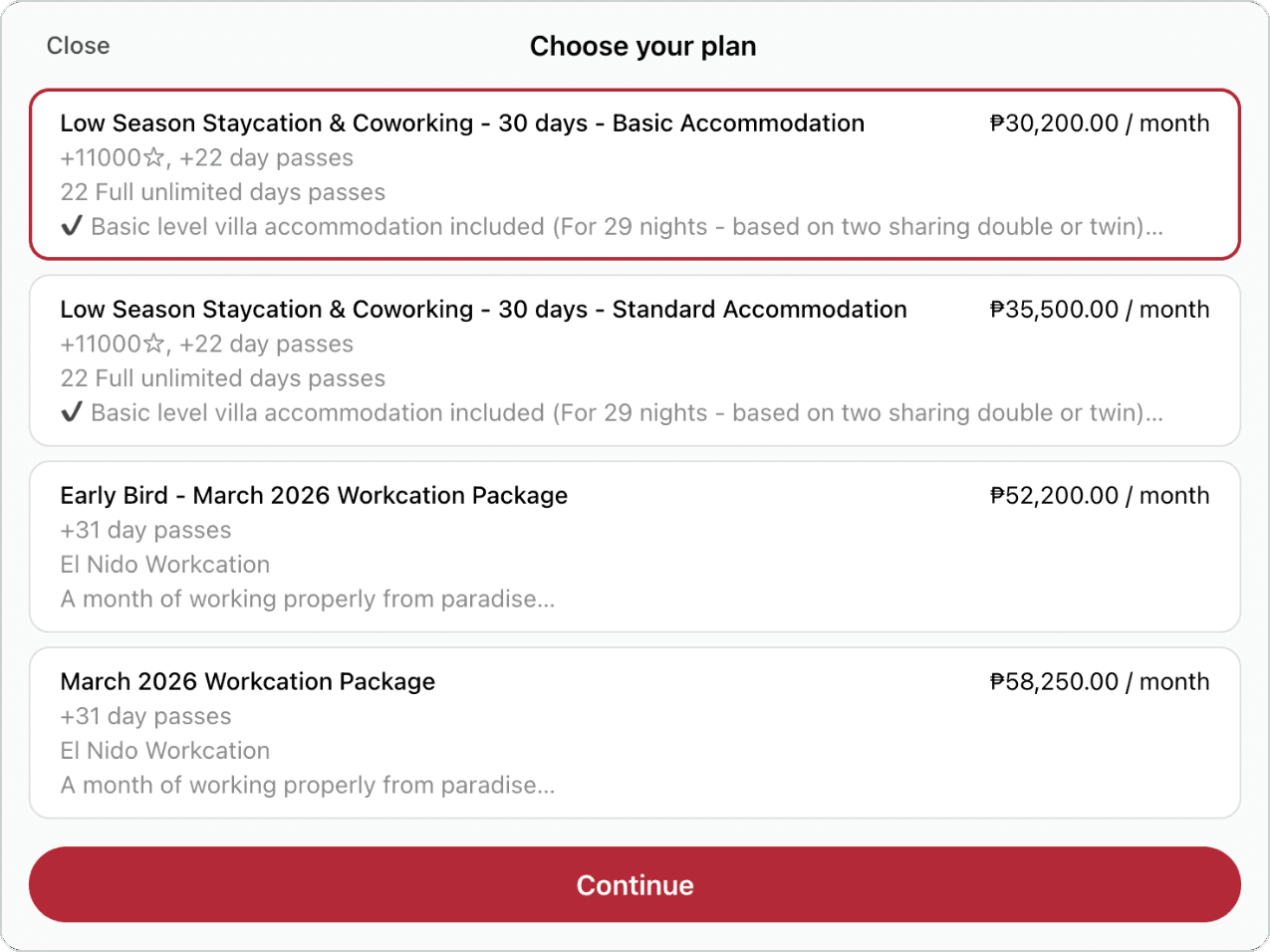
Staycation and workcation packages, Neighbors & Nomads. See the live plans
5. Spaces for creatives
The approach. Split your resources into two groups. Everyday spaces that need no training, like lounges, phone booths and standard meeting rooms, are open to everyone. Specialized spaces need training or verification and come with exclusive access, so only “Recording Pro” members can book the studio and only “Woodworking” members can book the table saw. Lower-priced hourly bundles for quieter hours can help fill the space without affecting peak times.
Atl Sound Factory offers four memberships based on studio hours: Connector ($99 / 4 hours), Indie ($249 / 12), Creator ($349 / 20) and Label ($499 / 32). Each one also includes member-only events and industry training.
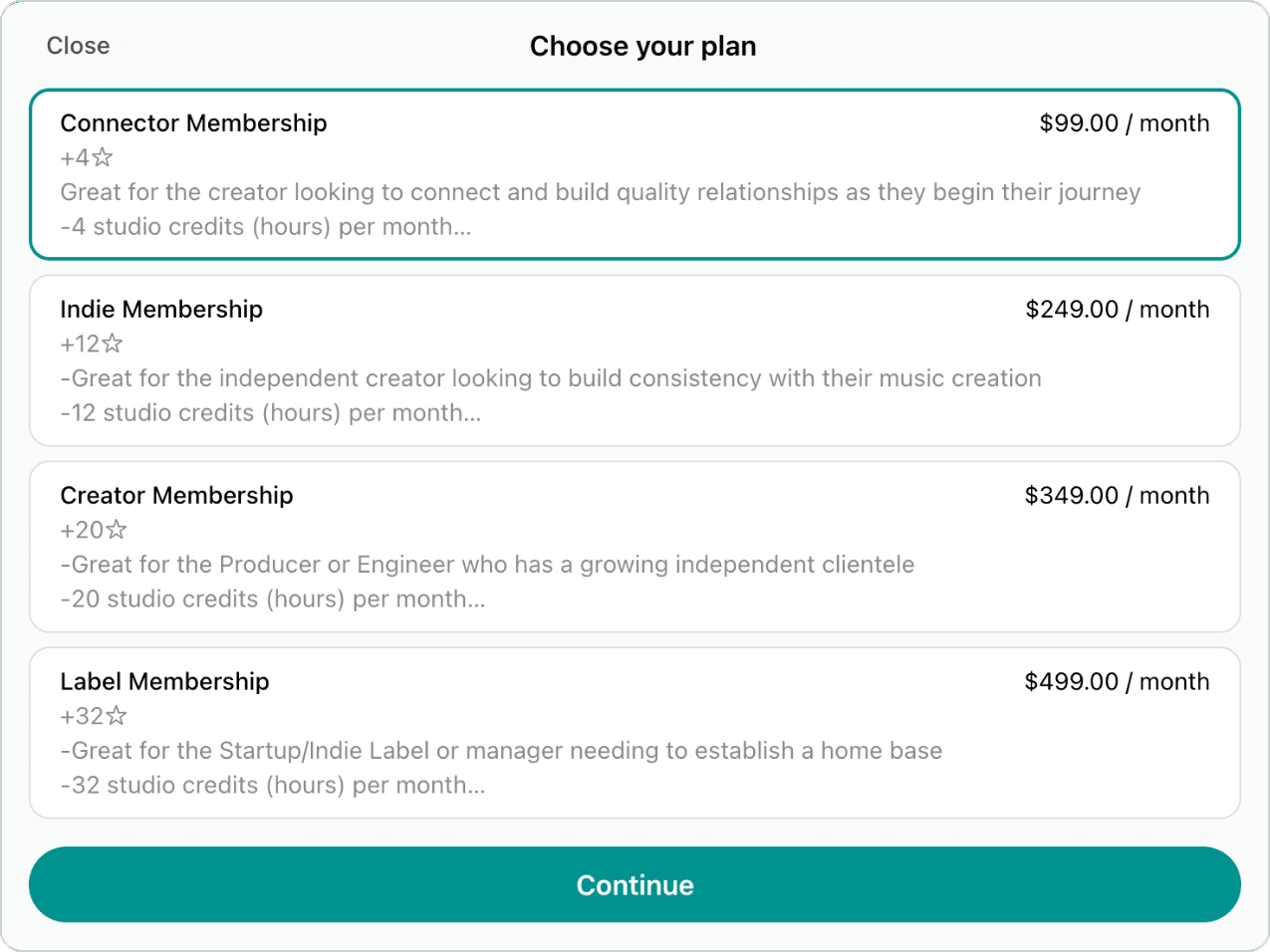
Studio-hour memberships, Atl Sound Factory. See the live plans
6. Regulated and professional coworking
Commissary kitchens, medical and dental suites, therapy rooms, legal and financial practices, labs. The plan setup is the same exclusive-access approach creative spaces use, with one important difference.
The approach. Members need valid licenses for the work they do, and if someone without a license works in your space, the responsibility can fall on you. Credits and room bookings stay simple. The agreements need more care, which brings us to the next section.
Membership agreements: terms of use or a signed contract
Plans describe what your members get. Agreements describe what happens if something doesn’t go as planned.
It’s common to spend weeks on pricing and then reuse whatever legal template came with the space. A clear agreement makes life easier for everyone when a question or disagreement comes up.
You don’t need to be a lawyer for this. There are three models, and you choose one per plan rather than one for the whole space. Our guide to writing a membership agreement goes through each clause, and our guide to coworking contracts and eSignatures walks through the signing process step by step.
Model 1: one set of terms, for self-serve plans
Best for: hot desks, flexible plans, day passes and most dedicated desks.
One Terms of Use document that every member accepts before their first booking or purchase. They accept, the date and time are recorded, and the terms cover every plan they buy afterwards.
This works because of a simple split. Your terms cover everything that applies to everyone: house rules, guest policy, acceptable use, liability limits, data handling, payment authorization, notice periods, what happens if a payment fails, and how you update the terms. The plan covers everything that varies: price, billing cycle, minimum commitment, allowances and setup fee.
That way you don’t need legal wording for each plan. The plan already shows the commercial details, and the acceptance is already recorded. Someone can join at 11pm without your team doing anything, and the agreement is still clear.
A helpful rule. Keep your plan descriptions and your terms in sync. If the plan says 30 days’ notice and the terms say 60, the member will reasonably expect 30. Write the notice period once, in your terms, and refer to it everywhere else.
Model 2: a signed contract, for agreed deals
Best for: private office rentals, dedicated desks on agreed terms, virtual office agreements, company accounts, custom discounts, deposits and event venue rentals.
Accepted terms of use are often enough, but a signed contract is the better choice in three situations: local law expects a specific signing process, the deal has terms you agreed individually, or you want a stronger record that a named person accepted it. A checkbox can’t capture an 18-month term with a 22% discount, a two-month deposit and first refusal on the office next door.
Signing used to mean printing, scanning and chasing. With eSignatures, the process looks like this:
- Start from an approved template. Keep a small set of Word templates, one for each kind of agreement: membership, desk rental, private office rental, virtual office and event venue rental. Placeholders fill in the member’s legal name, the dates, the signatories and every item with its price, so nobody retypes anything.
- Build the contract from what you already sell. Add the plans, desk or office rentals and one-off items, such as a setup fee or a deposit, that the deal includes. One-off items go on the first invoice.
- Add the signatories. Add the member’s signatory and, if your space signs too, your own authorized person. Set the signing order and an expiry date for the signature request.
- Issue it for eSignature. Each signatory gets an email in turn and signs online by drawing, typing or uploading a signature. If someone signs on paper, mark them as signed and upload the signed PDF instead.
- Follow up. A short reminder the next business day usually does it. If a contract is declined or expires, find out what got in the way, adjust the terms if needed, and issue a new version with a new expiry date.
- Let the signature start the membership. In Spacebring, once everyone has signed, the subscription can be created and activated automatically on the agreed start date, and the first invoice can go out on its own. It’s still worth checking that the first invoice matches the signed terms.
It’s also fast. In Spacebring’s data, 92% of contracts use eSignature, and 79% of those are signed within 24 hours, with a median of under two hours from sending to signing. Contracts signed on paper or outside the platform take a median of about a day and a half.
Model 3: application plus contract, for regulated professions
Best for: medical, dental, therapy, legal, financial, commissary kitchens.
If members need a license to do their job, a checkbox isn’t enough. Someone working without a valid license could lead to fines, legal claims or problems with your insurance.
Make these plans application-only. While you review the application, ask for the license number, issuing body, expiry date and insurance certificate, and check them. Then issue the contract with those details included, using the same signing steps as above.
You might expect extra steps to put people off. For regulated professions, they usually do the opposite. These professionals expect to be asked, and a careful check shows them you take their work seriously.
Choosing the right model
| If the plan is… | Use this agreement model |
|---|---|
| Standard self-serve: hot desks, day passes, flexible plans | Terms of use, accepted before the first purchase |
| Based on eligibility: student, nonprofit | Application, then terms of use |
| A virtual office | Application with an identity check, then terms of use, or a signed virtual office agreement where local rules expect one |
| A rental or custom deal: private office, agreed price, deposit, event venue | Signed contract, issued for eSignature |
| Regulated: therapists, lawyers, commissary kitchens | Application with a credentials check, then a signed contract |
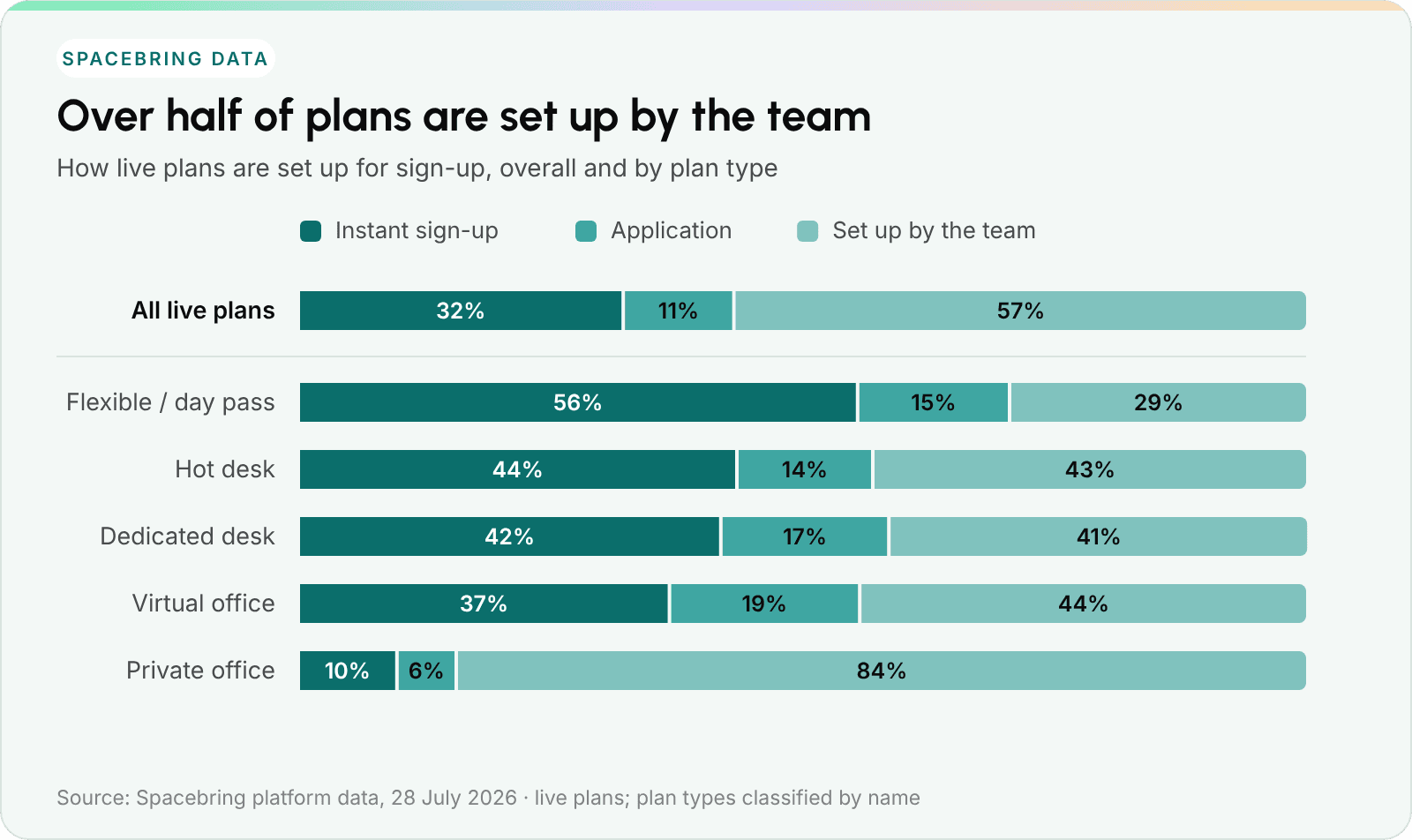
How live plans are set up for sign-up, overall and by plan type.
Where there’s room to grow
32% of live plans can be bought online instantly, and another 11% take an application. The other 57% are set up by someone on the team.
Some of that makes perfect sense. 84% of private office plans are set up by the team, which fits an agreed price and a signed contract. But 43% of hot desk plans and 29% of flexible plans are set up by the team too, and these are often the plans people would happily buy online at any hour. Almost one location in five has no plan open for online sign-up yet.
There’s encouraging news here as well. Among plans that are open for sign-up, 75% are instant and only 25% ask for an application. Once operators open online sign-up, most go all the way.
How to use this: Go through your plans and ask one question about each: is there a legal or eligibility reason someone can’t buy this online right now? For hot desks and flexible plans, the answer is usually no, so those are great candidates for instant sign-up.
The 15-point terms of use checklist
If you work on one legal document this year, make it your Terms of Use. You don’t need a lawyer to write it from scratch. Draft it yourself using this list, then ask a lawyer to review it. Here’s what to cover:
- Who you are. Legal entity, registration number, registered address.
- The law. Governing law and where disputes are resolved.
- The locations. Which locations are covered, and whether access is location-specific.
- The keys. Access hours, access method, and what a lost card costs.
- The allowances. How credits and day passes work, when they expire, and what happens to them on cancellation.
- The limits. A fair-use policy, so “unlimited” has sensible limits.
- The guests. Visitor policy, and who’s responsible if a guest damages something.
- The rules. House rules and what happens if they’re broken.
- The money. Payment authorization, currency, taxes, invoicing.
- Failed payments. Retries, late fees, and when access is paused.
- Leaving. Notice period and exactly how cancellation works.
- The deposit. What can be deducted and when the rest is returned.
- Liability. Liability limits and any insurance members need.
- Data. How you handle personal data, naming every processor.
- The version. Version number, effective date, and how you let members know about changes.
Number fifteen is the one people most often forget, and it’s the one that helps most if there’s ever a disagreement. Keep every past version with its effective date, and when you update the terms, ask every member to accept the new version. Your software should record who accepted and when, so you can always see which version someone agreed to.
One more tip: keep one Terms of Use plus one plan schedule. The terms hold the rules. The schedule is a table with one row per plan, listing price, billing cycle, minimum commitment and allowances. Launching a new plan then just means adding a row.
Start from a draft. You can ask an AI assistant like Claude or ChatGPT to draft your terms of use from the 15 points above. If your space management software connects to AI assistants, as Spacebring does, the assistant can look up your actual plans, so prices, billing cycles and allowances in the draft match what you sell. Fill in the legal details yourself, then ask a lawyer to review it.
Billing details that make plans work
A well-priced plan works best with clear billing behind it. These five things are worth deciding before you launch.
1. Mid-cycle upgrades
Say a member on a €100 hot desk upgrades to a €350 dedicated desk on day 20 of a 30-day cycle. There are ten days left.
What usually happens. Access changes right away, so they get their desk today. The price is a separate question. In Spacebring, if you schedule the upgrade with a start date before that period is invoiced, the charges are prorated automatically. If you make the change immediately and the current month is already invoiced, the new price starts at the next renewal, so for those ten days the member enjoys the upgrade at the old price.
Your choice. You can treat those ten days as a welcome gift, or charge the difference: ten thirtieths of €250, which is €83.33, added to the next invoice or billed now. Both are perfectly fine. What helps most is picking one approach and writing it into your terms, so every member is treated the same way.
2. Allowances when plans change or end
Credits and day passes from a plan usually reset at each renewal, and whatever is left expires when the subscription ends. Packs a member buys separately keep their own expiry date. It’s good to know exactly how your software handles this and to say so in your terms, so members know what to expect.
3. Failed payments
Following up on expired cards by hand takes a lot of time, and most of it can be automated. Set up automatic retries and reminders: Spacebring, for example, retries a failed payment twice, three days apart, and lets both the member and your team know each time. Then decide the personal part: how long you’ll wait after the last retry, and when access is paused. Applying the same rule to everyone keeps things fair.
4. Deposits
Deposits are easiest to manage when you keep them separate. Charge a deposit as its own line item or on a separate invoice, keep it out of tax and out of your revenue numbers, and explain in your terms what can be deducted and when the rest is returned after move-out.
5. Tax display
Show prices either with tax or without it, and keep it the same on every plan. Consistent prices make it easy for people to compare plans and decide.
Common pricing mistakes (and easy fixes)
Pricing is about more than numbers. It’s also how you show people what your space is worth. Here are six common mistakes, and how to avoid them.
- Charging for every little thing. When every basic service comes with a separate fee, members can feel like they’re always paying. Including the basics in the plan helps people feel welcome and looked after.
- Upselling too soon. Offering extra room hours right after someone signs up can feel pushy, since they haven’t used what they bought yet. A better moment is when they actually need more: when their credits run out or their last day pass is used.
- Surprise fees. If your public price is €200 and checkout shows a €100 setup fee and a €400 deposit, buyers can feel caught off guard. Showing every extra cost upfront, and being clear about what’s included and what uses credits, builds trust from the start.
- Prices that are too close together. If your dedicated desk costs barely more than your hot desk, it’s hard for people to see the difference. The typical gap is about 50%. A clear step in price that matches a clear step in value makes the choice easy.
- Offering just a desk. If your premium plan is only a piece of furniture, it’s hard to see what makes it special. A dedicated desk shines with a few extras, like printing, a bundle of room hours or priority at events.
- Plan descriptions that don’t match your terms. If the pricing page says 14 days’ notice and the terms say 30, members will reasonably expect 14. Keeping both in sync avoids confusion.
How to package plans without creating extra admin
Five ideas that keep checkout simple and save your team time.
1. Let people buy online
Open online sign-up on as many plans as you can, and handle the rest individually. Your team can then focus on the moments where a person really helps: a tour, an ID check, or a custom agreement. More than half of live plans are still set up by the team, so this is one of the easiest improvements available.
2. Review your plans once a year
Pricing works best when you revisit it. Your members’ needs change and your costs go up. Once a year, adjust for inflation and update what’s included based on what members tell you.
3. Keep commitments for when you need them
A monthly hot desk rarely needs a six-month commitment. Commitments make the most sense when you’re setting something aside for one member, like a private office or an assigned desk.
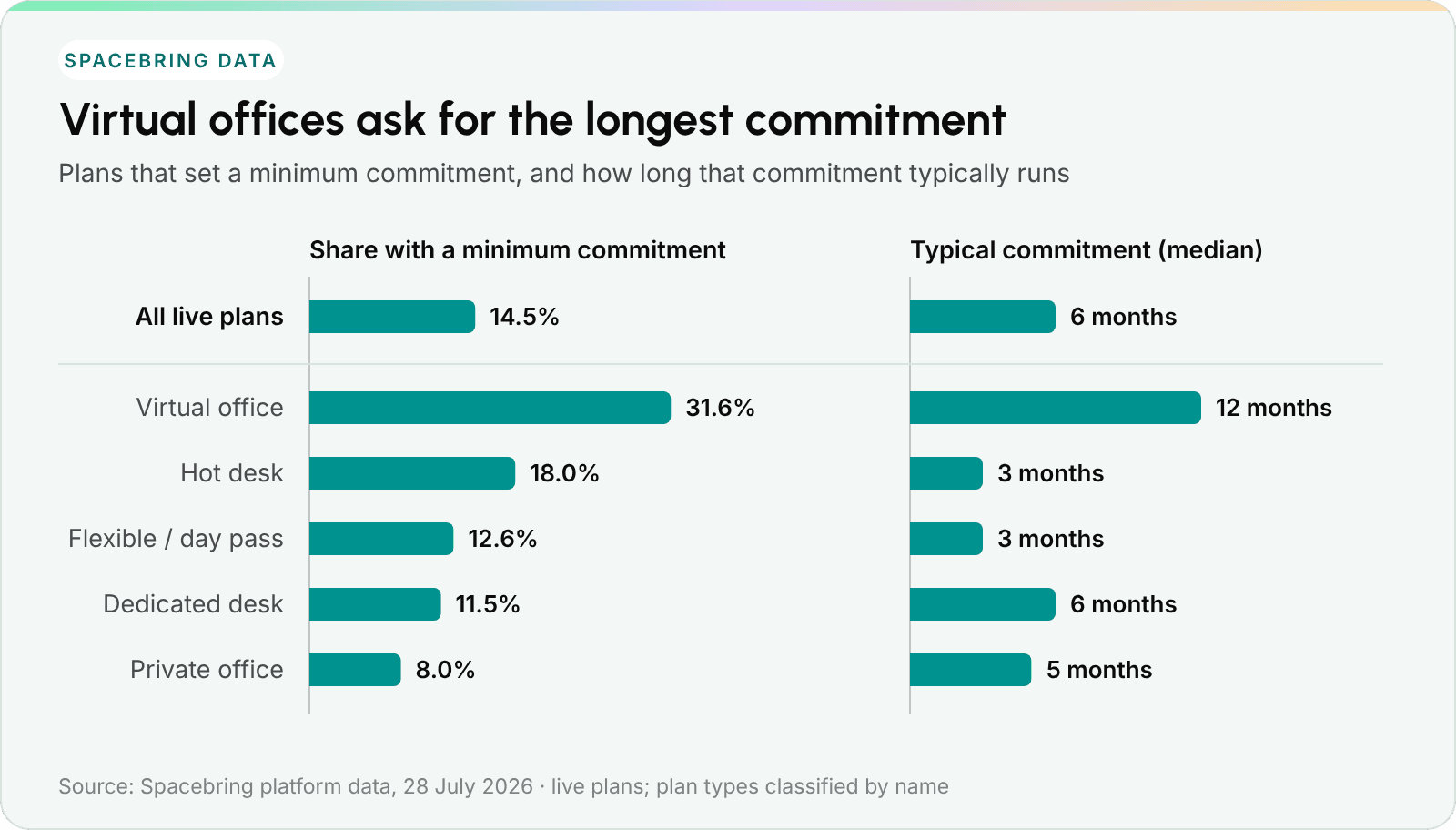
Which plans ask for a minimum commitment, and how long that commitment runs.
Most operators already use commitments sparingly: 14.5% of live plans ask for one. Looking at which plans use them, though, shows a pattern that might surprise you.
Virtual offices ask for a commitment most often: 32% have one, typically twelve months. Hot desks ask for one 18% of the time, typically three months. Dedicated desks, where a seat is set aside for one member, ask for one only 12% of the time. Private offices are lowest at 8%, probably because their terms usually live in a signed contract instead of the plan.
If your own setup looks similar, it may simply have grown over time. A simple starting point: no commitment on hot desks or flexible plans, two to three months on a dedicated desk, and twelve months only for deals where you’re setting something aside for one member, written into a contract.
Flexibility is one of the main reasons people choose coworking over a traditional lease, so it’s worth protecting.
4. Write a clear description
A creative name is fun, but people also need to know what they’re buying. “The Innovator Tier” on its own doesn’t say much. Give every plan three to five sentences that explain the access hours and the amenities in plain words. A third of live plans don’t have a description yet, so this is a quick way to make your plans easier to choose.
5. Show three to five plans publicly
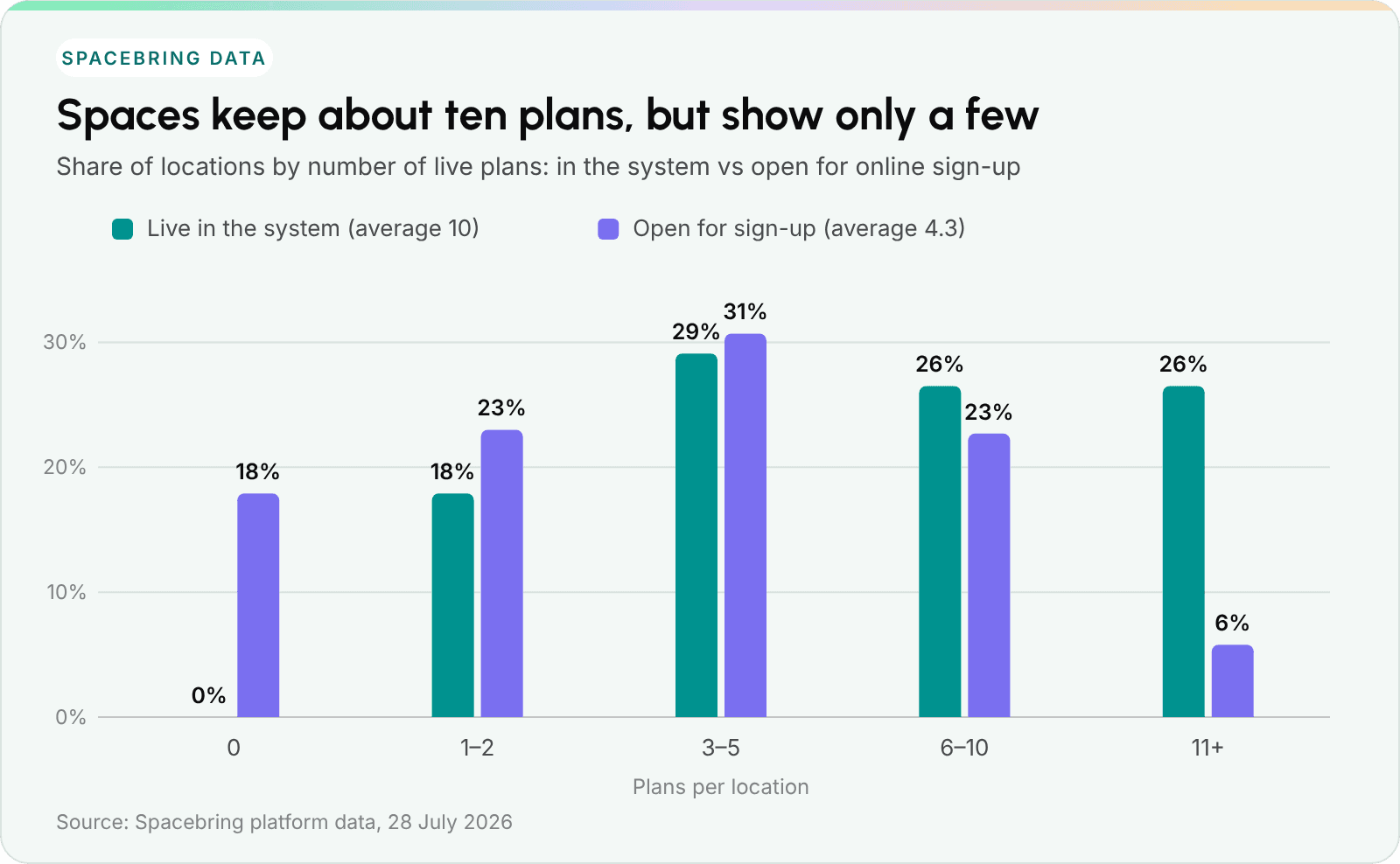
How many plans spaces keep in their system, and how many they open for sign-up.
The average location keeps ten live plans in its system, and the median keeps six. But only about four of them, on average, are open for sign-up. Most operators already keep their public list short.
That’s a great instinct to keep. Around ten plans behind the scenes is completely normal: long-time members, custom company deals, add-ons and seasonal packages all need a place. What new visitors see works best as three to five plans that are clearly different from each other, so choosing is easy.
How to change plans without losing members
At some point, every operator raises prices or updates their plans. Handled with care, it can go smoothly and even strengthen trust. Here are five steps.
1. Decide about existing members first
Will current members keep their old price, or will everyone move to the new one? Keeping old prices builds goodwill but lowers your margin. Either choice is fine, as long as you apply it to everyone in the same way. Consistency is what keeps trust strong.
In Spacebring, this is a setting on each subscription: when you edit a plan, the change applies to new subscribers and to existing subscriptions with Auto-update from plan turned on. A new price, credits and day passes kick in from their next billing cycle. Everyone else keeps their current terms.
2. Give plenty of notice
Give more notice than your contract requires. If your terms say 30 days, you could give 60. An extra month at the old price is a small cost for a much smoother conversation.
3. Focus on what members get
Explain what’s new for the member, rather than why your costs went up. People are much more comfortable with a price change linked to something they can see: a new phone booth, longer hours, more credits or better coffee.
4. Update the subscription instead of replacing it
It's tempting to cancel a subscription and create a new one at the new price, but that has side effects. Canceling right away removes the member's remaining credits and day passes, their desk or office assignment, their discounts and their door access, and a new subscription might add a setup fee. Editing the existing subscription works better: end the old plan on a date and start the new one from the next day. The one exception is a change of billing cycle, such as monthly to annual, because a subscription's billing cycle can't be changed. In that case, schedule the old subscription to end and start a new one the next day.
5. Retire old plans instead of deleting them
Close the old plan to new sign-ups so it no longer appears publicly, and let existing subscriptions continue until those members leave or switch. Your team can still add the closed plan by hand when needed. Deleting a plan can't be undone: existing subscriptions continue, but you lose the plan as a template for new ones.
How to tell whether your plan mix is working
Four numbers, checked once a month, will tell you a lot. If something in your plan setup needs attention, one of these usually shows it first.
1. Revenue share by plan
The share of monthly recurring revenue each plan brings in. Keep an eye on any single plan above 60% of recurring revenue. Relying that much on one plan means a competitor’s offer or a needed price change could affect most of your revenue at once.
2. Allowance use
Credits and day passes used, compared with credits and day passes given.
- Usually under 40%: members aren’t using much of what’s included. You could reduce the allowance, or keep it and adjust the price.
- Usually close to 100%: members want more. Offering top-up packs earlier in the cycle can help.
3. Churn by plan, not just for the whole space
Look at the cancellation rate for each plan rather than one number for the building. If overall churn looks fine but one hot desk plan is losing members three times faster than average, that plan probably needs a closer look. Averages can hide useful details.
With monthly plans, keep in mind that some members buy a single month on purpose. It helps to separate people who left after one cycle from people who stayed a while and then left.
4. Upgrades and downgrades
How many members move between plans each month. If nobody ever moves up or down, your plans might be too similar to make switching worthwhile, often because their prices are too close.
The plan health matrix
Place each plan on a grid of allowance use against churn.
| Low allowance use | High allowance use | |
|---|---|---|
| High churn | The quiet plan. Members join, rarely come in, and leave. The value might not be clear yet, so this plan could use a refresh. | The busy plan. Members use everything and still leave. The price may be too low, or members may be outgrowing it. |
| Low churn | The steady plan. Members stay but don’t engage much. Reliable revenue, with room to build more engagement. | The sweet spot. Members are active and staying. These are great candidates for top-ups and upgrades. |
Put your membership plans into practice. See how Spacebring brings subscriptions, billing and member access together.
FAQ about coworking membership plans
1. What membership cancellation policy should I choose?
Thirty days’ written notice is common, and it gives you time to plan and fill the space. For a friendlier experience, let members request cancellation from their member portal, and end the subscription at the close of their current billing cycle.
2. How many free meeting room hours should I include in a plan?
First decide what a credit is worth, then size the allowance as a share of the plan price. A good starting point is to give back 5–10% of the plan price in room value. If an hour costs €10 and the plan costs €300, that’s €15–€30, or one and a half to three hours. Then let your members’ usage guide you: if most credits go unused, you can reduce the allowance; if members run out every month, offer top-up packs.
3. Should I give different numbers of hours for different room types?
Usually not. Simple is easier for everyone, and nobody wants to keep track of “boardroom hours” and “podcast hours” separately. Use one credit balance and price each room in credits according to its rate. A smaller room uses fewer credits, and a premium room uses more.
4. How do I structure different tiers for the same physical space?
Think about the experience, not just the floor space. Flexible access to a lounge, where members sit somewhere different each day, is one plan. An assigned workstation with an overnight locker in that same lounge is a premium plan. Same room, different product.
5. How do I price a part-time member against a full-time member?
Make them separate plans with clear names, rather than adjusting invoices by hand. A part-timer chooses the plan with ten day passes a month. A full-timer chooses the plan with unlimited access. Everyone knows exactly what they’re getting.
6. What is the best way to control who can sign up?
Add an application step only when there’s a legal or eligibility reason: a student card, a charity registration, a professional license, or an identity check for a virtual office. For everything else, a simple “choose, pay and start working” flow works best.
7. Do I need a signed contract, or is accepting the terms of use enough?
For standard self-serve plans such as hot desks, day passes and flexible plans, terms of use accepted before the first purchase are usually enough, and much quicker. A signed contract is the better choice when local law expects a specific signing process, when terms are agreed individually (a deposit, a custom price, a specific office or desk), when you want a stronger record of who accepted, or when a member needs professional credentials for their work. With eSignature, most contracts are signed within a day.
8. Can one Terms of Use document cover several membership plans?
Yes, and it’s the simplest way to do it. Everything that applies to everyone goes in the terms. Everything that varies, such as price, billing cycle, commitment and allowances, goes on the plan or in an attached schedule.
9. What happens to unused credits and day passes when a member cancels?
Allowances that come with a plan usually expire when the subscription ends, and with most software they also reset at every renewal. Whatever your setup, it’s a good idea to explain this clearly in your terms before your first cancellation.
10. Should I charge a setup fee?
Only if onboarding has a real cost you can’t recover otherwise, such as printing an access card or a required background check.
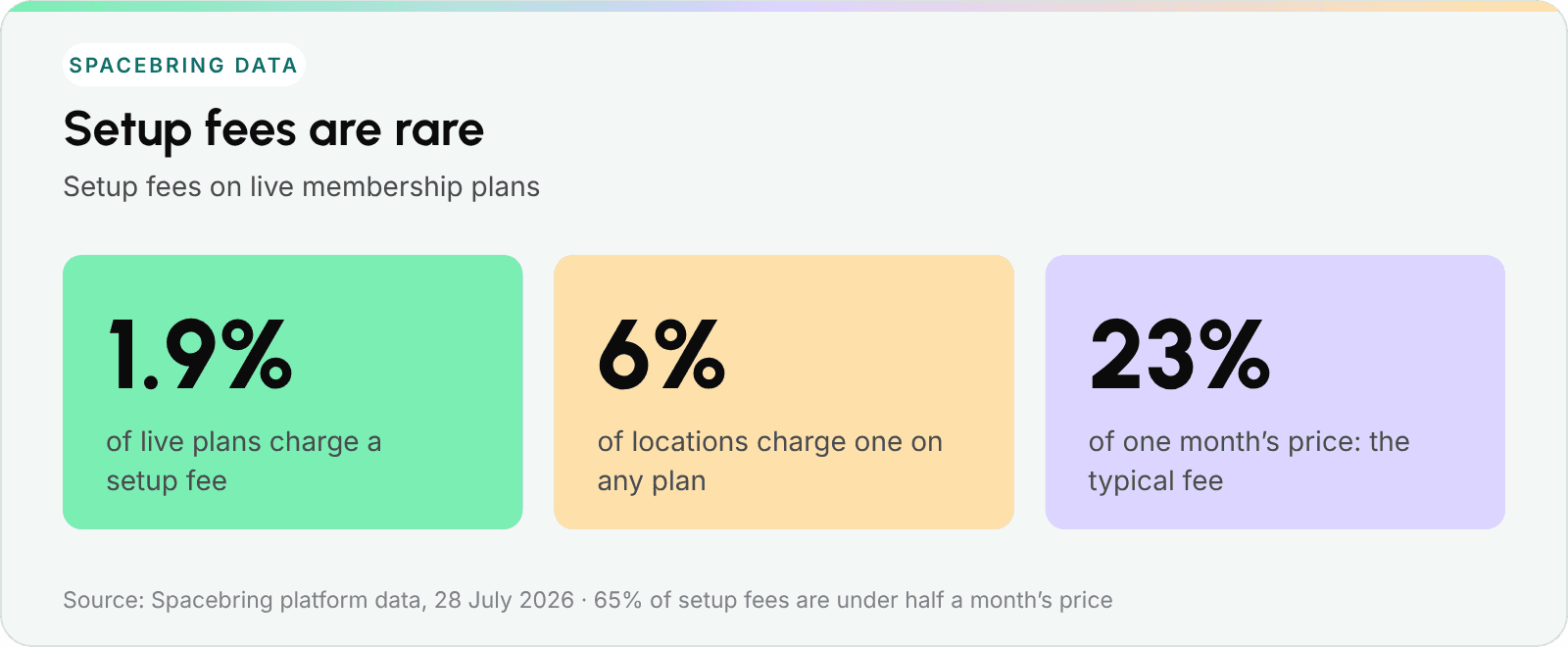
How many plans charge a setup fee, and how large it is compared with one month’s price.
Setup fees are rare. Only 1.9% of live plans charge one, at about 6% of locations. Where operators do charge one, the median fee is roughly a quarter of one month’s price. If you decide to charge one, keep it small, show it on the plan, and make sure buyers see it before they reach the payment screen.
11. How many membership plans should a coworking space offer?
Three to five public plans is a good number. Behind the scenes, around ten is normal: plans for long-time members, company deals, add-ons and seasonal packages all need a place. What matters most is how many plans a new visitor has to compare.
About the data: Figures come from a Spacebring data export dated 28 July 2026. Plan figures cover every live membership plan on the platform at that date; plans that operators had deleted are excluded. Plan types were assigned from plan names. Price ratios compare monthly-equivalent prices of different plan types within the same location, so no currency conversion is involved. Membership lifetimes come from all subscriptions that ended between January 2024 and July 2026, excluding subscriptions canceled before they started. Day-pass, sign-up and commitment figures by plan type are based on the classified plans.