

You have just agreed on a private office deal. The customer is ready to move in next month, but the contract still needs to be prepared, reviewed, and signed.
To avoid delays and back-and-forth, establish a clear contract process and keep your templates ready to use. This means knowing which terms apply, how customers should accept or sign them, what information to collect, and who needs to approve the agreement.
Let’s start by clarifying the types of agreements coworking operators use. Private office rentals, desk rentals, memberships, and virtual office services each have different terms, obligations, and signing requirements. Understanding which agreement fits each offering helps you prepare the right contract and move deals forward without delays.
Types of coworking contracts and agreements
Coworking operators use different contracts depending on the product they sell. These agreements should not be treated as interchangeable: each one covers a different service, set of rights, and commercial terms.
1. Membership agreement
A membership agreement sets the terms for using a coworking space and its shared services. It may apply to hot desks, shared work areas, community access, or other flexible membership plans.
It typically covers the membership plan, fees, payment terms, access rules, notice period, renewal terms, and use of shared spaces.
2. Desk rental agreement
A desk rental agreement applies when a customer rents a specific dedicated desk or workspace. In addition to standard usage and payment terms, it can define the assigned desk, access arrangements, term, and any services included with the rental.
3. Private office rental agreement
A private office rental agreement applies when a customer rents an enclosed office. It should clearly define the office being provided, rental term, pricing, deposit, renewal and notice terms, and any negotiated conditions or included services.
This is not a coworking membership agreement, although both agreements may include similar commercial terms.
4. Virtual office agreement
A virtual office agreement covers services provided without physical workspace use, such as a business address, mail handling, or other administrative services. It should specify the services included, fees, term, permitted use of the address, and any relevant limitations.
5. Event venue rental agreement
An event venue rental agreement applies when a customer books a coworking space for a meeting, workshop, conference, or private event. It should define the venue, booking date and time, rental fee, payment and cancellation terms, included equipment or services, capacity limits, setup and cleanup requirements, and rules for catering, alcohol, noise, or third-party vendors.
1. When do you need a signed coworking contract?
Online terms may be sufficient when they are legally enforceable and adequately cover the service and customer relationship. When they are not sufficient, use a signed contract and a signature method that is legally enforceable for the agreement and jurisdiction.
Consider:
- The type of service being provided, such as a membership, desk rental, private office rental, or virtual office service
- Whether the terms are standard or individually negotiated
- Whether the arrangement needs customer-specific terms
- Whether online acceptance is legally enforceable for the service and customer location
- Whether the chosen signature method meets local requirements
The agreement should clearly regulate the relationship between the coworking space and its customer and protect both parties’ rights.
Online standard terms vs. individually negotiated contracts
Online standard terms set rules that apply to customers generally. They can form an enforceable agreement when customers accept them through a valid consent flow and when they are adequate for the transaction.
An individually negotiated contract records terms specific to one customer’s deal, such as the agreed services, pricing, deposit, term, or other negotiated conditions. Whether to use this approach depends on the agreement and local legal requirements—not simply on the length or value of the deal.
In Spacebring, customers can accept your ‘Terms of use’ through the member portal. Use a signed contract when local law or the agreement requires a particular signature process, when the deal includes individually agreed terms, or when you want a stronger record of the customer’s acceptance—even for a standard membership.
2. What should a coworking contract include?
A contract does not have to be intimidating. It should answer the practical questions a member may have before committing.
Start with the basics:
- Who is signing? Include the legal names of the member and coworking business, plus the relevant company information.
- What are they getting? Name the office, desk, membership, mailbox, or other service clearly.
- What will it cost? Include fees, billing period, discounts, deposits, and one-off charges.
- How long does it last? State the start date, end date, minimum commitment, renewal terms, and notice period.
- What happens if plans change? Cover early exit, office moves, seat changes, add-ons, and other negotiated conditions where relevant.
- Who is authorised to sign? Identify the authorised signatories for both parties, and include signature fields and the signing date.
The exact legal wording should come from your approved template and local legal advice. Your job is to make sure the commercial details are complete and accurate before the agreement is sent.
Create templates for each type of agreement
Think about the agreement types you send most often. Create separate templates when the conditions differ—for example, for private offices, dedicated desks, virtual offices, or renewals.
A private-office agreement may need to cover the specific office, deposit, notice period, and office-specific terms. A virtual-office agreement may instead define how mailbox or business-address services are provided, including any applicable timeframes and restrictions.
The goal is not to make every deal identical. It is to keep approved legal wording consistent and avoid rewriting standard terms. Update only the details that genuinely change, such as the member, workspace or plan, price, dates, services, and authorised signatories.
Useful placeholders include:
- Member or company legal name
- Member contact details
- Workspace location
- Membership plan, desk, or office name
- Start and end dates
- Contract term and notice period
- Price, billing period, discount, and deposit
- Additional services, such as parking or mailbox access
- Authorised signatories and signing date
There are several ways to prepare a contract. Copying a previous document requires no special software, but it is time-consuming and makes it easy to leave behind an old name, price, date, or clause. AI can help draft or adapt documents, but it should not be relied on to generate legal terms or commercial details without careful review.
A more reliable approach is to prepare approved templates in advance and use a system that fills in the changing details consistently. Spacebring contract templates let you upload an approved .doc or .docx file, add placeholders for customer and deal information, and populate them with the relevant data. Your team starts with the right agreement without copying and manually editing an older contract.
Template-based contracts are especially useful when a deal includes both recurring and one-off items. In Spacebring, you can add both to the contract, and one-off items appear on the first subscription invoice. This helps keep the signed agreement and the initial bill aligned without manually calculating or copying details between documents.
How House of Business uses contracts in practice
House of Business, a flexible workspace operator with five locations in Budapest and more than 500 members, issues more than 20 contracts per month through Spacebring.
The electronic contract and eSignature feature from Spacebring is brilliant. It works perfectly, it’s reliable, and its simplicity meant zero training was required for our team.Attila FeherManaging Partner at House of Business

You probably need fewer templates than you think. Across coworking operators in Spacebring’s anonymised product data, the median operator had two active contract templates. Start with the agreements you use most, then add another only when a real pattern emerges.
Source: anonymised Spacebring contract-template export; active-template snapshot September 11, 2026.
3. Should you use an electronic signature or an external signing process?
The practical answer is: use the simplest signing method that is legally enforceable in your jurisdiction for the scope of the contract.
Electronic signatures can speed up contract signing for both the customer and the coworking operator by removing the need to print, scan, exchange, and store paper documents.
A signatory can receive the contract by email, review it, and sign without printing or scanning. That can be especially helpful when decision-makers work remotely or when several people need to sign.
A signature completed outside Spacebring may still be appropriate in some situations. Your local regulations, the agreement itself, or the customer’s internal process may require a different method. When that happens, keep the final signed PDF with the contract record so your team is not searching through inboxes later.
Whichever route you choose, set it up before you send the contract:
- Add every person who needs to sign, including the authorised signatory from your own team.
- Confirm whether the signatories can sign in any order or whether one person must sign first.
- Set a clear expiry date for the signature request so the agreement does not remain open indefinitely.
- Decide who will follow up and where the final signed document will be stored.
With Spacebring eSignatures, create a contract from an approved template, add customer-side and location-side signatories, and set their signing order. After you issue it for eSignature, each signatory receives the contract by email in sequence. For contracts signed on paper, mark each signatory as signed and upload the final signed PDF to Spacebring.
A simple legal check before you switch to eSignatures
Before rolling out eSignatures for a contract type, check:
- Are electronic signatures valid for this type of agreement in your country, and does your chosen signing method meet any applicable requirements?
- Are there requirements around identity checks, audit trails, storage, or the type of signature?
- Does your customer need a particular signing method for their own compliance process?
- Who in your organisation has authority to sign? The contract should be signed by someone authorised to legally bind the organisation, usually a person listed in the company’s registration documents or formally granted signing authority.
Ask local counsel to validate the answers. Do not assume that eSignatures are valid for every type of agreement your business uses. Confirm that your chosen signing method is appropriate for each contract type and your local legal requirements.
What does this look like in practice?
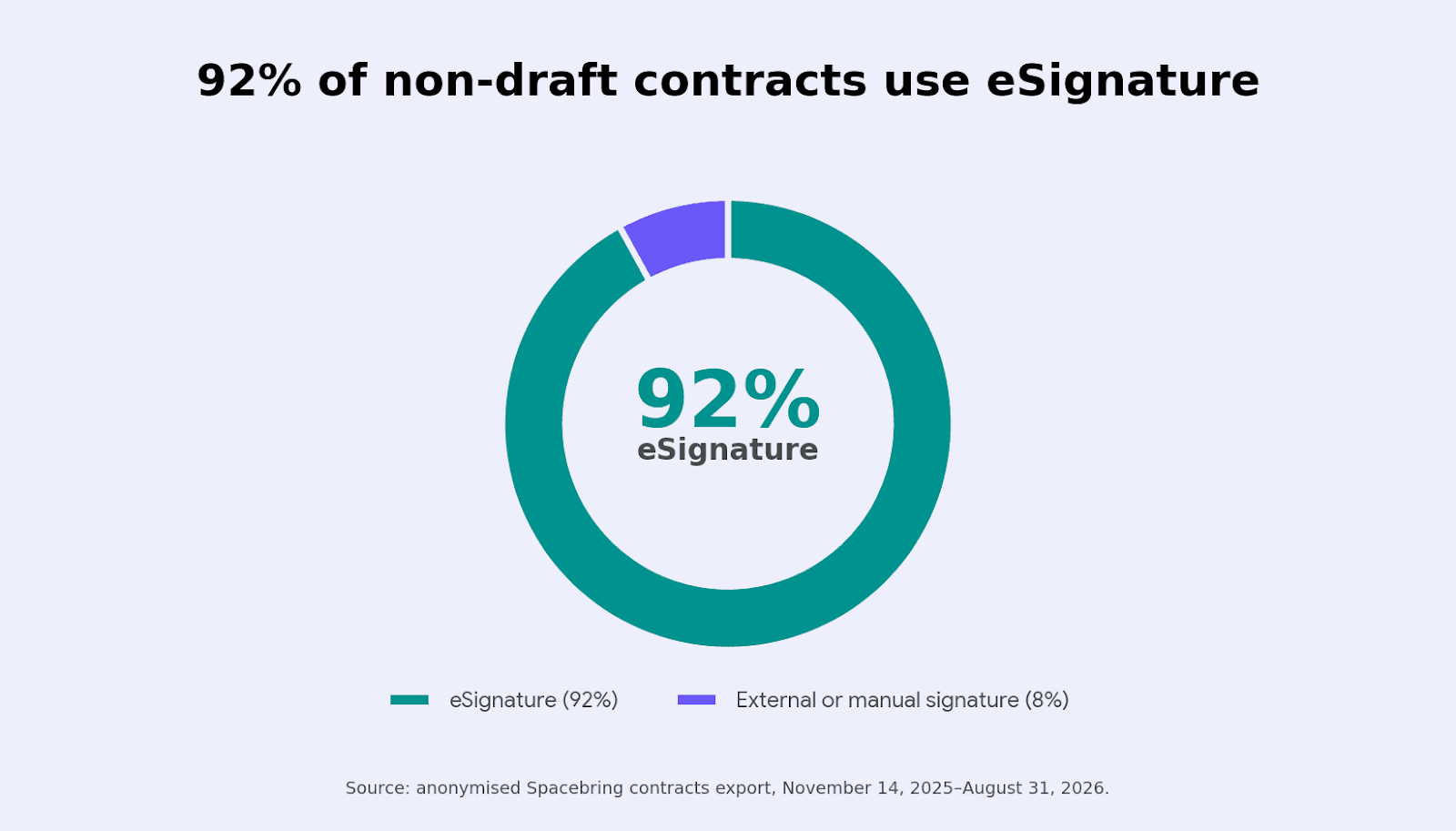
Spacebring product data shows that eSignatures are the common route in practice: 92% of contracts that had moved beyond draft used eSignature, while 8% used an external or manual signature. This shows signing-method adoption, not that one method is legally appropriate for every agreement or country.
Speed is one practical benefit of eSignatures. In Spacebring’s anonymised contract-signing data, 79% of signed contracts were completed within 24 hours, with a median issue-to-signature time of 1.8 hours. By comparison, only 50% of contracts recorded as manual or external signatures were completed within 24 hours, and their median time to signature was 37.6 hours.
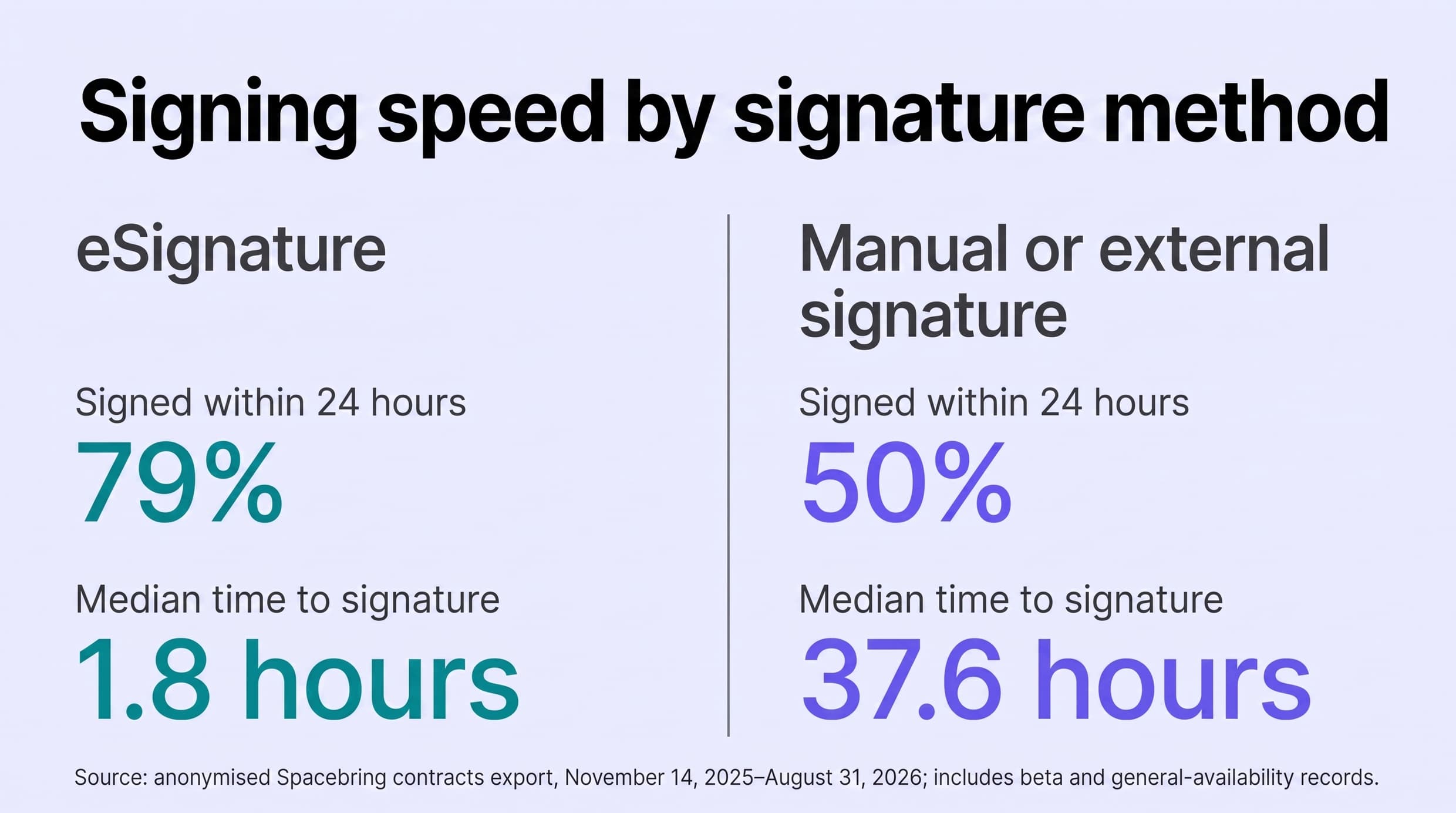
Source: anonymised Spacebring contracts export, November 14, 2025–August 31, 2026; includes beta and general-availability records. “Manual/external” does not necessarily mean a paper or wet-ink signature.
4. Before you send a coworking contract
The best signing experience is prepared long before the customer receives an email.
Start by making sure your system has the building blocks:
- Approved, reusable templates with placeholders for details that change, such as the member’s legal name, workspace, price, deposit, dates, and authorised signatories
- Accurate services, prices, billing periods, and discounts
- A clear place to store customer and signatory details
- A list of the people authorised to sign for your coworking business
- A simple handoff between sales, operations, finance, and onboarding
- A reminder process for contracts that are nearing expiry or a renewal deadline
One tip makes a big difference: collect the customer’s company details, billing information, and each signatory’s full name and email address during the sales conversation. Then prefill them in the contract.
Your customer should not need to do admin work that your team has already done. The easier the signing step feels, the more likely it is that the customer will complete it quickly.
5. A simple new-member contract signing workflow
A clear workflow means the customer knows what to do, and your team knows what happens next.
Step 1: agree on the commercials
Before creating anything, confirm the plan, price, term, discount, deposit, and any special conditions. The contract should document an agreed deal—not start a new negotiation.
Step 2: collect signatory details
Ask who needs to sign on the customer side and who is authorised to sign for your coworking space. Check names and email addresses, and confirm whether anyone has to sign first. Doing this early prevents the classic delay: a contract is ready, but it was sent to the wrong person.
Step 3: create the contract from a template
Choose an approved template with placeholders for customer and deal information, then create the contract in your contract management system so the customer details, plan, price, discounts, deposits, and dates are filled in consistently. Check every commercial term against the agreed deal before sending.
Step 4: send it for signature
Send the contract with a short, human message: what the agreement covers, who needs to sign, and when you need it back. If several people need to sign, make the order clear. With eSignature in Spacebring, each signatory receives the contract by email and can sign from there.
Step 5: follow up before it expires
Do not wait until the last day. Follow up promptly when a contract remains unsigned—often the next business day—to uncover simple blockers such as a missed email, the wrong signatory, or an outstanding question about the terms. Keep the contract’s expiry date visible so the team can follow up in time.
Step 6: get the contract fully signed
Once the customer has signed, complete any required internal approval or countersignature. Confirm that the agreement is fully executed, store the final version, and make it available to the sales, operations, and finance teams.
Once the contract is fully signed, the next step is to activate the agreed services and billing. In Spacebring, a subscription can be configured to be created and activated automatically once all required signatures are collected. We’ll cover the post-signature handoff in the next section.
What if the contract is declined or expires?
Treat it as a conversation, not a paperwork failure. Ask what changed. It may be a price discussion, a missing signatory, an expiry date that was too short, or a condition that needs revising.
Update the agreement as appropriate, set a new expiry date, and issue the new version. Keep the process clear so the team always knows which document is current.
6. What happens after a coworking contract is signed?
A fully signed contract should trigger the operational handoff: activate the agreed services, start billing, and prepare the customer for their start date.
Use the signed agreement to complete the remaining handoff:
- Confirm the start date. Confirm when the customer can move in, collect keys, or begin using the service. If access begins before the contract is fully signed, document the interim arrangement and its conditions.
- Set up the agreed service. Provide access to the office, desk, mailbox, or other services in the agreement.
- Check the first invoice. Confirm it reflects the signed price, discounts, deposit, and one-off items.
- Brief the person welcoming the customer. Share the main contact, agreed service, and relevant commitments.
- Record renewal and notice dates. Set reminders while the agreement is still current.
- Keep one final version. Sales, operations, and finance should work from the same signed agreement.
In Spacebring, you can add recurring services to the contract before it is signed and set the subscription to be created or activated automatically on the selected start date once all required signatures are complete. This helps your team start billing from the agreed contract terms without re-entering the deal. For contracts with only one-off items, Spacebring can issue an invoice after the contract is fully signed.
You can also hand the welcome to an agent. A Contract agent sends the customer a confirmation once they sign and explains what happens next, like the first invoice and when their access begins.
In Spacebring’s anonymised product data, 98% of non-draft contracts configured to create a subscription had a linked subscription. This does not cover every onboarding task, such as access or welcome, but it removes one manual billing handoff.
Source: anonymised Spacebring contracts export, November 14, 2025–August 31, 2026; includes beta and general-availability records.
7. How to manage contract renewals in a coworking space
Renewals are easier when they are planned rather than chased.
Review upcoming end dates and notice periods well in advance. For many annual agreements, contacting the customer at least a month before renewal is a sensible starting point. Longer notice periods, larger offices, or more complex price discussions may require an earlier conversation.
Before you send a renewal, check what has changed:
- Has the team grown or shrunk?
- Has the customer moved offices or added desks?
- Are there new services or add-ons?
- Is a price change planned?
- Does the existing agreement move into a new term automatically, end on a fixed date, or roll into month-to-month service?
You may need a renewal agreement, an amendment, or a new contract. Follow the process approved for your business and jurisdiction.
8. Five coworking contract mistakes that slow down sales and onboarding
1. Editing every agreement manually
It starts innocently: someone copies the last private-office agreement and changes the name, price, and dates. Then an old discount, notice period, or clause slips through unnoticed.
Better approach: start with an approved agreement for the relevant service instead of copying and editing an older document. This keeps standard terms consistent and reduces the risk of manual errors.
Treat unusual terms as exceptions that need review.
2. Asking customers to fill in information you already have
Nothing makes a customer less eager to sign than opening a contract and finding another form to complete. If sales has already collected their company name, address, and signatory details, the customer should not have to type them again.
Better approach: collect and verify the details during the sales process, then prefill them. Signing should feel like the final confirmation, not another admin task.
3. Sending multiple documents when one clear agreement would do
Every extra document adds another email, another signature request, and another opportunity for the deal to pause. This is especially frustrating when the documents all relate to one membership or office.
Better approach: where appropriate, keep the relevant terms together in one clear agreement and one signing flow. Have legal counsel decide when separate documents are necessary.
4. Forgetting that multiple people may need to sign
The contract can be perfect and still sit unsigned because it went to an office manager rather than the authorised director—or because a second signatory was never mentioned.
Better approach: ask who needs to sign at the beginning of the sales conversation. Confirm their email addresses and whether there is a required signing order before you create the contract.
5. Treating signature as the final step
The customer signs, but the agreed services are not activated, billing is not ready, and the onboarding team does not have the information it needs. The contract is complete, but the customer cannot start smoothly.
Better approach: treat a fully signed contract as the trigger for the next steps: activate the subscription or issue the invoice, set up the agreed services, share the final agreement internally, and record renewal and notice dates.

Frequently asked questions
1. Do I need a separate contract for every coworking member?
Not necessarily. Online terms may be sufficient when they are legally enforceable and adequately cover the service and customer relationship. Use a signed contract when the arrangement needs individually agreed terms, when local requirements call for a particular acceptance or signature process, or when you want a stronger record of the customer’s acceptance.
2. Every office agreement is different. How can I automate the process?
Standardise what is standard. Keep your approved legal wording and common service terms in a small set of templates, then personalise the customer, office or plan, price, dates, discounts, contract items, and signatories. Send unusual deals for review instead of creating a new template for every exception.
3. What if several people need to sign the contract?
Identify every signatory before sending the agreement. Confirm who can sign, collect their email addresses, and check whether anyone must sign before another person. In Spacebring, you can add multiple customer-side and location-side signatories and set a sequential signing order when needed.
4. What is a standard minimum commitment, deposit, or contract expiry date?
There is no universal standard. These terms depend on your market, service type, customer profile, and risk policy. Set internal defaults that work for your business, allow controlled exceptions, and have local counsel review the legal terms.
5. If I increase prices, do I need every customer to sign again?
It depends on the existing agreement and applicable law. Review the pricing and renewal clauses before communicating a change, then follow the process your business has approved for that jurisdiction.
6. A member signs today but starts next month. When should I onboard them?
Prepare the onboarding in advance, but align access and recurring charges with the agreed service start date. The signed agreement, onboarding checklist, and billing setup should all reflect the same date and terms.
7. What should I do if a contract is declined or expires?
Find out what blocked the signature before sending it again. The problem may be a missing signatory, a missed email, an expiry date that was too short, or a commercial term that needs to change. Update the agreement where appropriate, set a new expiry date, and issue a new version.
Make contracts feel like part of good hospitality
The best contract process feels almost invisible to the customer. They agree to the deal, review clear terms, sign without unnecessary effort, and arrive to a space that is ready for them.
For your team, the same process should replace scattered documents and manual handoffs with one reliable path from sales conversation to signed agreement, billing, and onboarding.
Ready to see how that could work in your space? Book a demo with the Spacebring team to walk through a contract and eSignature workflow built around your services, signatories, billing setup, and member experience.